-
Hi,
I have just received the WIPy and Expansion board I Ordered and am having trouble communicating with it.
It has successfully powered up (with the heartbeat flashing every 4 seconds) and the drivers for the USB to Serial have loaded (Windows 7 box and Windows XP box). I have attempted to upgrade the firmware (as suggested) but it fails (link installed between G23 and Gnd).
If I use Pymaker and connect direct to the COM port it states that it has connected to the Pycom device but when I try to run anything e.g. the Hallo.py example it waits for a few seconds then responds with "Could not enter friendly REPL.(Click to attempt to reconnect". Clicking causes the messages "Connecting to a Pycom device", then immediately "Connected" - which is obviously incorrect.
Any ideas?
I have left all the jumpers (TX, RX etc) on.
Regards
George
-
Just checking, have you removed the G23 -> GND link and reset the board before attempting to use Pymakr?
-
I actually have two issues
-
This is a Wipy not a Wipy 2 so when I use the Firmware updater and get here
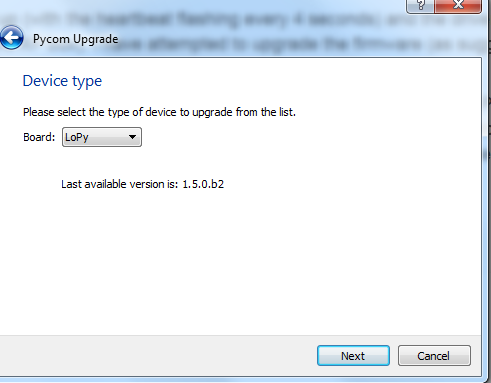
the only options under Board is Lopy or Wipy 2.0. So how do I update a Wipy? -
If I attempt to use Pymakr (after removing the jumper and resetting the Wipy I get this
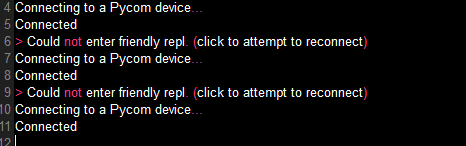
The system recognises the USB to Serial and I am using the correct COM port.
This is on my desktop (no wifi connection, Win 7) and the direct USB connection. I tried it on my laptop (direct connection and Win XP yesterday) but will try that again
Thanks
George -
-
The updater tool and the G23-GND instructions are only for the new board WiPy 2.0, LoPy, etc.
As far as I know Pycom isn't making tools or updates for the original WiPy board, the more up to date firmware is now provided by MicroPython project:
-
OK, that explains that but I still need to be able to connect to the Wipy to do anything.
Can I still connect to the Wipy with a direct USB connection or do I need to add something to the WiPy boot.py file? If I cannot connect then how, via FTP or Putty. Tried Putty on Win 7, set it to correct port, serial connection at 115200 baud, 8 bits etc. It opens comms window but I get nothing from the wipy. Port and settings are correct. Perhaps this is just a faulty Wipy - had such promise too for my apps.
Just plugged the Wipy into the laptop and it doesn't recognise the USB to Serial driver - Hmmm as it is Win XP maybe it is incompatible. Tried to connect via Wifi, I can see the wipy-wlan-xxxx, tried to connect using the password "www.pycom.io" and it stalls on "acquiring network address", never gets one.
I am stumped, should be really simple.
Regards
George
-
@Cam-Era
Looks like you're following the new instructions which are just for the new boards. You should be reading the ones for WiPy 1.0.For the WiPy 1.0 the WiFi password is www.wipy.io
The documentation you want is at https://docs.pycom.io/wipy/
-
That explains a lot.
Got a wifi connection now but it keeps dropping it every few seconds (only holds it for 6 seconds and then drops it requiring the window to be clicked again to connect. Repowered wipy and same thing happens.
Tried to use Filezilla but couldn't figure out what type of connection - "anonymous" just responds with "Could not connect with server" - I was using the standard username as "anonymous" and password as an email address. I cannot see how to connect with some form of username?
Thanks
George
-
Default for FTP is
user: micro
pass: pythonAlso read carefully https://docs.pycom.io/wipy/wipy/general.html#local-file-system-and-ftp-access as you'll need to use passive mode
-
Hello! It looks like you're interested in this conversation, but you don't have an account yet.
Getting fed up of having to scroll through the same posts each visit? When you register for an account, you'll always come back to exactly where you were before, and choose to be notified of new replies (either via email, or push notification). You'll also be able to save bookmarks and upvote posts to show your appreciation to other community members.
With your input, this post could be even better 💗
Register Login