PyMakr Plugin on VS Code always crashes when choosing 'Upload Current File only'
-
Not a dealbreaker, but ever since I am using the PyMakr plug-in for Visual studio this annoys me. No matter what file it is ( a simple two line text file, or an actual Python source code file), the 'Upload Current File only' command always crashes and returns an error message from the Pycom module (LoPy, GPY or FiPy), and it never succeeds transferring the file. Since I've not found other complains about this issue on the forum it could also be that I'm doing something wrong, but what ?
-
Hi @Cees_Meijer,
Please make sure you are using the latest VS Code and the latest Pymakr plugin.
N.B: If you can share some screenshots this may help us get a better overview of the issue that you face.
Thank you
-
I'm using PyMakr 1.1.6, which is (as far as I can see) the latest version. My VS-Code is updated almost weekly, so that is not a problem.
Unfortunately the error itself is only visible for a fraction of a second, then the terminal crashed and I get this:
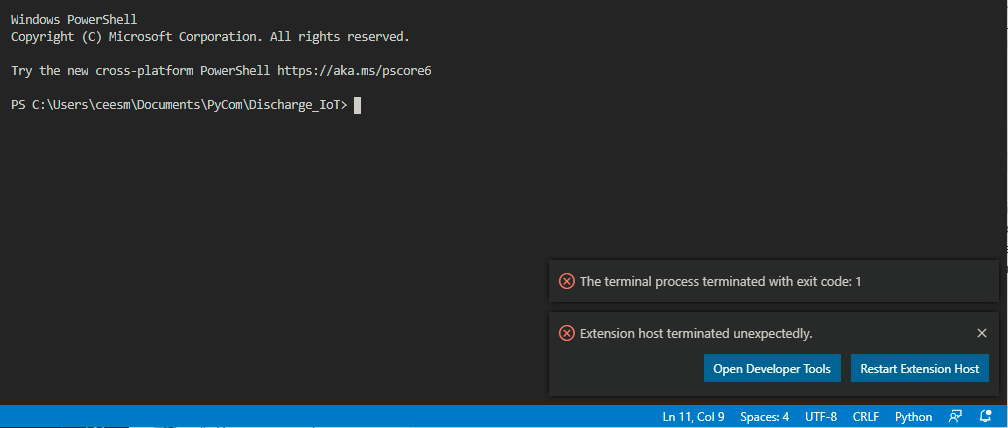
As said: I simply choose 'Upload current file only', it starts the transfer, and then crashes. If I click the 'Upload' button to upload the complete protect, everything is fine. -
I'm also seeing this issue with updated Visual Studio Code and Pymakr 1.1.6. Uploading the current file always fails, but I was able to upload a complete folder.
Visual Studio Version:
Version: 1.46.0 (user setup)
Commit: a5d1cc28bb5da32ec67e86cc50f84c67cc690321
Date: 2020-06-10T09:03:20.462Z
Electron: 7.3.1
Chrome: 78.0.3904.130
Node.js: 12.8.1
V8: 7.8.279.23-electron.0
OS: Windows_NT x64 10.0.18363
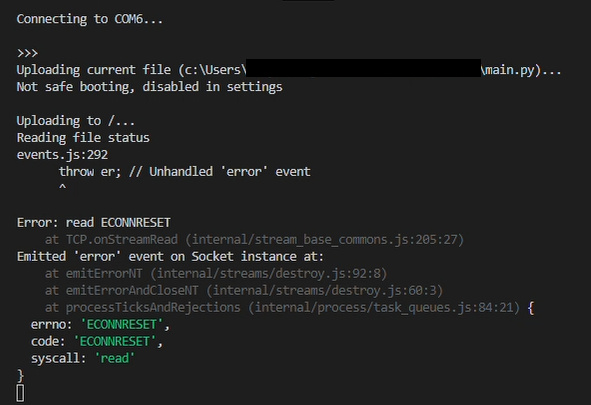
The error is only visible for a split second, but with a screen recording, I was able to get this:

Hello! It looks like you're interested in this conversation, but you don't have an account yet.
Getting fed up of having to scroll through the same posts each visit? When you register for an account, you'll always come back to exactly where you were before, and choose to be notified of new replies (either via email, or push notification). You'll also be able to save bookmarks and upvote posts to show your appreciation to other community members.
With your input, this post could be even better 💗
Register Login