Welcome to the Pycom forum Forum
    • \[\[global:header.categories\]\]
    • \[\[global:header.recent\]\]
    • \[\[global:header.tags\]\]
    • \[\[global:header.popular\]\]
    • Login

    Explore Pybytes | Official Documentation | Report a Firmware Bug/Issue | GitHub

    I2C device not detected

    Scheduled Pinned Locked Moved Discussion
    9 Posts 4 Posters 115 Views 4 Watching
    Loading More Posts
    • Oldest to Newest
    • Newest to Oldest
    • Most Votes
    Reply
    • Reply as topic
    Log in to reply
    This topic has been deleted. Only users with topic management privileges can see it.
    • tiborrrT Offline
      tiborrr
      last edited by

      Hello,

      I've just started with pycom after moving from the Particle.io platform.

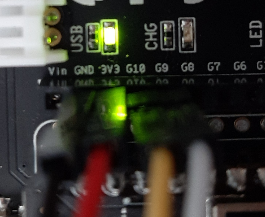
      I'm trying to get I2C to work. But my Wipy does not detect any of my devices. My setup is as follows:
      5d9d8813-10ef-4422-87bb-412d7e0bc389-image.png

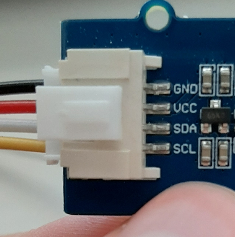
      Directly connects to my Grove SGP30 gas sensor:
      61ce177b-a031-4310-b9a5-f1d601a883b0-image.png

      I'm using the following code:

      from machine import I2C
      
      #I2C setup
      print("setup i2c")
      i2c = I2C(0)
      i2c.init(I2C.MASTER, baudrate=400000, pins=('P9','P10'))
      print(i2c)
      
      slaveList = i2c.scan()
      print(slaveList)
      

      This returns:

      setup i2c
      I2C(0, I2C.MASTER, baudrate=400000)
      []
      

      My SCD30 CO2 sensor gives me the same result.

      Could you please assist.

      Kind regards,

      Tibor

      T robert-hhR 2 Replies Last reply Reply Quote 0
      • T Offline
        thinginnovations @tiborrr
        last edited by

        Did you add pull-up resistors to the SDA and SCL lines?

        tiborrrT 1 Reply Last reply Reply Quote 0
        • robert-hhR Offline
          robert-hh @tiborrr
          last edited by robert-hh

          @tiborrr The pins the yellow and white cable go to on the Expansion board picture are P22 and P23, not P9 and P10. The P9 == G16, P10 == G17.

          The three numbering schemes of Pycom are confusing. See also https://github.com/pycom/pycom-micropython-sigfox/blob/Dev/esp32/boards/WIPY/pins.csv

          tiborrrT 1 Reply Last reply Reply Quote 1
          • tiborrrT Offline
            tiborrr @robert-hh
            last edited by

            @robert-hh wow this costed me sooo much time :(. @pycom please mention this in the I2C manual. I cannot imagine that I'm the only one who falls into this trap.

            @thinginnovations in the past on my Particle devices the sensors worked on 3.3V. Why should I use an additional pullup resistor?

            T 1 Reply Last reply Reply Quote 0
            • T Offline
              thinginnovations @tiborrr
              last edited by

              @tiborrr Some devices may have internal pull up resistors that can be enabled, however they may not be enough. Some breakout boards can include these already so you'd need to check their documentation.

              1 Reply Last reply Reply Quote 0
              • P Offline
                pmulvey
                last edited by

                On my SiPy Board with expansion Board I use:

                i2c = I2C(0, pins=('P10','P9'))
                

                i.e. reversing your pin configuration.

                1 Reply Last reply Reply Quote 0
                • tiborrrT Offline
                  tiborrr @thinginnovations
                  last edited by tiborrr

                  I don't think that need to enable them as on my particle devices it was working fine

                  I do have issues scanning for my I2C devices. Does this have something to do with this?

                  from scd30 import SCD30
                  from machine import I2C
                  
                  #I2C setup
                  print("setup i2c")
                  i2c = I2C(0)
                  i2c.init(I2C.MASTER, baudrate=400000)
                  
                  #CO2 sensor setup
                  #co2sensor = SCD30(i2c, 61)
                  
                  while True:
                      print(i2c.scan())
                      time.sleep(1)
                  

                  This sometimes returns my sensor but most of the times it doesn't

                  See the result below:

                  >>>
                  setup i2c
                  []
                  []
                  []
                  []
                  []
                  []
                  []
                  []
                  [97]
                  []
                  []
                  []
                  []
                  []
                  []
                  []
                  []
                  []
                  [97]
                  
                  robert-hhR 1 Reply Last reply Reply Quote 0
                  • robert-hhR Offline
                    robert-hh @tiborrr
                    last edited by

                    @tiborrr the value is not very critical. I typically use 4.7 kOhm.

                    tiborrrT 1 Reply Last reply Reply Quote 0
                    • tiborrrT Offline
                      tiborrr @robert-hh
                      last edited by tiborrr

                      @robert-hh I tried using a pull-up resistor, however, after doing so I lose signal from my other gas sensor.

                      I have already found the problem. The SCD30 likes to operate at a baudrate of 50.000 (as recommended in their documentation) instead of the 400.000 i was using.

                      https://www.sensirion.com/fileadmin/user_upload/customers/sensirion/Dokumente/9.5_CO2/Sensirion_CO2_Sensors_SCD30_Interface_Description.pdf

                      Thanks for all the help!

                      1 Reply Last reply Reply Quote 0

                      Hello! It looks like you're interested in this conversation, but you don't have an account yet.

                      Getting fed up of having to scroll through the same posts each visit? When you register for an account, you'll always come back to exactly where you were before, and choose to be notified of new replies (either via email, or push notification). You'll also be able to save bookmarks and upvote posts to show your appreciation to other community members.

                      With your input, this post could be even better 💗

                      Register Login
                      • 1 / 1
                      • First post
                        Last post

                      Pycom on Twitter

                      Pycom