uart write human-readable ASCII text
-
Hi,
I'm working on Lopy4 interfacing with Nextion serial display (http://nextion.tech/instruction-set/#s6).
To send the data to the monitor for displaying, I have to follow their rules (see below Arduino code for instance).
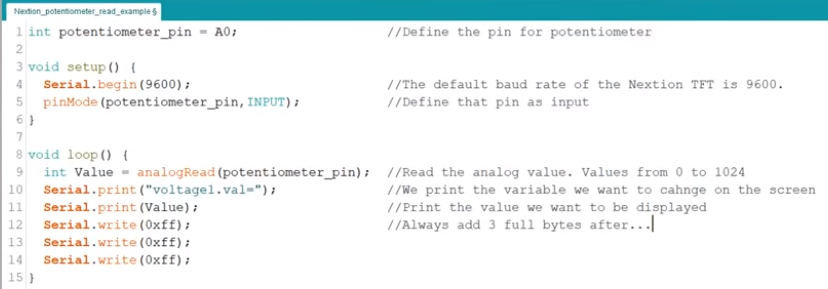
Sample code from https://www.youtube.com/watch?v=akpF9TbvNss&t=542sI had tried to migrate the Arduino code to Lopy4, but never make it works. After investigating, my understanding is that
uart.write()can not accomplish the work thatSerial.print()in Arduino does. Because the former write a series of bytes to the serial port, while the latter one prints human-readable ASCII text to the serial port.So my question is can Lopy4 UART port write human-readable ASCII text? Please give some instructions. Thank you!
-
In short, can Lopy4 UART port performs the same function as Serial.print() does in Arduino?
-
Try:
uart.write("Hello World!".encode())Not 100% sure, but thinks that should do the trick.
Johan
-
@Mao There are two options:
a) use the str() function or an string formatting methods to convert a non-ascii object into it's ascii representation, which you then can send with uart.write(). Likeuart.write(str(100.3))
b) use thefile = streamoption of print, like:from machine import UART uart = UART(1) print("The answer is", 42, ", but what is the question?", file=uart)Obviously you can combine both methods for a pretty formatted output, a little bit easier than you could do with Arduino.
P.S.: Thanks to Dave Hylands pointing me at the file=xxx option again.
-
Thank you for all the instruction and explanation! My problem finally got fixed!
-
@Mao could you please post a copy of your program? I have not been able to find a way to send the 0xFFFFFF Nextion terminator to the Nextion screen as part of the uart.write command. It always complains that it can't convert the object to a string. If I try to convert it to a string it is converted to the string of characters that I used to define the object, like b'\xff\xff\xff' or 765. How did you do it?
Thanks, -
@mao
Well I think I've solved this one. It seems the original method now works, although I will swear on a stack of Bibles that it didn't the first time I tried it. I set a variable to '\xff\xff\xff' and then use that as the command terminator and it now at least runs whereas I was getting an error message before.
Now I have a different problem... -
This post is deleted! -


Hello! It looks like you're interested in this conversation, but you don't have an account yet.
Getting fed up of having to scroll through the same posts each visit? When you register for an account, you'll always come back to exactly where you were before, and choose to be notified of new replies (either via email, or push notification). You'll also be able to save bookmarks and upvote posts to show your appreciation to other community members.
With your input, this post could be even better 💗
Register Login