Problem ftping to new WiPy
-
I am new to the Pycom world. I have a WiPy 3 plugged into an Expansion board (v3.1) that I want to ftp into so I can see what is in /flash. I successfully upgraded the firmware to 1.20.2.rc10 and can talk to the board from my PC via a USB connection. I am using the Pymakr plugin for Atom.
When I try to ftp into the device using FileZilla it fails to connect - I receive a message that says "Can't connect with server". I poked around on the web and I suspect that my problem may lie in the board's WiFi mode. I believe in order to see the board it's mode needs to be WLAN.AP. According to the documentation the board is supposed to boot up in this mode. I suspect that it is actually WLAN.STA. I came to this conclusion because the board's "hot-spot" doesn't show up as an available network for my PC and when I use the "Get Device Info" utility in Atom it shows the Wifi mode as "Station". I am new to Micropython but when I query the WLAN mode - using wlan.mode() - it returns '1'. I can't find out what '1' means but I suspect it means the board is in Station mode (as reported by Atom).
How can I fix this? Remember I am new to MicroPython so be gentle. Ultimately I want to use multiple WiPys to share information about devices connected to them. There is no need or desire to share this information beyond the LAN so no connection to the Internet is needed or desired.
I look forward to constructive suggestions! Thanks!
-
You have to use the right settings. You have to limit your ftp programm to only one connection and set it into pasive mode.
-
@crumble Not sure what you mean by the "right settings". I am using FileZilla and the server IP (192.168.4.1), user (micro), and password (python) given in the documentation. I'm not using the "quick connect" option in FileZilla - following instructions in the online documentation. At the moment I can't even get into the machine (on ftp) so I haven't had the option to set the transfer mode to passive.
-
@nigelwattrus A value of 1 means indeed station mode. In that mode it tries to connect to your local router's access point. Unless you configure your device with the SSID and password of that AP, it will not succeed. Look here for examples to configure the WiPy in station mode: https://docs.pycom.io/tutorials/all/wlan/. These configuration commands are then typcially put into main.py.
With the introduction of PyBytes and PyCom's intention to strongly suggest using it, there are cases where the AP of the Pycom boards is not started. In order to configure it as AP, see the more general documentation about WLAN: https://docs.pycom.io/firmwareapi/pycom/network/wlan/#wlan-mode-mode
Essentially this should be something along the lines:from network import WLAN wlan=WLAN(mode=WLAN.AP, ssid='wipy-wlan', auth=(WLAN.WPA2,'www.wipy.io'))That should start an AP with ssid "wipy-wlan" and the password 'www.wipy.io'. That AP should be visible in the network setting of your PC and you have to connect the PC to that network, before you can run ftp. Since switching the WLAN's is tedious, it is anyhow more comfortable to use the Wipy in STA mode. So better use STA mode.
Note: The default password for the AP, if it ever comes up, is www.pycom.io.
The user name/password "micro" and "python" is used by the ftp server. -
@robert-hh thanks for some details! Don't I need to have the board in AP mode in order to ftp to it?
-
@nigelwattrus no. The board can as well be in STA mode. Once a wifi connection is established, using either the STA or AP mode of the device, you can run a service over the connection, may it be ftp, telnet, MQTT, or whatever.
-
@robert-hh So can you suggest why I can't connect via FileZilla? I'm following the online documentation. Can you suggest a way forward?
-
@nigelwattrus Did you connect the WiPy to your home network, like shown below:
from network import WLAN
wlan=WLAN(mode=WLAN.STA)
wlan.connect('my_ssid', auth=(net.sec, 'my_wifikey'), timeout=5000)
while not wlan.isconnected():
    machine.idle() # save power while waiting
print('WLAN connection succeeded!')
print(wlan.ifconfig())
my_ssid and my_wifikey are ssid ans password of your local WLAN. If that succeeds, you get the IP address which was assigned to the WiPy. That address must be used in FileZilla as the server address.
-
@robert-hh I have been able to connect my WiPy to my router but FileZilla still can't connect.
This is what I see in Atom when I connect my PC to the expansion board. Does this look normal?
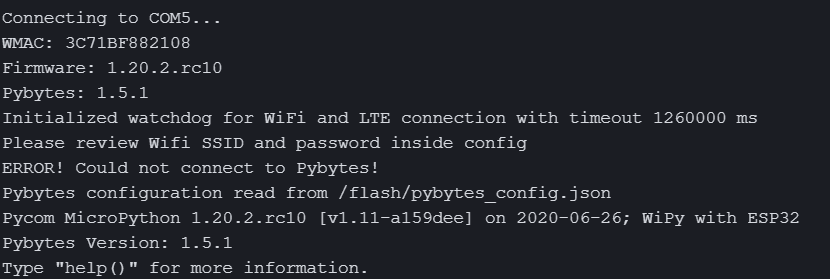 .
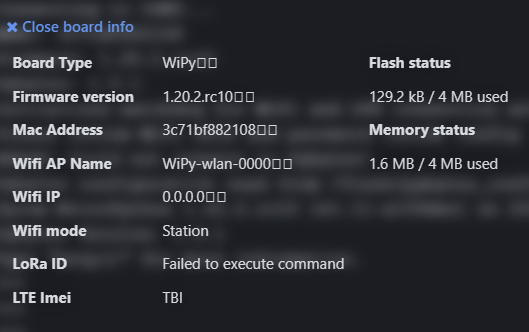
.This is what Atom knows about the board before I connect it to my router. I'm puzzled by the reference to LoRa
These are the commands I type in the Atom terminal to connect to my router. my_ssid and my_pwd are the user id and password credentials to access the router.
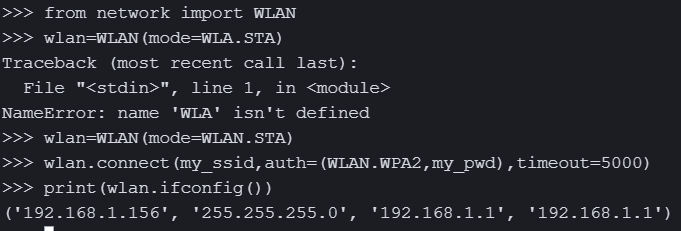
You can see that the router has assigned the IP address 192.168.1.156 to the WiPy.
When I try to ftp into the device with FileZilla it fails
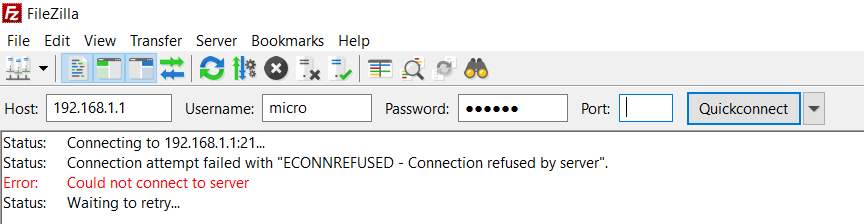
The transfer mode is set to binary.
Where am I going wrong?
Thanks for your help on this.
-
@nigelwattrus For the connection to the WiPy you have to use in Filezilla the IP address that was assigned to the WiPy (first field returned by ifconfig). So the host field has to show 192.168.1.156. And better do not use the quickconnect items, but go through the File->Servermanager (Ctrl-S) menu. There you can set properties like 'Passive mode' and 'Number of Sessions=1'.
Note: 192.168.1.1 is the address of the router.
-
@robert-hh duh!!! I should have realised that! I'll try that and hopefully that will solve my problem!


Hello! It looks like you're interested in this conversation, but you don't have an account yet.
Getting fed up of having to scroll through the same posts each visit? When you register for an account, you'll always come back to exactly where you were before, and choose to be notified of new replies (either via email, or push notification). You'll also be able to save bookmarks and upvote posts to show your appreciation to other community members.
With your input, this post could be even better 💗
Register Login