Socket Help
-
Good Morning,
I am every new to using devices for embedded networking. I'm a lot more used to developing software for the cloud. I'm trying to create a very simple socket that sends a UDP packet that has been ascii encoded.
Here is the code I'm using:
import time
import socket
import ssl

print('stating script')

UDP_Server = '<machine IP>'
UDP_Port = 11000
Message = 'Hello World!'

eMessage = Message.encode('ascii')
print(eMessage)

s = socket.socket(socket.AF_INET, socket.SOCK_DGRAM)
print('socket created')
s = ssl.wrap_socket(s)
s.setblocking(False)
s.connect(socket.getaddrinfo(UDP_Server, UDP_Port)[0][-1])
print('socket connect set up')
s.send(eMessage)
print('message sent though socket')
s.close()
print('socket closed')
The boards is setup to automatically connect to my wifi
I have two issues i'm struggling with at the moment, and I'm hoping someone would kindly offer some help.
-
When I run the script its prints messages to the console up to 'socket created' after that I don't get any more console statements and I have to turn the device on/off to get it to connect and work again. I belive the script is finishing to some extent due to my next issue.
-
When a message gets to my UDP listener it received the message are 'garbage'. I know my listener works as I have successfully sent and decoded packs from both my pc and laptop. With such a simple script I can see what going wrong to cause this issue. Below is an image from my LTE test script, the left terminal is the one connected to the PyCom and the right is the one connected to my server.
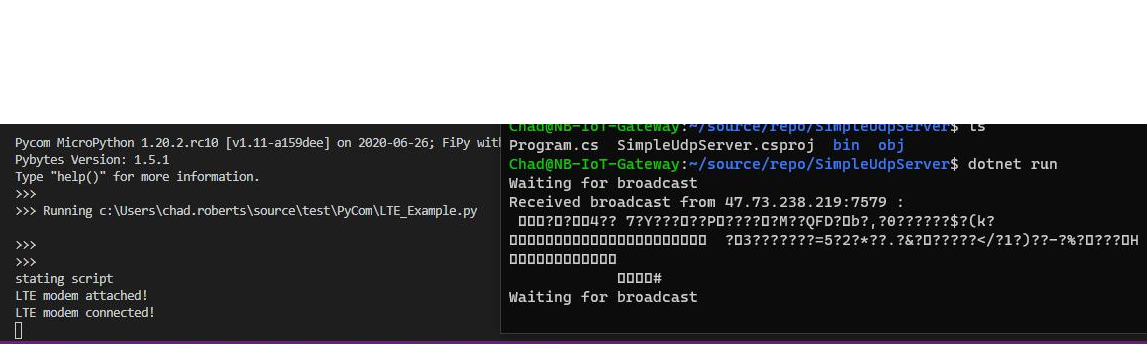
And here is the same image for the code snippet at the top of the post using my WiFi:

The issues happen with Wifi and LTE (NB-IoT). Any help offered would be really appreciated.
-
-
Hi,
I am not exactly sure where you got the
Message.encode('ascii')from?
You should be able to uses.send('Hello World!')by default.If the server is local, you should also be able to connect using
s.connect(('ip', port))Let me know
Gijs -
Message.encode('ascii')is just from the standard library. Its a method onstrobject in CPython. Also to ensure compatibility across systems is it not good practice to explicitly encode message in a fixed format?Either way thanks for the suggestion!
I tried, its doing the same thing, sending garbage to my listener.
-
You code in MICRO- nt C-pthon. Please have a look on the micropythonn documentation about the differences. Than have a look on the implementation details of pycom.
There are differences which are important, if you which to write fast and stable code for these little devices. Writing code like you do it on a PC will work only for very small projects. If your stuff grows, you will run into problems - more sooner than later.
If you are on a device with 2MB free memory instead of 32-64k, you may run later into problems. But later it will much harder to refactor the whole architecture.
The micropython part is easy, There are chapters about the difference between CPython and microython and one about performance.
-
I know I'm writing in Micropython and not CPython. I have read the documentation. I have been writing code for hobby dev boards and micro controllers for about 9 years. I know the limitations of a micro controller. I know how to write embedded code.
I need to know why my fipy is sending out garbage when everything else does not. If this does not work then I need to return by fipy's as i bought them to be mocking devices to speed up development of cloud services at work.
-
I am not sure of the issue, but I believe it is with your server. When I run this example (from a quick google search: https://gist.github.com/majek/1763628) on my computer:
udpserver.pyimport logging import socket log = logging.getLogger('udp_server') def udp_server(host='0.0.0.0', port=1234): s = socket.socket(socket.AF_INET, socket.SOCK_DGRAM) s.setsockopt(socket.SOL_SOCKET, socket.SO_REUSEADDR, 1) log.info("Listening on udp %s:%s" % (host, port)) s.bind((host, port)) while True: (data, addr) = s.recvfrom(128*1024) yield data FORMAT_CONS = '%(asctime)s %(name)-12s %(levelname)8s\t%(message)s' logging.basicConfig(level=logging.DEBUG, format=FORMAT_CONS) for data in udp_server(): log.debug("%r" % (data,))And this on my Lopy4:
main.pyfrom network import WLAN import time machine.idle() wlan = WLAN() wlan.init(mode=WLAN.STA, ssid="-", auth=(WLAN.WPA2, "-")) print("connecting..", end='') while not wlan.isconnected(): print(".", end='') time.sleep(1) import socket s = socket.socket(socket.AF_INET, socket.SOCK_DGRAM) print('socket created') s.setblocking(False) s.connect(('ipaddr', 1234)) print('socket connect set up') s.send("hello world") print('message sent though socket') print(s.recv(16)) s.close() print('socket closed')It works without issues and the response is:
2020-07-30 11:43:45,465 udp_server       INFO	Listening on udp 0.0.0.0:1234
2020-07-30 11:44:39,985 udp_server      DEBUG	b'hello world'
and
connecting....socket created
socket connect set up
message sent though socket
b''
socket closed
>
I can even make it talk both ways (not setup here)
Best,
Gijs -
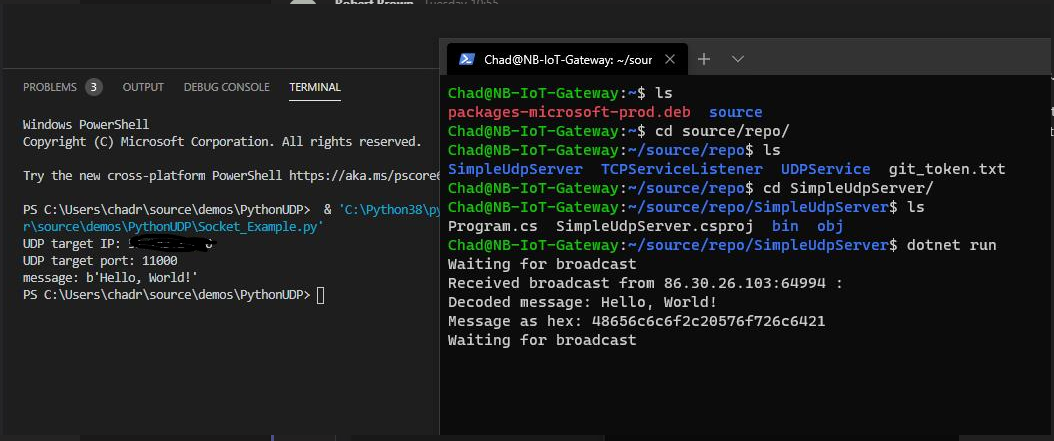
The issue is not with my server. My server it works as expected:
-
Hi,
I am not sure what exactly is going on in your UDP server setup, which is why I attached one. were you able to test the examples I send you?There should not be any issue in either case, but can you test it anyways? I have also tried with sending things over http in my browser and that works fine as well ( https://docs.pycom.io/tutorials/networkprotocols/webserver/ )
Best, -
Ok...We got there in the end! Thank you for your help.
The issue was this line
s = ssl.wrap_socket(s). Once this was removed it worked. Very annoyed at my self that I missed that. Hopefully this will help someone else out. -
It can happen to the best of us! I missed the ssl line in your example as well when typing it over.
Great to hear it got solved
Hello! It looks like you're interested in this conversation, but you don't have an account yet.
Getting fed up of having to scroll through the same posts each visit? When you register for an account, you'll always come back to exactly where you were before, and choose to be notified of new replies (either via email, or push notification). You'll also be able to save bookmarks and upvote posts to show your appreciation to other community members.
With your input, this post could be even better 💗
Register Login