Problem writing non-ascii values to uart
-
Hi All,
I have been trying to get my Nextion serial screen to work. I can read from it but I can't write to it. For those unfamiliar with the device, it is connected to a uart ("1" on my WiPy) and then serial commands can be sent, such as "page firstPage", where page is the command to display a selected page, and firstPage is the page name defined to the screen (using the seriously awful Nextion Editor, but I'll save that rant for another day).Every command sent to the screen must be terminated with three bytes all containing 0xFF. To do this I defined a variable
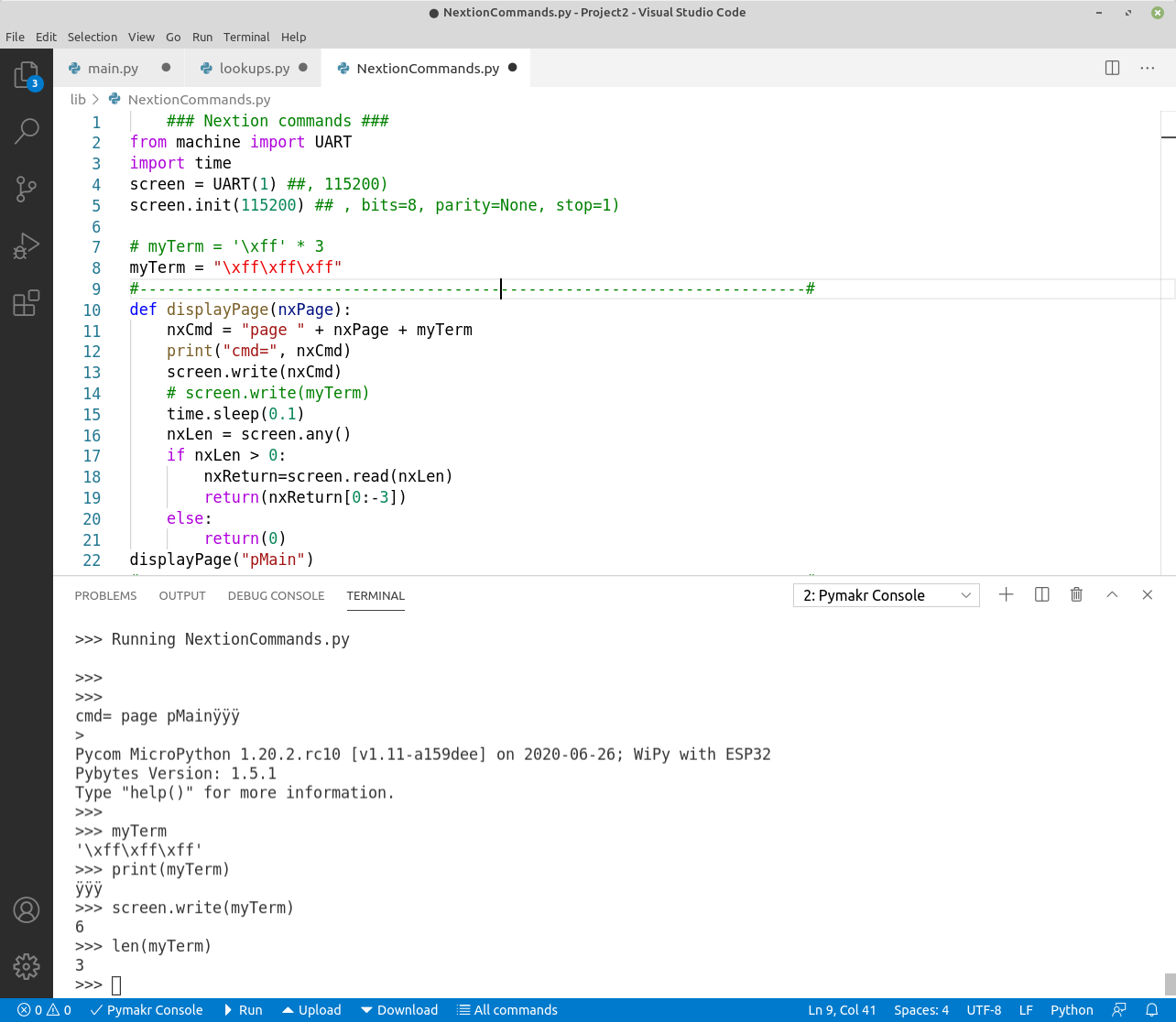
myTerm = '\xff\xff\xff'and appended that to the command string. But when I send the command to the screen it doesn't work. In the following screenshot the command is printed before I send it. On my system the terminator string is displayed as 3 "y"s with an umlaut. Not sure if that's standard but that's what I see.
Below that I've tried a couple of things in the REPL. The "print" and "len" commands give the expected results, but if I write the terminator to the screen it sends 6 bytes, not 3. At least that's what it reports. I don't know if that's the source of the problem, and if it is what to do about it, if it isn't, then what?
I'm using the latest version of VS Code, and pymakr plugin, running on Linux Mint 19.3.All advice gratefully received.
-
@mogplus8 that’s probably because your string is encoded and sent as UTF-8.
Your should use a binary string (
b'\xFF\xFF\xFF\xFF'), though I’m not quite sure what happens if you try to concatenate that with a regular string. -
@jcaron said in Problem writing non-ascii values to uart:
though I’m not quite sure what happens if you try to concatenate that with a regular string.
The result is a type error. But the first part of the command can as well be set as a byte string, being pure ASCII.
-
Many thanks to @jcaron and @robert-hh, it now works. I found I had to specify the terminator as a byte string (a variation I had tried before but always got a type error, as robert-hh noted), but I had never tried making the command string a bytes field as well, in fact I didn't know that was possible. If I'm totally honest I was only vaguely aware that there is a difference between byte strings and strings. I had to Google it, and I'm still not sure I entirely get it, but moot point right now.
Anyway, thanks again.
;-)


Hello! It looks like you're interested in this conversation, but you don't have an account yet.
Getting fed up of having to scroll through the same posts each visit? When you register for an account, you'll always come back to exactly where you were before, and choose to be notified of new replies (either via email, or push notification). You'll also be able to save bookmarks and upvote posts to show your appreciation to other community members.
With your input, this post could be even better 💗
Register Login