Help a pycom newbie, please.
-
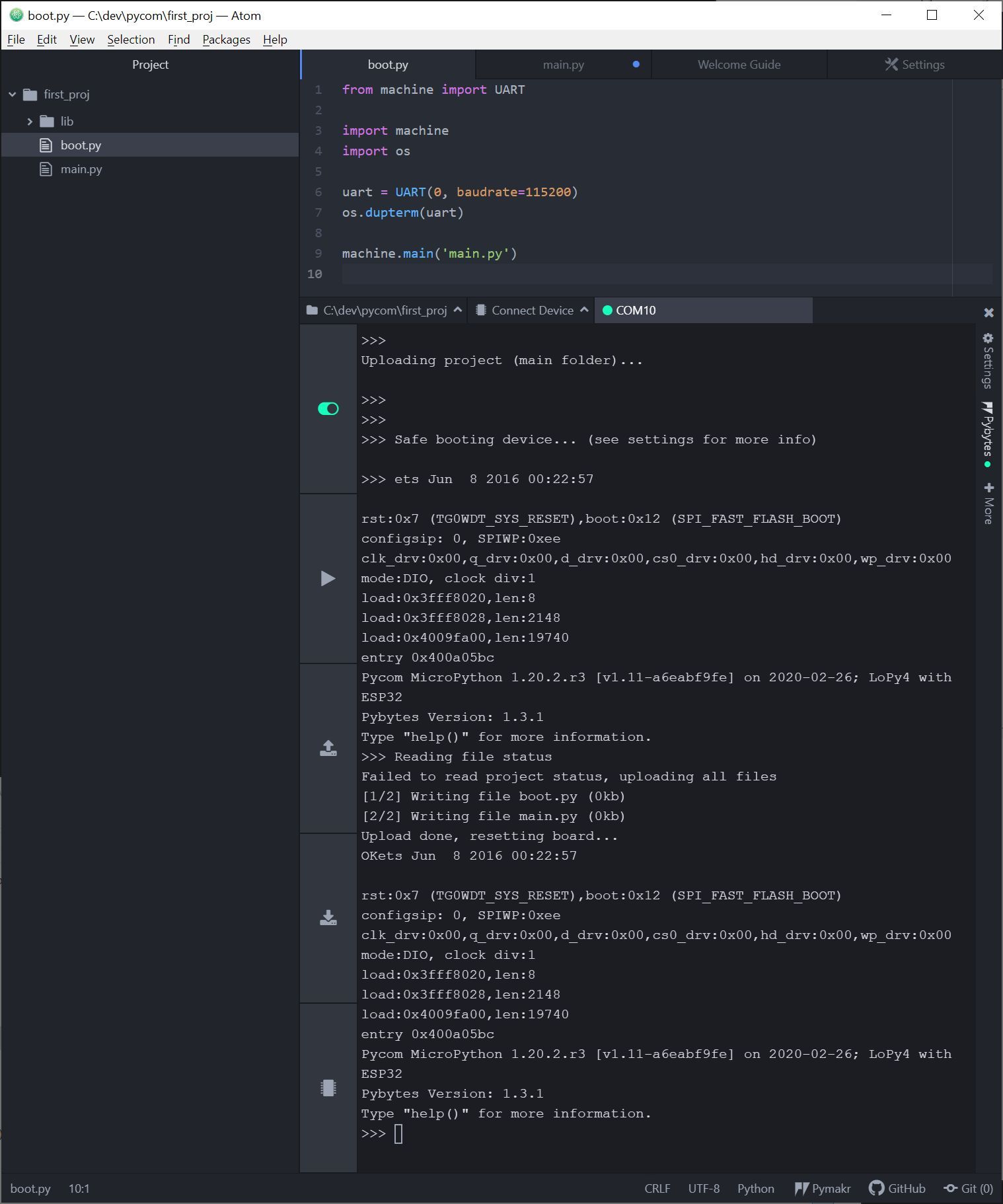
Hi everyone. I am having the exact same problem as described in the post below. I have main.py blinking the rgb led using "run". I added the code as described to boot.py. I can upload them but main.py does not run. Screenshot of Atom below. The only thing I've noticed is that boot.py and main.py are showing as "0kb". Did I not setup the project correctly?
Re: How do I get main.py to run when the WiPy board boots?
-
Hi,
The
main.pywill automatically run after theboot.py, even without any content in theboot.py. Im not sure about the situation in 2018, but that is not at hand anymore.
The files are marked as 0kb, as their size is rounded to 0. Im not sure of the content of yourmain.pyfile, but it should be running..
Check the getting started for a working example
Best, Gijs -
-
Ah yes, I forgot to mention, always save your project files before uploading, as unsaved changes will Not get uploaded
Hello! It looks like you're interested in this conversation, but you don't have an account yet.
Getting fed up of having to scroll through the same posts each visit? When you register for an account, you'll always come back to exactly where you were before, and choose to be notified of new replies (either via email, or push notification). You'll also be able to save bookmarks and upvote posts to show your appreciation to other community members.
With your input, this post could be even better 💗
Register Login