pysense with mpu9250
-
import machine, time, math, pycom, os
from machine import I2C
from mpu9250 import MPU9250
from ak8963 import AK8963

i2c = I2C(0, mode=I2C.MASTER, pins=('P10','P11'))
pycom.heartbeat(False)
sensor = MPU9250(i2c)
sensor2= AK8963(i2c)

#Declination Ankara, TURKEY
#https://www.ngdc.noaa.gov/geomag-web/calculators/calculateDeclination?lat1=%2719.48698%27&lon1=%27-99.18594%27
decli=5.55

print("MPU9250 id: " + hex(sensor.whoami))
print("AK8963 id: " + hex(sensor2.whoami))
print("To Calibrate Magnetometer please draw an 8 on the air 1 minute")
cali=sensor2.calibrate(60)
offset=cali[0]
scale=cali[1]

sensor2= AK8963(i2c,offset=offset, scale=scale)
print("Calibration finished (offset), (scale): ",cali)
time.sleep_ms(5000)
n=0
while True:
  print('acc :',sensor.acceleration)
  print('gyro:',sensor.gyro)
  print('mag :',sensor.magnetic)
 #Compass Direction
  x=sensor.magnetic[0]
  y=sensor.magnetic[1]
  z=sensor.magnetic[2]
  if (y > 0):
  	heading=math.atan(x/y)*(180/(math.pi))
  if (y < 0):
  	heading=180-math.atan(x/y)*(180/(math.pi))
  if (y==0) & (x < 0):
	  heading=180.00
  if (y==0) & (x > 0):
	  heading=0.0
  #print('mx=',x,'uT, my=',y,'uT, mz=',z,'uT')
  print('Compass Direction:',round(heading+decli),'degrees')
  # Turn light on Green when 0 degrees
  if (round(heading+decli)==0):
	 pycom.rgbled(0x000800)
  if (round(heading+decli)!=0):
	 pycom.rgbled(0x000000)
  time.sleep_ms(50)
  n=n+1
I shared the code above. As seen in the code, I am using pysense p10 and p11 pins and made my cable connection that way.
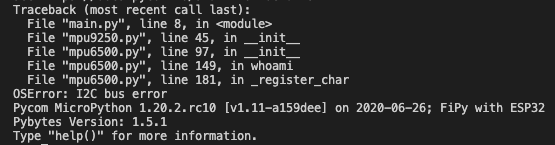
I got such an error.
I read on the forum that the pysense i2c bus fail error with the mpu9250.
Is this true?
What can I do?
Can you help me?
Do you have an idea?
Thanks pycom family! -
Im not sure exactly what you mean, but im sensing you have 2 additional sensor attached over the i2c bus and soldered the i2c wires to the Pysense pins. Do you have both sensors connected? It seems line 9 is the definition of
sensor2= AK8963(i2c)Meaning it cannot initialize the AK8963 sensor.
Did you try using Pins
P9andP10instead? According to the datasheet, they are the SDA and SCL pins respectively. Also, Im not too familiar with the libraries. Make sure you have SDA and SCL defined in the correct order, and have the sensors powered up. It seems the I2C is not able to communicate to the sensors, but your log is too limited to properly examine.
What happens previous to the error? -
@Gijs
Thank you so much.
I have applied the information you provided and the code is working.
but I'm having trouble with calibration. Is there any advice you can give about this? Thank you again. -
The best way to calibrate a magnetic compass is outside. As concrete and metal objects will affect the magnetic field orientation, and thus the sensor output. Also, keep the sensor level, as rotation around other axes will require additional calibrations (you could use the accelerometer in the device to account for this ). i believe there are many examples on the internet using this or similar sensors :)
Gijs
Hello! It looks like you're interested in this conversation, but you don't have an account yet.
Getting fed up of having to scroll through the same posts each visit? When you register for an account, you'll always come back to exactly where you were before, and choose to be notified of new replies (either via email, or push notification). You'll also be able to save bookmarks and upvote posts to show your appreciation to other community members.
With your input, this post could be even better 💗
Register Login