pyTrack2 - sleep and power usage
-
I can't work out how to get low power use when using a lopy4 and pytrack V2 board. I have looked at other posts on this subject (there seems to be many) but have not been able to get current usage when sleeping in the 20uA range. Best I can get is more in the 6mA which will drain batteries too fast. This post was the most useful how-to-deep-sleep-with-sipy-pysense-3-7v-lipo but was for a pysense board and didn't get power usage below about 6mA for me. The GPS on the pyTrack may be further complicating things?
I've tried a bunch of other approaches i.e setting. gps_state() , using machine.deepsleep() , different settings for go_to_sleep(). Nothing seems to stop high power usage on the pyTrack board when sleeping other than turning of I2C, but then the board can't be restored from a sleep.
This is the power usage trends I see with the main.py code shown below. (Each 100mv = 40mA - I measured across a 2.5ohm resistor)
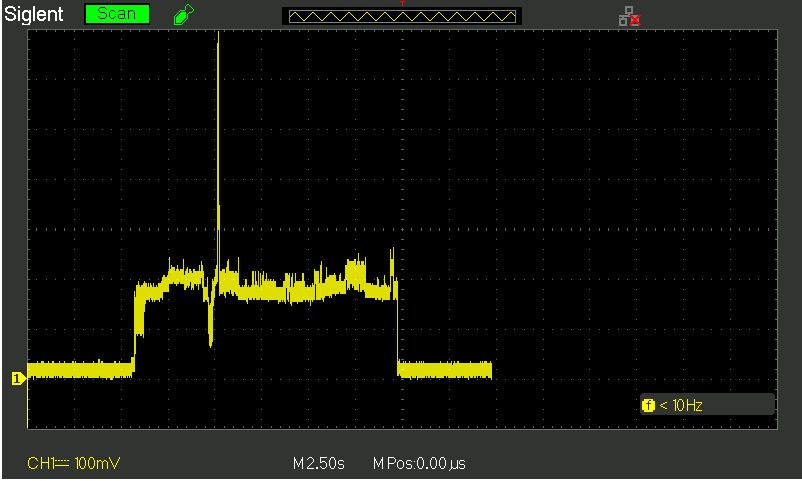
I am trying to use the pyTrack and Lopy4 wake up and take a GPS reading every hour then sleep in low power. I'm getting to the point where I am thinking it might be easier just to add a timed power supply that wakes up evey 1 hour (but I shouldn't need to do that).
Any hints or pointers to where someone has run a pyTrack in the 20uA range when asleep would be a big help, I am thinking there is something I need to turn off that I haven't done.
My main.py test code (pytrackHelper.getGPS() gets a gps reading)
import pycom import machine import pytrackHelper from pytrack import Pytrack from LIS2HH12 import LIS2HH12 from network import WLAN import time # from network import WLAN py = Pytrack() acc = LIS2HH12() wlan = WLAN() print("Startup") # Don't want default blue LED flashes pycom.heartbeat(False) # Don't use wifi for my IOT so turn it off to save power wlan.deinit() # Turn off accelerometer py.setup_int_wake_up(True, False) acc.set_odr(0) # py.sd_power(False) pytrackHelper.blink(1, 0x00f0f0) print("get GPS:", pytrackHelper.getGPS(py, 3)) pytrackHelper.blink(1, 0xff8f00) # dark orange print("Sleep..") # Turn off GPS power pytrackHelper.blink(1, 0x00ff00) # Green py.setup_sleep(10) py.go_to_sleep(False) -
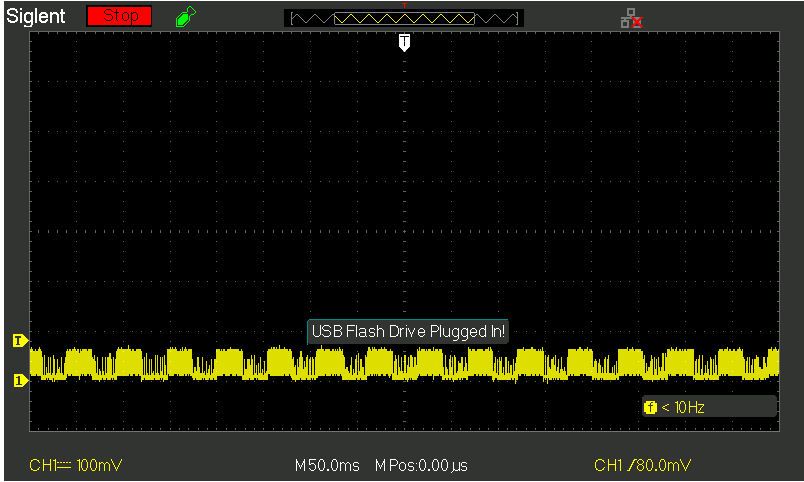
One more clue? When I look at the current usage and expand the timebase when in sleep (and awake) I see this square wave pattern with a duty cycle a little over 50ms. Maybe this can help identify the component still drawing power during sleep?
-
You have to send the GPS into sleep as well. Have a look into the GPs manual for the matching PMTK sentenes.
But be warned. The L76 doesn't like to play. Mine has not found any sat for months. I like o have a full erase like the one for the ESP32.
Hello! It looks like you're interested in this conversation, but you don't have an account yet.
Getting fed up of having to scroll through the same posts each visit? When you register for an account, you'll always come back to exactly where you were before, and choose to be notified of new replies (either via email, or push notification). You'll also be able to save bookmarks and upvote posts to show your appreciation to other community members.
With your input, this post could be even better 💗
Register Login