Pymakr does not find my board
-
Hello,
I am using Windows 10 and the Lopy4, I have already installed nodejs and pymakr to be used in Vscode but when I hit the command to list the serial ports my board is not found. I know the board is ok as I can connect to the board using Teraterm a client for serial connections and run some
commands. What can I do to fix that? -
I think you have to change a setting under All commands -> Pymakr > Global Settings. I think I've had some similar issue with my PC at work, which uses Win 7 and VSC.
Can you tell me, what is written under autoconnect_comport_manufacturers in the pymakr.json, which gets opened after you select the global settings?
Tomorrow, I can check the settings at my windows PC at work.
And welcome to the Forum btw!
-
Yes, the same thing happened to me. I was using a "Prolific" serial cable, and had to add the manufacturer name to autoconnect comport manufacturers. You can find the manufacturer of your cable under Device Manager.
When you add the new manufacturer within Atom, it will look like this:

Or in VSCode:
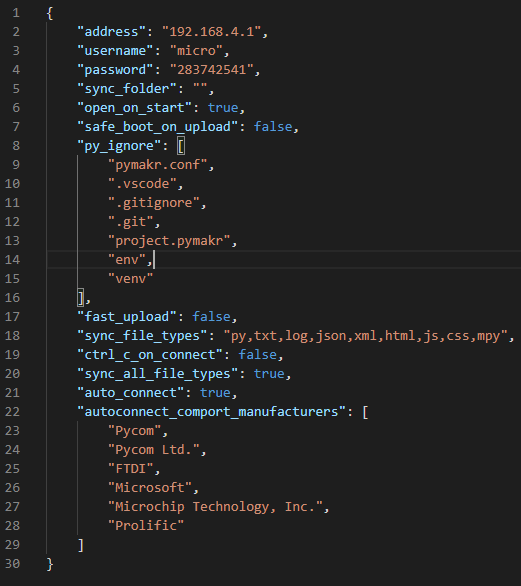
-
@d-alvrzx It is working right now, thank you. Although I thought FTDI was the manufacturer of my cable it was Digi International indeed.
-
for those wondering where in Pymakr that the "autoconnect_comport_manufacturers" is --
in Atom (I don't know about Visual Studio, though it's also an Electron-based app),
go to File->Settings
Select the Pymakr package
View Code
Navigate to .atom/packages/pymakr/lib/config.jslook for the
autoconnect_comport_manufacturers.default:add your manufacturer to the list (don't break the JSON!)
Restart Atom
Hello! It looks like you're interested in this conversation, but you don't have an account yet.
Getting fed up of having to scroll through the same posts each visit? When you register for an account, you'll always come back to exactly where you were before, and choose to be notified of new replies (either via email, or push notification). You'll also be able to save bookmarks and upvote posts to show your appreciation to other community members.
With your input, this post could be even better 💗
Register Login