Can't get Sigfox ID and PAC from Lopy4
-
Hi all,
I have a Lopy4 card installed on a Pytrack2.0. I updated the firmware of the Lopy4 (did not upgrade firmware of Pytrack 2.0 as requested). But I do not seem to get the sigfox ID and PAC. What am I doing wrong? image url)
Thanks for your help
-
Hi,
This happens when you clear the CONFIG and NVS partitions on firmware upgrade. Normally they would be restored to the sigfox IDs as we keep a backup of them, but if the firmware updater tool has no internet connection, we can unfortunately not do that.Edit: Can you privately DM me the WMAC of your device?
Gijs
-
Hello,
I am facing the same issue. I just bought the lopy4 and it's impossible for me to get the sigfox id and pac number.
Could you please enlighten me here ?Thank you,
Regards
Yacine -
Hi,
You should be able to get them using the firmware updater tool as shown here: https://docs.pycom.io/gettingstarted/registration/sigfox/ -
-
Hi Gijs,
I've got the same problem with a new Lopy4 I've just bought. I already try method that works (using firmware 1.20.1, updating with latest Windows version of Pycom Firmware Update tool)
Can u help me, regards, Olivier
-
Hi @Gijs,
Can u help me because I'm facing the same issue. I can't get Sigfox Id and PAC with Lopy 4 ('ffffffff' instead). Already trying to update firmware (now with 1.20.1). I'm using Windows version of updater tool.
Thanks
-
If you use the firmware updater tool, it will give you the SigFox PAC and ID in the last screen as mentioned in the documentation page I linked in. Please elaborate on what is not working for you.
-
Hi @Gijs ,
I use updater tool and at the end of the operation, I get Device ID and LoRa Mac displayed but not SigFox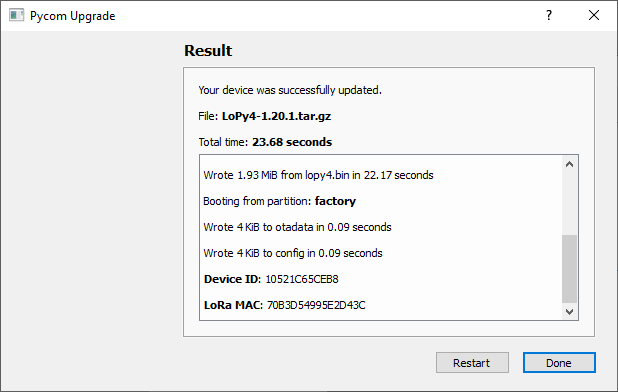
I use the latest version of Firmware updater tool (1.16.5) and th choice of this firmware is as recommended in a learning course
Hope this enough to describe my problem
-
Hi,
It seems your device is not explicitely recognized as a Lopy4 (note the difference in screenshots: https://docs.pycom.io/gettingstarted/registration/sigfox/). Please use the Firmware updater in online mode to retrieve the Sigfox PAC and ID, and do not submit a file manually, but rather let the tool get it from our software server. This way, it will / should also update the Sigfox PAC and ID if you previously removed it from the device (using for example erase all and/or erase config / nvs partitions).Next to that, I recommend to update to the latest stable firmware version (1.20.2.r4), though if your course recommends something different, you can always downgrade to that version.
-
-
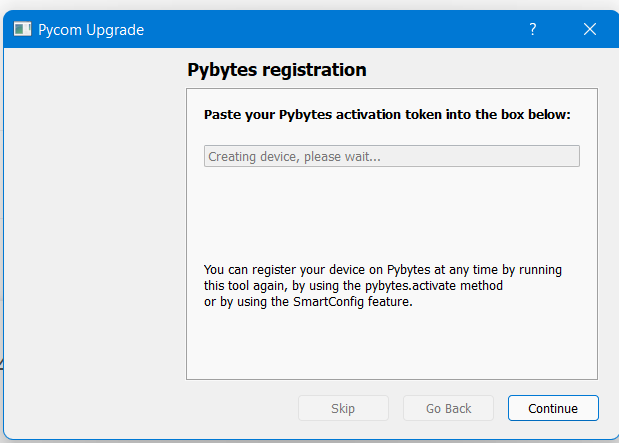
I have the same problem.
I am using the Pycom firm update to update new firmware for my Sipy.
But it got stuck after I've chosen the country (Singapore).
Thanks.
Hello! It looks like you're interested in this conversation, but you don't have an account yet.
Getting fed up of having to scroll through the same posts each visit? When you register for an account, you'll always come back to exactly where you were before, and choose to be notified of new replies (either via email, or push notification). You'll also be able to save bookmarks and upvote posts to show your appreciation to other community members.
With your input, this post could be even better 💗
Register Login