Geofencing with Pytrack
-
Thanks for your previous input @jcaron and @Gijs
I had some more time now to work on this. However, I’m getting lost in a few places. Just a quick reminder of what I’m trying to achieve: check whether my lopy coordinates are inside a set of static polygons stored in a json file. If yes, I want to print the name of the specific polygon that matches my coordinates.
So here’s my progress:
I stored a few test polygons in a json file. Initially I tried a geojson file, as this seemed more appropriate for polygons. However, it does not seem possible to upload geojson to the Lopy (via Atom). Should this generally be possible?
My json file has the following format:
[
{
	"name":"Polygon1",
	"type": "Polygon",
	"coordinates": [[40,0],[40,1],[41,1],[41,0],[40,0]]
},
{
        "name":"Polygon2",’
	"type": "Polygon",
	"coordinates": [[50,0],[50,1],[51,1],[51,0],[50,0]]
},
…
]
Does that seem correct?
I’ve stored the json file in my project and then load the data into the main.py
with:import json with open('polygon.json') as j: polygondata = json.load(j)I know @Gijs suggested json.dumps but if I understand it correctly this is to convert from Python to JSON. Since I created a separate JSON file, I assume I need to use json.load to convert this data to Python in order to use it in main.py. Correct?
The next element is the PiP function. I’ve created the PiP function in a separate file in the library called Polygoncheck.py
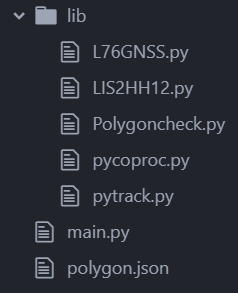
class PolygonCheck:

def PiP(x: int, y: int, poly) -> bool:

    num = len(poly)
    i = 0
    j = num - 1
    c = False
    for i in range(num):
        if ((poly[i][1] > y) != (poly[j][1] > y)) and \
                (x < poly[i][0] + (poly[j][0] - poly[i][0]) * (y - poly[i][1]) /
                                  (poly[j][1] - poly[i][1])):
            c = not c
        j = i
    return c
Now comes the code from @jcaron:
coords = l76.coordinates()
if (PiP(coords[0], coords[1], polygondata)):
I’ve changes ‘fences’ to ‘polygondata’, assuming this needs to take the data from my json file?
Should the above work together with my PiP function in its current state? Or do I need to tweak it?
I assume the code just generally checks whether my lopy coordinates fall within any of the polygons?
If so, how do identify (and print) the specific polygon the coordinates fall into?
I remember that’s where the loop function from @Gijs comes in.
def check_all_fences(fences, coordinate):
 for n in fences:
  if not n.check_point(coordinate)
   return False #point is outside one of the fences
 return True # point is inside all fences
But how do I combine both pieces of code together?
As you can see, lots of questions and I probably mixed up a few things here.
Hoping you can help me untangle this and bring everything together.
Thank you!
-
@newkit You should not call
PiPdirectly with the full list, it expects just one polygon at a time. You can it in the loop (instead of thecheck_point).Probably something along the lines of:
def check_all_fences(coords, fences):
 for fence in fences:
  if PiP(coords, fence.coordinates):
   return fence
 return None

coords = l76.coordinates()
found_fence = check_all_fences(coords, polygondata)
if (found_fence != None):
  print "Coords in fence {}".format(found_fence.name)
else:
  print "Coords not in any fence"
I didn't try it and my Python is rusty but it shouldn't be very far from that.
-
@jcaron Great, I will test this. Thanks!
I've to admit though I'm slightly confused with the different terminology. Coords and polygondata is clear, but what exactly does fence, fences, and fence.coordinates refer to?
-
-
fencesis the list of fences thecheck_all_fencesfunction will check against the provided coordinates. When we call the function, we passpolygondatawhich is the list you loaded from the JSON file. -
fenceis each individual fence in turn (for a in bis a loop which will run for each element ofb, with the current element being available asainside the loop). -
fence.coordinatesis the list of points of a givenfence, from thecoordinatesfield of each fence in you JSON file.
fencesis local to thecheck_all_fencesfunction.fenceis local to thefor ... inloop. -
-
Thanks for clarifying @jcaron
I’ve tested the code. First, I encountered a few synthax errors in my project which I was able to fix. But now I’m stuck with a couple of errors regarding my PiP function and the coordinates from the json file.
First the PiP error:
Traceback (most recent call last):
  File "main.py", line 46, in <module>
  File "main.py", line 41, in check_all_fences
NameError: name 'PiP' isn't defined
I’ve tested integrating PiP directly into main.py, which is working. So that means the function itself is ok, but I’m not importing it properly from polygoncheck.py (see file in previous post) into main.py?
I've got the following in main.py:
import polygoncheck
from polygoncheck import PolygonCheck
Now the coordinates error:
Traceback (most recent call last):
  File "main.py", line 60, in <module>
  File "main.py", line 55, in check_all_fences
AttributeError: 'dict' object has no attribute 'coordinates'
This seems to suggest something is wrong with my json structure (see previous post). Or perhaps I’m not correctly loading the json data into main.py?
with open('polygon.json') as j:
    polygondata = json.load(j)
I've tested the code above by printing the polygondata, which is working. So it looks like it's the json format.
Any ideas on both errors?
And lastly a very stupid question :) how do you highight in light red in the text editor?
-
Ok, I’ve tried lots of different things in the meanwhile. But I just don’t get it to work. Frustrating!
@jcaron @Gijs I know I probably pushed the limits of your willingness to help a newbie with his questions. Really appreciate you got me this far! I feel like I’m so close though to get this to work. Perhaps you can have another look?
I’ve put the earlier PiP error to the side for now, as I can circumvent it by including the function directly in main.py.
However I’m going in circles regarding the coordinates error:
Traceback (most recent call last):
  File "main.py", line 60, in <module>
  File "main.py", line 55, in check_all_fences
AttributeError: 'str' object has no attribute 'coordinates'
Line 55 is the third line below:
def check_all_fences(coords, fences):
 for fence in fences:
  if PiP(coords, fence.coordinates):
   return fence
 return None

coords = l76.coordinates()
found_fence = check_all_fences(coords, polygondata)

if (found_fence != None):
    print ("Coords in fence {}").format(found_fence.name)
else:
    print ("Coords not in any fence")
This is the PiP function:
def PiP(x: int, y: int, poly) -> bool:

    num = len(poly)
    i = 0
    j = num - 1
    c = False
    for i in range(num):
        if ((poly[i][1] > y) != (poly[j][1] > y)) and \
                (x < poly[i][0] + (poly[j][0] - poly[i][0]) * (y - poly[i][1]) /
                                  (poly[j][1] - poly[i][1])):
            c = not c
        j = i
    return c
I've created a new JSON file in the meanwhile: polygon.py (saved as .py as I can't upload json)
Please let me know if you need any more info.
Thank you!
-
@newkit Your JSON is not structured as it was in your previous post. It had
coordinatesas a direct attribute of each fence, while it is now one level down insidegeometry:{ "type": "Feature", "properties": { "name": "Fence 1" }, "geometry": { "type": "Polygon", "coordinates": [So it should be
fence.geometry.coordinatesinstead. Of course the code assumes you only have polygons at this stage, if you have other types the code would need to be adapted.Likewise, the name is also one level down inside
properties, so it should befound_fence.properties.namea bit further down. -
Thanks @jcaron, that makes sense. But it just seems to shift the error to geometry:
Traceback (most recent call last):
  File "main.py", line 60, in <module>
  File "main.py", line 55, in check_all_fences
AttributeError: 'str' object has no attribute 'geometry'
The previous json file showed the same coordinates error as in the previous post. Initially I thought my json format was the issue, therefore I created the new file.
I also tried various changes around this code:
with open('polygon.json') as j:
    polygondata = json.load(j)
E.g. json.loads(j), json.load(‘j’), or
input_file = open ('polygon.json')
polygondata = json.load(input_file)
It doesn't solve the issue though.
-
@newkit OK, so a few issues:
- My python is indeed rusty and I used Javascript object syntax rather than python dict. So it's
fence['geometry']['coordinates'], notfence.geometry.coordinatesandfound_fence['properties']['name'], notfound_fence.properties.name. - The list of coordinates is in an inner array inside
coordinates(I suppose your JSON file can have multiple polygons for a single feature?), so it's reallyfence['geometry']['coordinates'][0] - The list of fences is not at the top level in the JSON, but within
features, so it'spolygondata['features'], notpolygondata. - PiP expects
xandyas separate args, not an array, so it'sPiP(coords[0], coords[1], fence['geometry']['coordinates'][0]) ()where not in the same place in the print when a match is found.
Final result (tested on python 3.7, don't have a Pycom device at hand right now, you'll have to change the json import):
import json
input_file = open ('polygon.json')
polygondata = json.load(input_file)

def PiP(x: int, y: int, poly) -> bool:

    num = len(poly)
    i = 0
    j = num - 1
    c = False
    for i in range(num):
        if ((poly[i][1] > y) != (poly[j][1] > y)) and \
                (x < poly[i][0] + (poly[j][0] - poly[i][0]) * (y - poly[i][1]) /
                                  (poly[j][1] - poly[i][1])):
            c = not c
        j = i
    return c

def check_all_fences(coords, fences):
 for fence in fences:
  if PiP(coords[0], coords[1], fence['geometry']['coordinates'][0]):
   return fence
 return None

coords = (48, 0)
#coords = l76.coordinates()
found_fence = check_all_fences(coords, polygondata['features'])

if (found_fence != None):
    print ("Coords in fence {}".format(found_fence['properties']['name']))
else:
    print ("Coords not in any fence")
Note that in addition to the previous caveats, it only tests again the first set of coordinates in a feature.
- My python is indeed rusty and I used Javascript object syntax rather than python dict. So it's
-
@jcaron that seems to have fixed it. Initial results look positive, will do some more testing in the next days.
Thank you so much for sorting this out!
Hello! It looks like you're interested in this conversation, but you don't have an account yet.
Getting fed up of having to scroll through the same posts each visit? When you register for an account, you'll always come back to exactly where you were before, and choose to be notified of new replies (either via email, or push notification). You'll also be able to save bookmarks and upvote posts to show your appreciation to other community members.
With your input, this post could be even better 💗
Register Login