Welcome to the Pycom forum Forum
    • \[\[global:header.categories\]\]
    • \[\[global:header.recent\]\]
    • \[\[global:header.tags\]\]
    • \[\[global:header.popular\]\]
    • Login

    Explore Pybytes | Official Documentation | Report a Firmware Bug/Issue | GitHub

    New firmware release, version 1.6.0.b1

    Scheduled Pinned Locked Moved Announcements & News
    72 Posts 13 Posters 40.6k Views 13 Watching
    Loading More Posts
    • Oldest to Newest
    • Newest to Oldest
    • Most Votes
    Reply
    • Reply as topic
    Log in to reply
    This topic has been deleted. Only users with topic management privileges can see it.
    • J Offline
      JF002 @daniel
      last edited by

      @daniel said in New firmware release, version 1.6.0.b1:

      Just freeze my lopy. I noticed it when trying to fix another issue with ds1820 and mqtt :

      OK it happens, not always at the first time. I'm working on it... Wait for the 1.6.3.b1 coming a bit later...

      Yeah, thank you! You're the best!

      1 Reply Last reply Reply Quote 0
      • D Offline
        daniel
        last edited by

        Hello,

        1.6.3.b1 is out there. In my tests the gc.collect() problem is now fixed. @livius @JF002 please test and let me know... Thanks!

        Cheers,
        Daniel

        N C 2 Replies Last reply Reply Quote 1
        • N Offline
          Neo @daniel
          last edited by Neo

          @daniel Still hanging on LopY. In our script this is happening after wifi STA connect ... we have a gc.mem_free call. We removed all gc collect calls.

          1 Reply Last reply Reply Quote 0
          • D Offline
            daniel
            last edited by

            Then it's not the gc anymore in your case. If you can share with me a piece of code that can reproduce it I'll get onto it.

            Cheers,
            Daniel

            N 2 Replies Last reply Reply Quote 0
            • N Offline
              Neo @daniel
              last edited by

              @daniel Unfortunatelly the code is huge. I will try to reduce the area. I chekced also one auto tests only with LoRa initiation and Lora socket reading + gc.mem_free calls ... I saw that this test is hanging. I believe the real problem ties to memory leak /bad management. Here is the memory output at each second called soket recv and dump the mem_free:
              Memory 19264
              Memory 18656
              Memory 18080
              Memory 17504
              Memory 16928
              Memory 16352
              Memory 15776
              Memory 15200
              Memory 14624
              Memory 14048
              Memory 13472
              Memory 12896
              Memory 12320
              Memory 11744
              Memory 11168
              Memory 10592
              Memory 10016
              Memory 9440
              Memory 8864
              Memory 8288
              Memory 7712
              Memory 7136
              Memory 6560
              Memory 5984
              Memory 5408
              Memory 4832
              Memory 4256
              Memory 3680

              1 Reply Last reply Reply Quote 0
              • N Offline
                Neo @daniel
                last edited by

                @daniel Here it is your memory leak script:

                def test2():

                from network import LoRa
                _lora = LoRa(mode=LoRa.LORA)
                
                import socket
                _socket = socket.socket(socket.AF_LORA, socket.SOCK_RAW)
                _socket.setblocking(False)    
                
                import gc
                gc.enable()   
                while True:
                
                    try:
                        bytes = self._socket.recv(512)
                        if len(bytes) > 0:
                            print(" %s RECV %s" %  (self, bytes))
                        
                    except Exception as e:   
                            print("_recv", str(e))    
                            
                    print('Memory %d' % (gc.mem_free()))
                
                    utime.sleep(1)
                

                test2()

                1 Reply Last reply Reply Quote 0
                • D Offline
                  daniel
                  last edited by daniel

                  @Neo, I modified your script in order to be able to run it:

                  from network import LoRa
                  import utime
                  
                  class test:
                      def __init__ (self):
                          self._lora = LoRa(mode=LoRa.LORA)
                  
                          import socket
                          self._socket = socket.socket(socket.AF_LORA, socket.SOCK_RAW)
                          self._socket.setblocking(False)    
                  
                      def run(self):
                          import gc
                          gc.enable()
                  
                          while True:
                              try:
                                  bytes = self._socket.recv(512)
                                  if len(bytes) > 0:
                                      print("%s RECV %s" %  (self, bytes))
                  
                              except Exception as e:
                                  print("_recv", str(e))
                  
                              print('Memory %d' % gc.mem_free())
                              utime.sleep(1)
                  
                  t = test()
                  t.run()
                  

                  I get the following output:

                  Memory 54880
                  Memory 54320
                  Memory 53760
                  Memory 53200
                  Memory 52640
                  Memory 52080
                  Memory 51520
                  Memory 50960
                  Memory 50400
                  Memory 49840
                  Memory 49280
                  Memory 48720
                  Memory 48160
                  Memory 47600
                  Memory 47040
                  Memory 46480
                  Memory 45920
                  

                  Which is totally correct, that's the way Python works. Memory is consumed as code runs, and when there's no more memory, the garbage collector kicks in and frees memory so that code can continue running. At some point you see:

                  Memory 5040
                  Memory 4480
                  Memory 3920
                  Memory 3360
                  Memory 2800
                  Memory 2240
                  Memory 1680
                  Memory 1120
                  Memory 560
                  Memory 0
                  Memory 54592
                  Memory 54032
                  Memory 53472
                  Memory 52912
                  

                  However, if I add a gc.collect() line like this:

                  from network import LoRa
                  import utime
                  
                  class test:
                      def __init__ (self):
                          self._lora = LoRa(mode=LoRa.LORA)
                  
                          import socket
                          self._socket = socket.socket(socket.AF_LORA, socket.SOCK_RAW)
                          self._socket.setblocking(False)    
                  
                      def run(self):
                          import gc
                          gc.enable()
                  
                          while True:
                              try:
                                  bytes = self._socket.recv(512)
                                  if len(bytes) > 0:
                                      print("%s RECV %s" %  (self, bytes))
                  
                              except Exception as e:
                                  print("_recv", str(e))
                  
                              print('Memory %d' % gc.mem_free())
                              utime.sleep(1)
                              gc.collect()
                  
                  t = test()
                  t.run()
                  

                  I get:

                  Memory 55520
                  Memory 55664
                  Memory 55648
                  Memory 55648
                  Memory 55648
                  Memory 55648
                  Memory 55648
                  Memory 55648
                  Memory 55648
                  Memory 55648
                  Memory 55648
                  Memory 55648
                  Memory 55648
                  Memory 55648
                  Memory 55648
                  

                  Which at least in this test it shows that there's no memory leak...

                  L C N 3 Replies Last reply Reply Quote 0
                  • C Offline
                    crankshaft @daniel
                    last edited by crankshaft

                    @daniel - can you make a new announcement when a new beta is released, the topic of this current thread is ... version 1.6.0.b1 however I think it is now version 1.6.3.b1 ?

                    You have to trawl and check every post to see if a new release has been made and it's not very productive.

                    Or at least update the header

                    1 Reply Last reply Reply Quote 0
                    • L Offline
                      livius @daniel
                      last edited by livius

                      @daniel said in New firmware release, version 1.6.0.b1:

                      bytes = self._socket.recv(512)

                      One hint if i can suggest something
                      what if you send something to this socket and this line recive some data?

                      bytes = self._socket.recv(512)
                      

                      is this still the same result?
                      I can test it self only in the evening (and only on different socket - Wipy2) - but maybe result is different and you can find something interesting
                      If not then we can only wait for @Neo to provide some sample

                      @crankshaft good point

                      think about people first, then computers

                      1 Reply Last reply Reply Quote 0
                      • C Offline
                        Colateral @daniel
                        last edited by Colateral

                        @daniel It is strange that yesterday using this script the LoPy was hanging ... today I re powered and I didn't reproduce it anymore. It is true that yesterday I did a lot of operation before.

                        However the entire solution is still hanging and I need to understand why on 1.5.0 this is working and 1.6.x is not working.

                        1 Reply Last reply Reply Quote 1
                        • N Offline
                          Neo @daniel
                          last edited by

                          @daniel It is still hanging. There is diff between your output and my output.... and I know why. My script is embedded in the app importing some additional modules.... that why mem is starting from 20K and not 50K as yours. Some of these modules have some static data and some of them have thread locks and Wifi data. Let me check.... the circle radius it will be reduced if I will take it one by one.

                          N C 2 Replies Last reply Reply Quote 0
                          • N Offline
                            Neo @Neo
                            last edited by Neo

                            @Daniel I changed the LopY with new one + upgrade to 1.6.3b1 and I ran only your script. Now the output is the same as yours... .but it ALWAYS hanging after the mem displays 400. Here is the output:

                            Running
                            Soft resetting the LoPy
                            Memory 55280
                            Memory 54720
                            Memory 54160
                            Memory 53600
                            Memory 53040
                            Memory 52480
                            Memory 51920
                            Memory 51360
                            Memory 50800
                            Memory 50240
                            Memory 49680
                            Memory 49120
                            Memory 48560
                            Memory 48000
                            Memory 47440
                            Memory 46880
                            Memory 46320
                            Memory 45760
                            Memory 45200
                            Memory 44640
                            Memory 44080
                            Memory 43520
                            Memory 42960
                            Memory 42400
                            Memory 41840
                            Memory 41280
                            Memory 40720
                            Memory 40160
                            Memory 39600
                            Memory 39040
                            Memory 38480
                            Memory 37920
                            Memory 37360
                            Memory 36800
                            Memory 36240
                            Memory 35680
                            Memory 35120
                            Memory 34560
                            Memory 34000
                            Memory 33440
                            Memory 32880
                            Memory 32320
                            Memory 31760
                            Memory 31200
                            Memory 30640
                            Memory 30080
                            Memory 29520
                            Memory 28960
                            Memory 28400
                            Memory 27840
                            Memory 27280
                            Memory 26720
                            Memory 26160
                            Memory 25600
                            Memory 25040
                            Memory 24480
                            Memory 23920
                            Memory 23360
                            Memory 22800
                            Memory 22240
                            Memory 21680
                            Memory 21120
                            Memory 20560
                            Memory 20000
                            Memory 19440
                            Memory 18880
                            Memory 18320
                            Memory 17760
                            Memory 17200
                            Memory 16640
                            Memory 16080
                            Memory 15520
                            Memory 14960
                            Memory 14400
                            Memory 13840
                            Memory 13280
                            Memory 12720
                            Memory 12160
                            Memory 11600
                            Memory 11040
                            Memory 10480
                            Memory 9920
                            Memory 9360
                            Memory 8800
                            Memory 8240
                            Memory 7680
                            Memory 7120
                            Memory 6560
                            Memory 6000
                            Memory 5440
                            Memory 4880
                            Memory 4320
                            Memory 3760
                            Memory 3200
                            Memory 2640
                            Memory 2080
                            Memory 1520
                            Memory 960
                            Memory 400
                            ets Jun 8 2016 00:22:57

                            rst:0x1 (POWERON_RESET),boot:0x13 (SPI_FAST_FLASH_BOOT)
                            configsip: 0, SPIWP:0x00
                            clk_drv:0x00,q_drv:0x00,d_drv:

                            1 Reply Last reply Reply Quote 0
                            • C Offline
                              Colateral @Neo
                              last edited by Colateral

                              @Neo On my LopY I have the same behavior. It is not necessary to iterate until end. Put gc.collect() after that sleep and .... that's it.

                              1 Reply Last reply Reply Quote 1
                              • M Offline
                                madsdk
                                last edited by

                                I'm having big FTP stability problems after updating to this version. When I upload stuff it fails about half the time. Anyone else having problems with that? The problem is especially bad when uploading multiple files in one go.

                                1 Reply Last reply Reply Quote 0
                                • L Offline
                                  livius @daniel
                                  last edited by livius

                                  @daniel said in New firmware release, version 1.6.0.b1:

                                  could it be that your file system is corrupted from previous firmware versions? Could you try:
                                  import os
                                  os.mkfs('/flash')

                                  to format the file system and start from scratch...
                                  Cheers,
                                  Daniel

                                  formated and tested on 1.6.1.b1 and still file corruption :(
                                  now i am testing 1.6.3
                                  on the left you have oryginal file - on the right corrupted
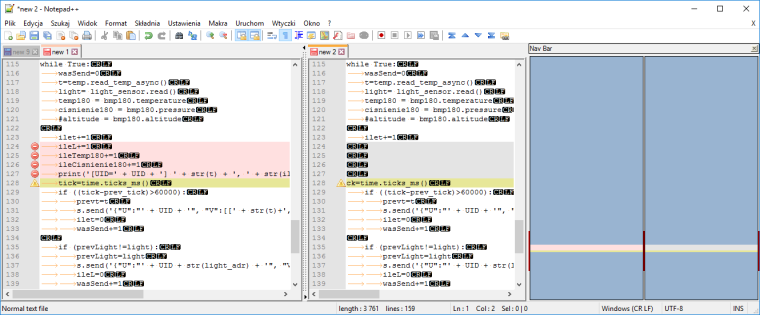
                                  0_1487351579822_upload-761dcbc2-0899-4a15-9d89-c827cf117346

                                  UPDATE
                                  flashed to 1.6.3
                                  formated and error is same -

                                  but!

                                  It is not visible at start see steps:

                                  1. write e.g. test.py (copy normal onewire content twice to this file on computer)
                                  2. copy this file to wipy throught ftp
                                  3. download it and see if it is ok - yes it is ok
                                  4. disable power (totally)
                                  5. power on wipy
                                  6. connect to it by ftp and download test.py - now it is corrupted

                                  UPDATE2
                                  It looks like it happened not always
                                  after few try storing file and restart i finally have file ok (strange)

                                  think about people first, then computers

                                  1 Reply Last reply Reply Quote 0
                                  • P Offline
                                    PCA
                                    last edited by

                                    I confirm the issue with bluetooth callback disabled in 1.6.0.b1 is solved in 1.6.3.b2.
                                    thanks @daniel

                                    1 Reply Last reply Reply Quote 0
                                    • N Offline
                                      Neo
                                      last edited by Neo

                                      @Daniel On LoPy with 1.6.3.b2 the issue with the gc.collect()/memeory release is till persistent. Please run that test file with the LoRa socket recv and check it.

                                      When do you think that we will have a fix for this? It is CRITICAL from many people point o view.

                                      (sysname='LoPy', nodename='LoPy', release='1.6.3.b2', version='v1.8.6-464-g0f843911 on 2017-02-17', machine='LoPy with ESP32', lorawan='1.0.0')

                                      J 1 Reply Last reply Reply Quote 0
                                      • D Offline
                                        daniel
                                        last edited by

                                        @Neo I agree it's super CRITICAL. It's on the top of our priorities at this moment. We'll do our best to resolve it ASAP.

                                        Cheers,
                                        Daniel

                                        1 Reply Last reply Reply Quote 0
                                        • J Offline
                                          JF002 @Neo
                                          last edited by

                                          @Neo said in New firmware release, version 1.6.0.b1:

                                          @Daniel On LoPy with 1.6.3.b2 the issue with the gc.collect()/memeory release is till persistent. Please run that test file with the LoRa socket recv and check it.

                                          When do you think that we will have a fix for this? It is CRITICAL from many people point o view.

                                          (sysname='LoPy', nodename='LoPy', release='1.6.3.b2', version='v1.8.6-464-g0f843911 on 2017-02-17', machine='LoPy with ESP32', lorawan='1.0.0')

                                          I also still have this bug... I was hoping it would be resolved in this update (1.3.6), but it doesn't seem to be the case... Do you want us to fill a bug on github?

                                          Thanks!

                                          1 Reply Last reply Reply Quote 0
                                          • D Offline
                                            daniel
                                            last edited by

                                            @JF002 yes please do report it on Github with a piece of code to reproduce the issue easily (include your boot.py as well if possible). Thanks!

                                            J 1 Reply Last reply Reply Quote 0

                                            Hello! It looks like you're interested in this conversation, but you don't have an account yet.

                                            Getting fed up of having to scroll through the same posts each visit? When you register for an account, you'll always come back to exactly where you were before, and choose to be notified of new replies (either via email, or push notification). You'll also be able to save bookmarks and upvote posts to show your appreciation to other community members.

                                            With your input, this post could be even better 💗

                                            Register Login
                                            • 1
                                            • 2
                                            • 3
                                            • 4
                                            • 3 / 4
                                            • First post
                                              Last post

                                            Pycom on Twitter

                                            Pycom