Send modbus slave data via lorawan
-
Hello,
I'm currently starting a project to read Modbus slave data and send it via lorawan to TTN. I combining lorawan with OTAA code with pycom_modbus code , here is my code#!/usr/bin/env python # # Copyright (c) 2019, Pycom Limited. # # This software is licensed under the GNU GPL version 3 or any # later version, with permitted additional terms. For more information # see the Pycom Licence v1.0 document supplied with this file, or # available at https://www.pycom.io/opensource/licensing # import pycom from uModBus.serial import Serial from uModBus.tcp import TCP from network import WLAN from network import LoRa import socket import machine import ubinascii import time #pycom.pybytes_on_boot(False) lora = LoRa(mode=LoRa.LORAWAN, region=LoRa.AS923) # create an OTAA authentication parameters, change them to the provided credentials app_eui = ubinascii.unhexlify('70B3D57ED0037CB2') app_key = ubinascii.unhexlify('6CE141489C7DA7312C0523697A7B2F30') # join a network using OTAA (Over the Air Activation) #uncomment below to use LoRaWAN application provided dev_eui lora.join(activation=LoRa.OTAA, auth=(app_eui, app_key), timeout=0) #lora.join(activation=LoRa.OTAA, auth=(dev_eui, app_eui, app_key), timeout=0) # wait until the module has joined the network while not lora.has_joined(): time.sleep(2.5) print('Not yet joined...') print('Joined') # create a LoRa socket s = socket.socket(socket.AF_LORA, socket.SOCK_RAW) # set the LoRaWAN data rate s.setsockopt(socket.SOL_LORA, socket.SO_DR, 5) # make the socket blocking # (waits for the data to be sent and for the 2 receive windows to expire) s.setblocking(True) ######################### RTU SERIAL MODBUS ######################### uart_id = 0x01 #modbus_obj = Serial(uart_id, pins=('P3','P4')) #default p3 p4 ==> tx1 rx1 #modbus_obj = Serial(uart_id, pins=('P3','P4'), ctrl_pin='P8') modbus_obj = Serial(uart_id, pins=('P10','P14'), ctrl_pin='P20') ###################### READ HOLDING REGISTERS ################## slave_addr=0x01 starting_address=0x25 register_quantity=2 signed=True while True: #read modbus slave data_bit register_value = modbus_obj.read_holding_registers(slave_addr, starting_address, register_quantity, signed) #print('Holding register value: ' + ' '.join('{:#x}'.format(x) for x in register_value)) # send some data #s.send(bytes([0x01, 0x02, 0x03])) s.send(register_value) # make the socket non-blocking # (because if there's no data received it will block forever...) s.setblocking(False) # get any data received (if any...) data = s.recv(64) #print(data) time.sleep(120)I got an error message like this,
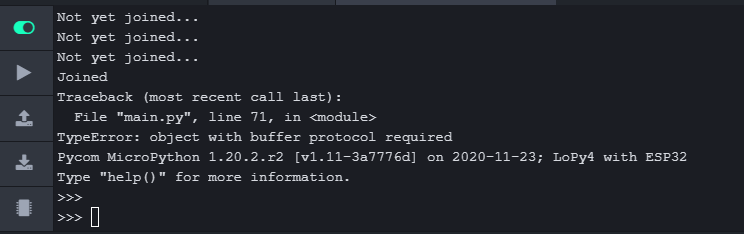
I don't know yet how to send the data, because I'm a newbie in python.
-
I have no luck with OTA mode on TTN for the lopy4, but ABP works OK
-
Not sure exactly what line corresponds to line 71, but I suspect it is the s.send(register_value) line.
I think you just need to change the type to bytes. Just try s.send(bytes(register_value)). -
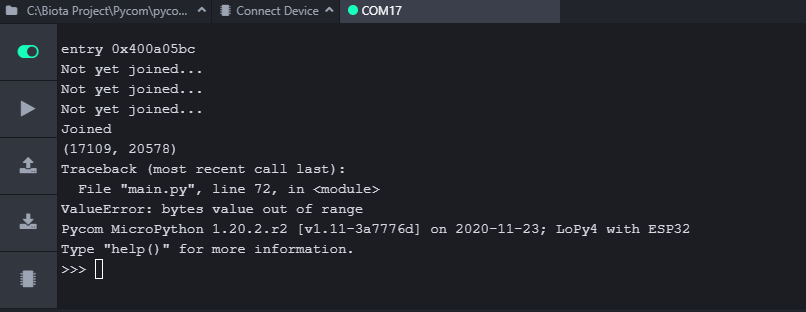
@tuftec data type of register_value is a tuple with int value (17109, 20578), I've tried s.send(bytes(register_value)) but still error. I don't know how to convert the value to byte
-
@kjm I think for OTAA mode is no problem. the problem is how to convert the register value to byte
-
This works for me.
LoRaSock.send(bytes([0x01, 0x02])+pack('>h',nvvar['Level']&0xffff)+bytes([0x02, 0x02])+pack('>h',nvvar['Batt']&0xffff))are my variables. -
@Gusti-Made-Arya-Wijaya I've fixed this problem, basically, data from Modbus Slave is byte HEX, so I think to not use conversion function in serial.py.
and here is the result, TTN receive HEX data from lopy4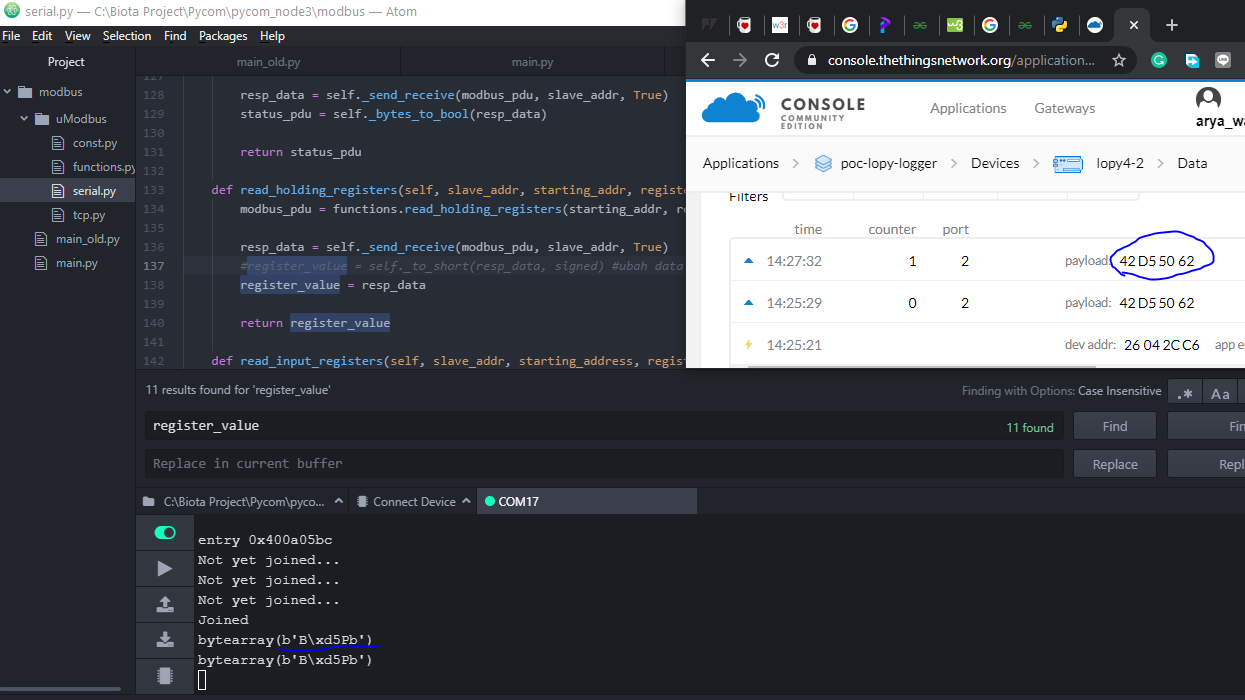
Thanks all for the replies

Hello! It looks like you're interested in this conversation, but you don't have an account yet.
Getting fed up of having to scroll through the same posts each visit? When you register for an account, you'll always come back to exactly where you were before, and choose to be notified of new replies (either via email, or push notification). You'll also be able to save bookmarks and upvote posts to show your appreciation to other community members.
With your input, this post could be even better 💗
Register Login