What do I misunderstand about rgbled()?
-
No, I do not debounce the switch at all. For the loraSendReceive() takes always the same 2135 ms to finish which is a debounce in itself.
I also see only one print statement on the console after pressing the switch, and only one message gets sent out. -
@Paul-Holthuizen I have an possible reason. In this version of the code:
while(True):
    if(switch() == 0):
        rgbled(white)
        retdata=loraSendReceive(senddata)
        print("Data verzonden: ", senddata)
        if(len(retdata) != 0):
            print("Data ontvangen: ", retdata)
    rgbled(green)
You are sending rgbled(green) very fast, when the button is NOT pressed. That may lock up the RGB, such that other calls to rgbled(white) are ignore. You could try to insert a small delay, like 1 ms, into the while(True) loop, just to give rgbled(green) time to complete.
Note: The signal pattern for the RGB led is created by the RMT unit. You load it once with a bit pattern, and then the transmission is done while the calling code can already return. So it's asynchronous to the code, which makes this kind interference possible. -
I have been following this thread as it could explain some issues I have been chasing in other areas. If the rgb led is in fact controlled by the underlying RTOS then that would explain a lot. You can not just simply look at your python code and work out what is happening. Calls to the led function could get queued or dropped without you knowing. I have observed strange timing behaviour when dealing with the LTE component on the FiPy which is handled by a totally seperate processor/modem. Am I correct in reading somewhere that some of the pycom modules (like LoRa) run on the second core, which call also introducing timing issues, particularly when not blocking.
Peter. -
@tuftec The calls to the led function are pretty simple. The function mod_pycom_rgb_led() in modpycom.c calls
bool led_set_color() in modled.c, which then calls rmt_write_items() to transfer the data bit pattern to the RGB led, AFTER waiting that the previous transmission has finished. Maybe the wait time is too short. The WS2812 requires reset time of 50µs between two transmissions. I see no wait period for that in the code, but in the actual timing on P2 I see that delay.
But it still only works with my test code, if I increase the delay to 200µs.Edit: Making a few trials it turns out, that up to a time gap of about 125µs between two commands to the RGB led, the second command is ignored. From about 150µs on, the second command will be executed. I do not know which RGB led is on the board. The OEM baseboard schematics show the WS2812B which is specified for 3.5V min, and I replaced once successfully a defective RGB led with a WS2812B. So it might work to some extend. But the mandatory reset time may be longer than 50 µs in that case.
-
This seems a reasonable explanation. And it gives me an idea of how to handle this particular problem. However, it also gives me something to think about. How do I know what functions are executed asynchronously?
This is by no means meant to be disapproving but how am I going to use inputs and outputs if I do not know beforehand how these are being handled by Pycom? Are these handled by an (interrupt driven) RTOS or not? If so, is there a description of the RTOS that handles all of this?
I am really impressed with the ability to make a solid network connection with only a couple of lines of code, but I still struggle with the connect-to-hardware side of things with the Lopy device. No doubt a learning curve.
-
@Paul-Holthuizen Adding a small sleep time into a busy loop is anyhow recommended.
In this case, pycom.rgbled() does not execute asynchronously as a function. It's the sending process that is started. I'm not sure if it is operating in hardware of software. Maybe similar to the UART, where a 128 byte queue is located in the UART hardware, which can be sent or received w/o any software/firmware interaction.
The RTOS is documented on the espressif web pages. https://docs.espressif.com/projects/esp-idf/en/release-v4.1/ The only complication may be, that Pycom does not use the latest release, and also a tailored version. But the previous versions should be available to at espressif.Edit: I also use a small test script along your code for verification:
import pycom import time from machine import Pin pycom.heartbeat(False) white=0x333333 green=0x003300 p = Pin("P9", Pin.IN, Pin.PULL_UP) time.sleep(0.5) while(True): if(p() == 0): pycom.rgbled(white) print("Data verzonden: ") time.sleep(1) pycom.rgbled(green) time.sleep_us(200) -
So if I understand this correctly, the loop
pycom.heartbeat(False)
While True:
   rgbled(green)
does not show a green color on the led because we call it too fast, leaving no time to actually change the led as we queue another task to change the led color right after the first one, squashing the first one? That would make sense.
Thanks for the thorough explanation! I would not have expected that and figured the method to be blocking until the LED color actually changed. Do you think this is a bug, or a feature?
Gijs
-
@Gijs Not really. It is not that a follow up call to rgbled() squashes the previous one. It is the opposite. If the follwow-up call is too early, it will be ignored. And in the example it was the rgbled(white) which came too soon, only ~50 µs after the previous one.
The messages themselves had proper structure, only the time between them was too short.
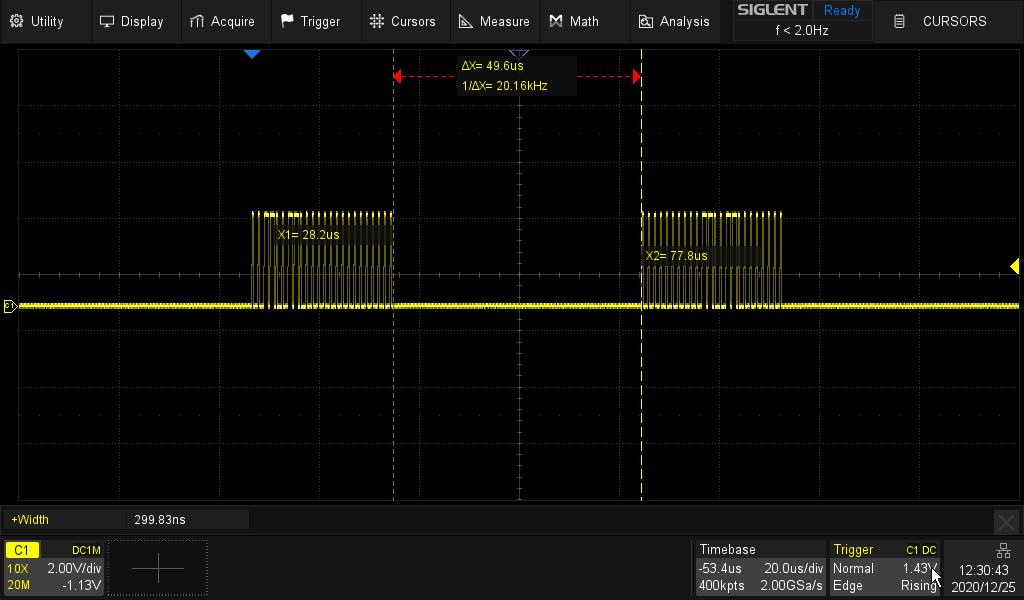
Adding more time (here 144 µs) made it work.
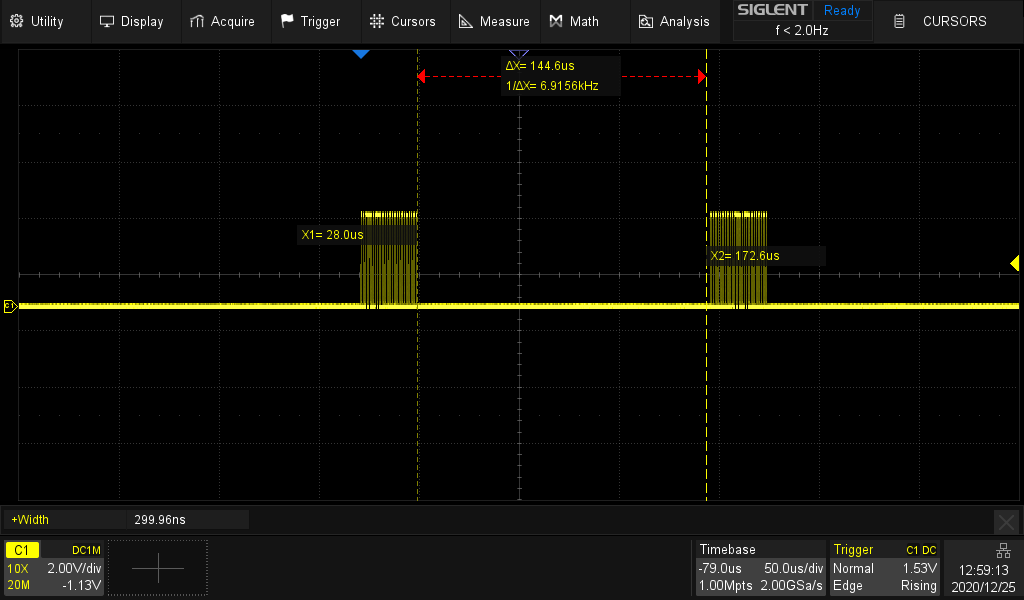
I made a PR ensuring at least 280 µs, because that's what I found in the datasheet of the WS2812B-V4 (opposed to 50µs in the WS2812B datasheet). -
@Gijs said in What do I misunderstand about rgbled()?:
I would not have expected that and figured the method to be blocking until the LED color actually changed. Do you think this is a bug, or a feature?
Using the RMT is definitly a feature. The code actually waits until a previous transmission is finished. And that's the heart of my PR. I just insert another wait pulse cycle pair to the RMT chain, which causes a sufficient delay. I was not able to find the place causing the 50µs delay which is initially there.
-
For my benefit: what's the RMT?
-
@Paul-Holthuizen That is the Remote Controller Unit of the ESP32. Intended to send and receive messages for remote controllers. But it is also fine for creating and timing bit patterns with high precision. See https://docs.pycom.io/firmwareapi/pycom/machine/rmt/#app
-
And precise enough to create the timing signals for a WS2812! I remember writing a piece of C-code for a PIC microcontroller controlling a whole string of these leds and wrestling with that for a bit.
Thanks for your support. I was getting a little bit frustrated with the lopy on my bench but am starting to realize now that the difficult bit here is not in the networking but in the way a high-level language like Python interfaces with low level hardware. Just more stuff to learn :-)

Hello! It looks like you're interested in this conversation, but you don't have an account yet.
Getting fed up of having to scroll through the same posts each visit? When you register for an account, you'll always come back to exactly where you were before, and choose to be notified of new replies (either via email, or push notification). You'll also be able to save bookmarks and upvote posts to show your appreciation to other community members.
With your input, this post could be even better 💗
Register Login