gpy UART does not work on battery power
-
when I power my GPY via battery the UART stops working. When I power the GPY with USB, the UART works. Is there an explanation for this?
-
@marcbeltman how are you powering the GPy and connecting to UART in either case? Are you using an expansion board or Pysense or Pytrack? If using your own board, can you provide a schematic of your setup?
-
i use the expansionboard 3.0 to communicate with an esp via uart.
i have a sensor on the standard uart pins of the gpy p3 and p4 and in addition i want to communicate via uart on pins 20 and 21 with an esp
In the picture you can see my setup.
When i power the gpy and the esp both through the usb (gnd and 3.3v not connected to esp) then the uart works. When i power the gpy from battery only, (gnd and 3.3v connected to esp) then the uart does not work. I don't know why.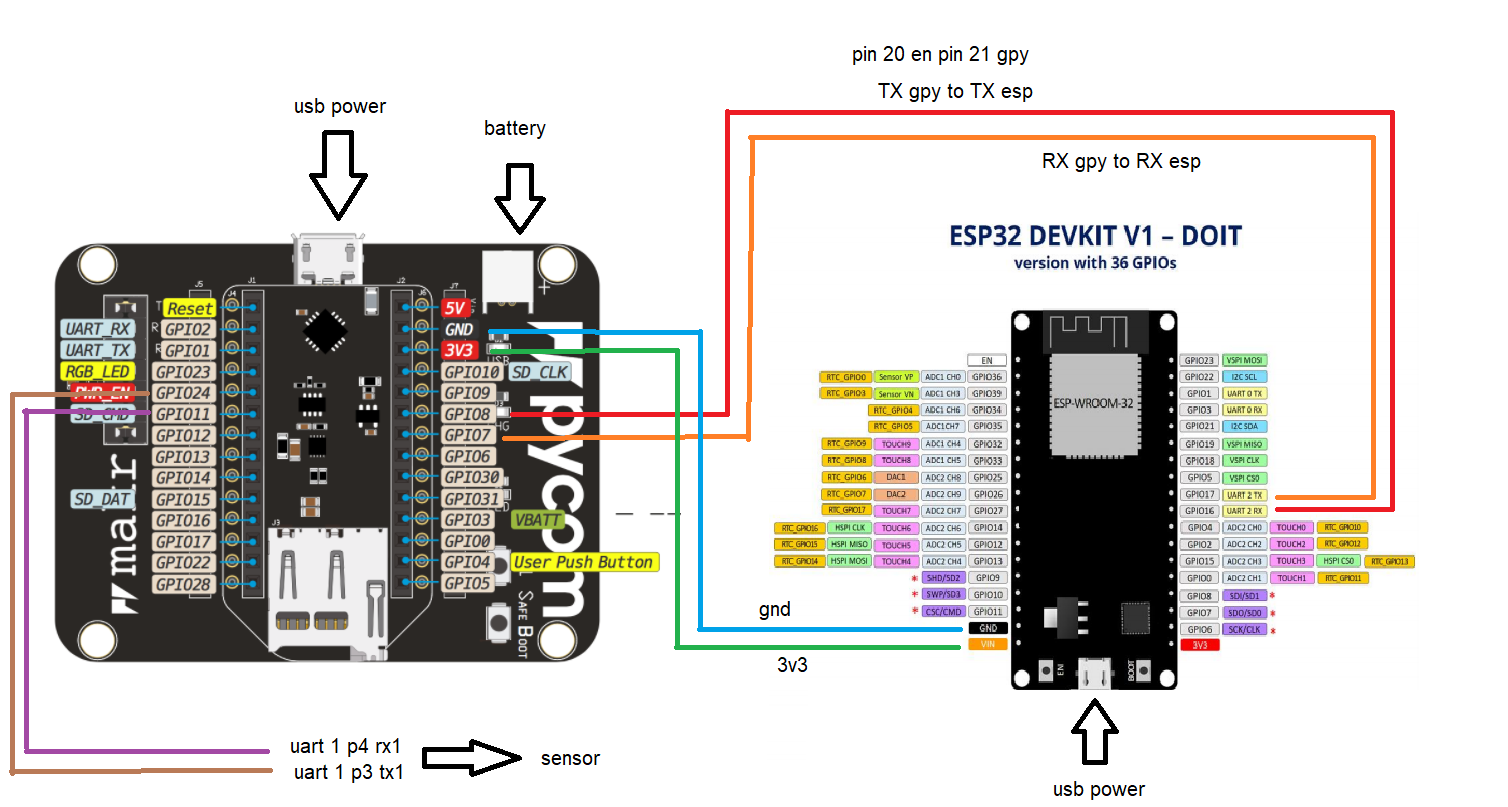
this is the code i am using from the gpy to the esp
he sends a "?" when the esp receives the "?" the esp sends the data to the gpyfrom machine import UART import time import pycom pycom.heartbeat(False) def read_esp(): uart = UART(1, baudrate=9600, pins=('P21','P20')) # voor esp strMsg = '' uart.write('?') time.sleep(2) if uart.any() > 0: strMsg = uart.read() print(strMsg) strMsg = str(strMsg, 'utf-8') print(strMsg) return strMsg else: strMsg = "noData" print(strMsg) return strMsg read_esp()This is the code from the esp
import machine uart = machine.UART(2, 9600, txbuf=512, rxbuf=512) strMsg = '' while True: if uart.any() > 0: strMsg = uart.read() print(strMsg) if '?' in strMsg: uart.write('033,3.3,+22,10,1,10') else: uart.write('error') ``` -
@marcbeltman said in gpy UART does not work on battery power:
i use the expansionboard 3.0 to communicate with an esp via uart.
i have a sensor on the standard uart pins of the gpy p3 and p4 and in addition i want to communicate via uart on pins 20 and 21 with an esp
In the picture you can see my setup.
When i power the gpy and the esp both through the usb (gnd and 3.3v not connected to esp) then the uart works. When i power the gpy from battery only, (gnd and 3.3v connected to esp) then the uart does not work. I don't know why.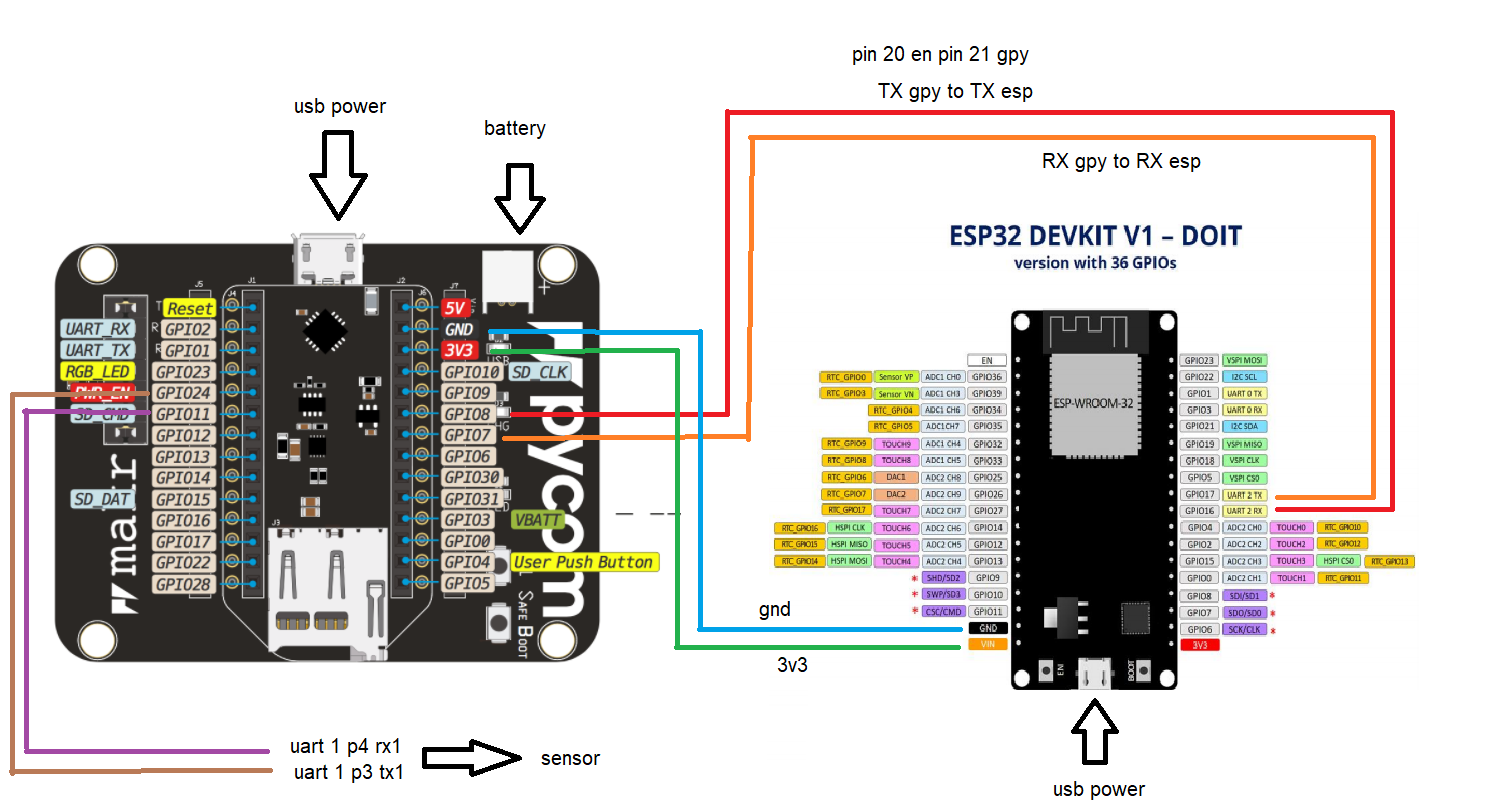
this is the code i am using from the gpy to the esp
he sends a "?" when the esp receives the "?" the esp sends the data to the gpyfrom machine import UART import time import pycom pycom.heartbeat(False) def read_esp(): uart = UART(1, baudrate=9600, pins=('P21','P20')) # voor esp strMsg = '' uart.write('?') time.sleep(2) if uart.any() > 0: strMsg = uart.read() print(strMsg) strMsg = str(strMsg, 'utf-8') print(strMsg) return strMsg else: strMsg = "noData" print(strMsg) return strMsg read_esp()This is the code from the esp
import machine uart = machine.UART(2, 9600, txbuf=512, rxbuf=512) strMsg = '' while True: if uart.any() > 0: strMsg = uart.read() print(strMsg) if '?' in strMsg: uart.write('033,3.3,+22,10,1,10') else: uart.write('error') -
@marcbeltman not sure if that’s related, but remember that UART1 is used to control the LTE modem on the GPy (and FiPy).
One thing you could try is connect RX to TX on either side to see if you still receive what you send (on both sides). This could help to isolate which side is the problem.
-
@jcaron did what you said see picture. The gpy now receives what it sends and it works on battery power.
strange!!!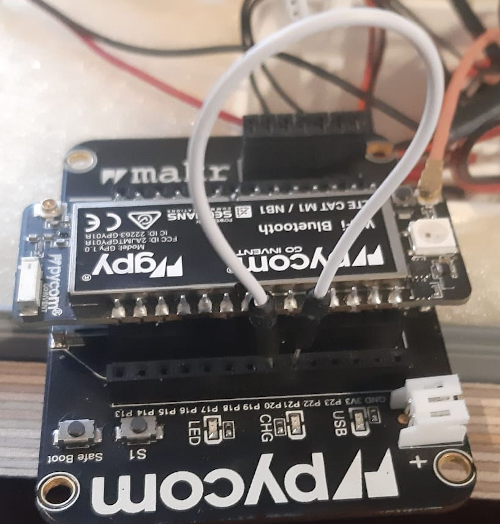
-
@jcaron on the gpy UART0 = P0 and P1 and UART1 = P3 and p4?
I am moving UART1 to pins P20 and P21
uart = UART(1, baudrate=9600, pins=('P21','P20'))
-
@marcbeltman you can set the UART pins as you like. The pins shown on the pinout diagrams are only the way they are connected to other peripherals: UART0 to the PIC on the expansion board which acts as the USB/serial converter, and UART1 to the LTE modem.
If you are using sleep modes and the like, the firmware may talk to the modem and reconfigure UART1 without you explicitly doing anything to it. Likewise with Pybytes.
-
SOLVED. thanks to jcaron. It was his response that led me to the solution.
The power to the ESP should not go to the vin but to 3v3. Than it works
Hello! It looks like you're interested in this conversation, but you don't have an account yet.
Getting fed up of having to scroll through the same posts each visit? When you register for an account, you'll always come back to exactly where you were before, and choose to be notified of new replies (either via email, or push notification). You'll also be able to save bookmarks and upvote posts to show your appreciation to other community members.
With your input, this post could be even better 💗
Register Login