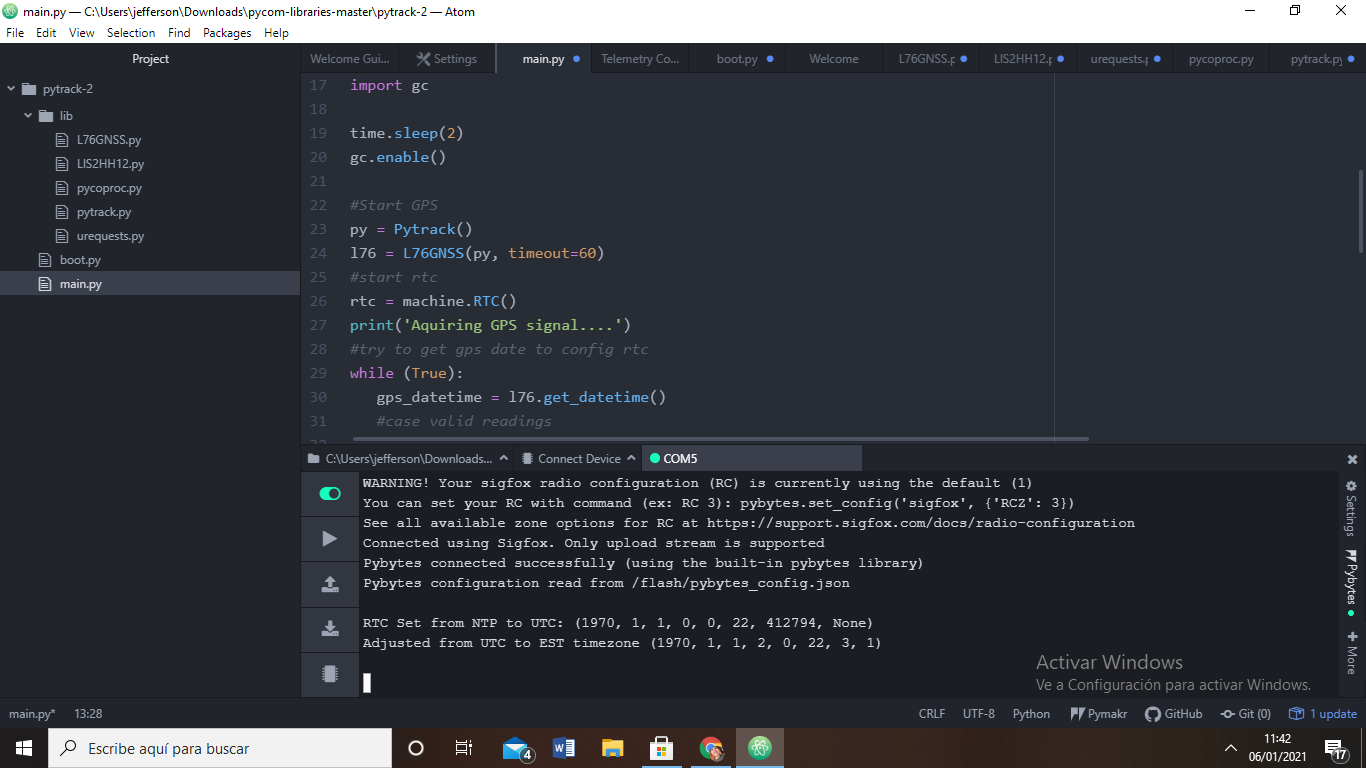
lopy4 +pytrack v1.1 does not show me coordinates , i have not idea why. the code stops in this part.
-
-
@jefferson-ayala please share your code (be sure to format is as code by clicking on the
</>icon on the toolbar). Also include the full log (as text, not an image).Also, are you outside with good visibility of the sky? A GPS receiver needs line-of-sight to multiple GPS satellites.
You may want to disable Pybytes if you don't use it, it can be quite confusing.
-
@jcaron hi , i share the code , i was download at github , please help me. the picture shared was outside of my house , do you know how i know if my zone o where a found a good visibility ? have you ever used the gps with the pytrack ?please .Help me ```
code_textInsert Code Here ```## Test code for read date/time from gps and update RTC import machine import math import network import os import time import utime from machine import RTC from machine import SD from machine import Timer from L76GNSS import L76GNSS from pytrack import Pytrack import struct # setup as a station import gc time.sleep(2) gc.enable() #Start GPS py = Pytrack() l76 = L76GNSS(py, timeout=30) #start rtc rtc = machine.RTC() print('Aquiring GPS signal....') #try to get gps date to config rtc while (True): gps_datetime = l76.get_datetime() #case valid readings if gps_datetime[3]: day = int(gps_datetime[4][0] + gps_datetime[4][1] ) month = int(gps_datetime[4][2] + gps_datetime[4][3] ) year = int('20' + gps_datetime[4][4] + gps_datetime[4][5] ) hour = int(gps_datetime[2][0] + gps_datetime[2][1] ) minute = int(gps_datetime[2][2] + gps_datetime[2][3] ) second = int(gps_datetime[2][4] + gps_datetime[2][5] ) print("Current location: {} {} ; Date: {}/{}/{} ; Time: {}:{}:{}".format(gps_datetime[0],gps_datetime[1], day, month, year, hour, minute, second)) rtc.init( (year, month, day, hour, minute, second, 0, 0)) break print('RTC Set from GPS to UTC:', rtc.now()) chrono = Timer.Chrono() chrono.start() #sd = SD() #os.mount(sd, '/sd') #f = open('/sd/gps-record.txt', 'w') while (True): print("RTC time : {}".format(rtc.now())) coord = l76.coordinates() #f.write("{} - {}\n".format(coord, rtc.now())) print("$GPGLL>> {} - Free Mem: {}".format(coord, gc.mem_free())) coord1 = l76.coordinates1() print("$GPGGA>> {} - Free Mem: {}".format(coord1, gc.mem_free())) coord2 = l76.get_datetime() print("$G_RMC>> {} - Free Mem: {}".format(coord2, gc.mem_free())) -
@jefferson-ayala I believe you have other code running on your LoPy, the output does not match tour source. Do you have something in boot.py maybe?
-
@jcaron hi , i have another part of the code . watch it
code_textfrom machine import UART from network import Sigfox import binascii import machine import os # initalise Sigfox for RCZ1 (Europe) (You may need a different RCZ Region) sigfox = Sigfox(mode=Sigfox.SIGFOX, rcz=Sigfox.RCZ4) # print Sigfox Device ID print("ID: ", binascii.hexlify(sigfox.id())) # print Sigfox PAC number print("PAC: ", binascii.hexlify(sigfox.pac())) uart = UART(0, baudrate=115200) os.dupterm(uart) machine.main('main.py') -
You set a timeout of 60 in the
main.py(which is differnet in the code you shared, where it is 30) on instantiating the GPS, meaning it will only print results every 60 seconds. Also, as @jcaron suggested, have you tried (and uploaded) the source from our examples on Github / in the documentation: https://docs.pycom.io/tutorials/expansionboards/pytrack2/ ? -
I am not on the latest version.
It seems that main.py is never called.
outcomment the last 3 lines of boot.py. You do not need to set the UART and main.py to the default values. Once this was problematic. Especially the UART redefinition.If main.py is called, you are waiting for at least one satellite to go on. This may never happens. Sadly there is no flush. You can either set to LED color or a sleep of 4sec after each print. So you can see better the last executed instruction .
Hello! It looks like you're interested in this conversation, but you don't have an account yet.
Getting fed up of having to scroll through the same posts each visit? When you register for an account, you'll always come back to exactly where you were before, and choose to be notified of new replies (either via email, or push notification). You'll also be able to save bookmarks and upvote posts to show your appreciation to other community members.
With your input, this post could be even better 💗
Register Login