my serialport not listed with pymakr vscode
-
Hi
I can´t see all my serialport when I run Pymak > Extra > list ports, just /dev/tty.Bluetooth-Incoming-PortMacOS 10.12.6
ls /dev/tty.*
/dev/tty.Bluetooth-Incoming-Port
/dev/tty.wchusbserialfa140
/dev/tty.Vega-WirelessiAPpymakr.json :
{
	"address": "/dev/tty.wchusbserialfa140",
	"username": "micro",
	"password": "python",
	"sync_folder": "",
	"open_on_start": true,
	"safe_boot_on_upload": false,
	"py_ignore": [
		"pymakr.conf",
		".vscode",
		".gitignore",
		".git",
		"project.pymakr",
		"env",
		"venv"
	],
	"fast_upload": false,
	"sync_file_types": "py,txt,log,json,xml,html,js,css,mpy",
	"ctrl_c_on_connect": false,
	"sync_all_file_types": false,
	"auto_connect": true,
	"autoconnect_comport_manufacturers": [
		"Pycom",
		"Pycom Ltd.",
		"Microsoft",
		"Microchip Technology, Inc.",
		"Apple Inc."
	]
}
pymakr.conf
{
    "address": "/dev/tty.wchusbserialfa140",
    "username": "micro",
    "password": "python",
    "sync_folder": "",
    "open_on_start": true,
    "safe_boot_on_upload": false,
    "py_ignore": [
        "pymakr.conf",
        ".vscode",
        ".gitignore",
        ".git",
        "project.pymakr",
        "env",
        "venv"
    ],
    "fast_upload": false
}
Also I hace test via rshell with success
rshell --port /dev/tty.wchusbserialfa140
Using buffer-size of 32
Connecting to /dev/tty.wchusbserialfa140 (buffer-size 32)...
Trying to connect to REPL  connected
Testing if ubinascii.unhexlify exists ... Y
Retrieving root directories ... /boot.py/
Setting time ... Jan 10, 2021 20:28:28
Evaluating board_name ... pyboard
Retrieving time epoch ... Jan 01, 2000
Welcome to rshell. Use Control-D (or the exit command) to exit rshell.
I've run out of ideas, any clue?
I will appreciate any help
Cheers -
Hi,
Im not sure what you mean exactly? Does the port show up inlsusbin the terminal and not in pymakr? Are you trying to use a third-party USB-Serial converter?
If using a third-party device, make sure you add it in the 'autoconnect comport manufacturers' settings list in pymakrGijs
-
@Gijs
I normaly work with Arduino and ESP8266, ESP32 board (with MacOS). I am trying to change to python ( micropython) and VSC ( my favorite IDE), then I found your plugin ( and Micropy-cli), it looks like good but I can´t run it, why? because pymakr doesn´t find any board.To use ESP8266 in arduino IDE I had installed a driver to connect to ch340g chip
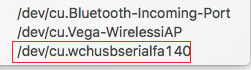
For a reason that I do not know pymakr plugin does not find this serial port. Also I have added this-party device to -> 'autoconnect comport manufacturers' settings list in pymakr -> wch.cn.
And this is the whole picture
Maybe I am totally wrong and pymakr only works with PyBoards, is not, how can I resolve this issue?
Thanks in advance
-
This post is deleted! -
My Mac OSX 12.1 with vsCode v1.63.2 also meet this problem... dev_board: ESP32_Lolin32
Hello! It looks like you're interested in this conversation, but you don't have an account yet.
Getting fed up of having to scroll through the same posts each visit? When you register for an account, you'll always come back to exactly where you were before, and choose to be notified of new replies (either via email, or push notification). You'll also be able to save bookmarks and upvote posts to show your appreciation to other community members.
With your input, this post could be even better 💗
Register Login