Pytrack Turning off the gps receiver.
-
I tired turning off the voltage to the gps by using the go_to_sleep(), gps_standby functions but they turn off the entire board. I have also tried this solution https://forum.pycom.io/topic/2043/turn-off-gps-while-pytrack-board-is-on but it also didn't work. Is it possible to turn off the gps without shutting down the board or they have the same VCC.
-
Concerning the pytrack 1 and 2: It is possible as the GPS is switched on a different VCC, but If i remember correctly, there is a backup-power connected as well through the 3.3v regulator on the Pytrack.
In the pycoproc 2, there are the following functions
        gps_standby(False)
        sensor_power(True)
which can be used to enable/disable power to the GPS
Gijs
-
from pytrack import Pytrack
py = Pytrack()
py.gps_standby(True)I tried it. It will shut off the pytrack as well. Let me know if you have any more I ideas I can try.
-
I remembered doing some research into this some time ago just after posting my last reply and indeed I could not get the function to work properly. From what I remember, using
pytrack.sensor_power(False)orpytrack.sd_power(False)would instead power down the GPS. If I'm correct, the issue is on the heap of 'pysense accelerator wakeup' issues and is being looked at.Gijs
-
@Gijs I tried the functions separately and together but it didn't work.
ReceivedMsg = ReceivedMsg.decode("utf-8")
    print(ReceivedMsg)

    if  ReceivedMsg == "test":
     print("GPS OFF")


     Pytrack().sensor_power(enabled=False)
     Pytrack().sd_power(enabled=False)
OUTPUT
Sending data: {"lon_d": **.37385, "lat_d": **.36488, "battery": 4.641541, "temperature": 0, "humidity": 0}
CoAP POST message ID: 65223
ID: 64967
Code: 69
Type: 2
Token: b''
ReceivedMsg: b'test'
b'test'
test
GPS OFF
CoAP GET message ID: 65479
Sending data: {"lon_d": **.37385, "lat_d": **.36488, "battery": 4.651577, "temperature": 0, "humidity": 0} -
Could you verify for me, do you have the Pytrack v1 or pytrack v2?
I was mistaken before. The Pytrack 1 does not support cutting power to the GPS, as it is connected to the power supplied by the development module. Instead, it is possible to switch off the backup power supply (which is connected to pin RC7 on the PIC, as mentioned in the other post, Im not exactly sure how that disables everything, but I guess its internal in the GPS)
On the Pytrack 2, the power rail is switched by RC7 on the PIC, which is toggled by
sensor_power(...), notgps_standby(...), though, you need to use the latter to activate the standby mode. -
@Gijs The current board I have is the pytrack v1. Just to make sure I understood correctly I should upgrade to pytrack v2 to be able to disable the gps receiver without turning the board off. Also the last part if I have v2 Should I use the sensor_power function or the standby function to turn it off.
-
@AM I just made a little test: You can indeed use the pytrack.write() method.
from L76GNSS import L76GNSS
from pytrack import Pytrack
py = Pytrack()
l76 = L76GNSS(py, timeout=30)
l76.write("PMTK161,0")
At that point the l76 module will switch off, reducing the power consumption by ~20mA, but also cuts the I2C. Next step: tell how to revive the module. The only way I found until now is power cycling. It may be possible to reset the chip, but there is nothing documented.
-
@robert-hh Resetting the L76 with a low pulse at Pin 9 of the package starts it again. Unfortunately, this pin seems not connected to the PIC. So is is not possible to force the wakeup by software. Since Pin 9 is at an edge, you can think about a hardware solution, wiring Pin 9 of the L76 to an output Pin of the xxPy module. The you can create a low pulse by your script. Soldering that wire is not too complicated with a fine tip.
P.S.: It's a pity that Pycom does not publish schematics. That would make life easier for users. People who want to create clones should have not difficulties of reverse engineer the boards. So again, like in most similar cases, it's the 'good' ladies and gents who suffer.
-
@robert-hh Thanks a lot for your help. I tried your idea, got I2C error. I will try to make it wok if not will go for the Pytrack v2 and use it with the standby function.
CoAP GET message ID: 6088
Caugh exception: I2C bus error
Caugh exception: I2C bus error
Caugh exception: I2C bus error
Caugh exception: I2C bus error -
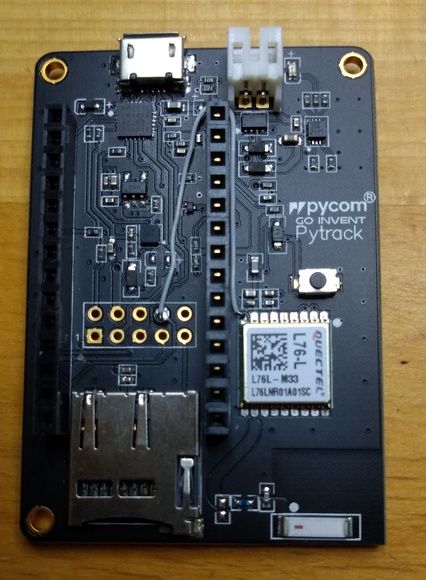
@AM Yes, that's what I have seen too. When the L76 module is sent to standby mode, it will not respond to I2C any more. To revive it, you have either to do a power cycle or reset the L76 module itself. I did the wiring between the reset pin of the L76 module and P11 of a LoPy4 module, and indeed resetting works. The L76 responds again to I2C messages and gets a fix.
The picture below show the wire, which runs to Pin 8 of the connector, which in turn is connected to P11.
-
@robert-hh I was not aware of this, thanks! If you dont mind, Ill put it in the documentation
-
@Gijs Sure
-
@robert-hh Thanks for the input will give it a try. When you have test it how long did it take to regain the full functionality?.
-
@Gijs @robert-hh I got the Pytrck 2.0 . I test with the standby, sensor_power Functions. also with
  def gps_state(self, gps=True):
        # enable or disable back-up power to the GPS receiver
        if gps:
            self.set_bits_in_memory(PORTC_ADDR, 1 << 7)
        else:
            self.mask_bits_in_memory(PORTC_ADDR, ~(1 << 7))
It disable and then automatically restart the receiver.
Sending data: {"lon_d": xxxxx, "lat_d": xxxxx, "battery": 4.766989, "temperature": 0, "humidity": 0}
CoAP POST message ID: 27515
ID: 26235
Code: 69
Type: 2
Token: b''
ReceivedMsg: b'test'
b'test'
test
GPS OFF
CoAP GET message ID: 27771
Caugh exception: I2C bus error
Sending data: {"lon_d": null, "lat_d": null, "battery": 4.756954, "temperature": 0, "humidity": 0}
CoAP POST message ID: 28027
CoAP GET message ID: 28283
Sending data: {"lon_d": 10.37374, "lat_d": xxxx, "battery": xxxxx, "temperature": 0, "humidity": 0}
CoAP POST message ID: 28539
Is there a way to disable it and it stays disabled until I enable it again.

Hello! It looks like you're interested in this conversation, but you don't have an account yet.
Getting fed up of having to scroll through the same posts each visit? When you register for an account, you'll always come back to exactly where you were before, and choose to be notified of new replies (either via email, or push notification). You'll also be able to save bookmarks and upvote posts to show your appreciation to other community members.
With your input, this post could be even better 💗
Register Login