No serial-over-USB connection to expansion board
-
I am unable to communicate with my new Wipy + expansion board over USB. I am able to connect to its wifi network successfully. I have verified that the 4 UART lines of code are in boot.py, and I have also checked that the jumpers are all installed (presumably forwarding a UART terminal to an FTDI chip on the expansion board). Pycom has not published a schematic of the expansion board so I can't tell what FTDI chip is being used, but I have also installed the latest VCP drivers, rebooted, played around with kextunload/kextload and still I cannot see the device in /dev/tty*<usb?>
I have tried multiple USB cables, multiple computers with two different OSX operating systems (El Cap and Sierra), and none of them show a serial connection over usb. I think someone needs to post instructions for Macs to connect over USB since it is not going very smoothly.
-
@paul12345 Hi Paul, could you post a picture of your WiPy + expansion board in the setup that you are using? It might give us an idea as to what the problem is!
-
Thanks for the response. I bought the following WiPy and expansion board from Adafruit:
https://www.adafruit.com/products/3338
https://www.adafruit.com/products/3344As explained above, I am able to connect wirelessly but not wired over USB. I tried two recent OSX MacBooks and neither show any /dev/tty.USB entry as far as I can tell.
-
@paul12345 instead of /dev/tty.USB try typing -
ls /dev/cu.*This should list your serial usb devices on Mac. You can then connect to it using;
screen *YOUR_SERIAL_USB_DEVICE* 115200Let me know how you get on with this!
-
I believe I tried that as well and didn't see any entries named as such, but I will try again tonight and report back.
-
@paul12345 Have a look at the headers on the expansion board, sometimes they fall off in transit and will mean your WiPy can't transmit/receive over USB Serial.
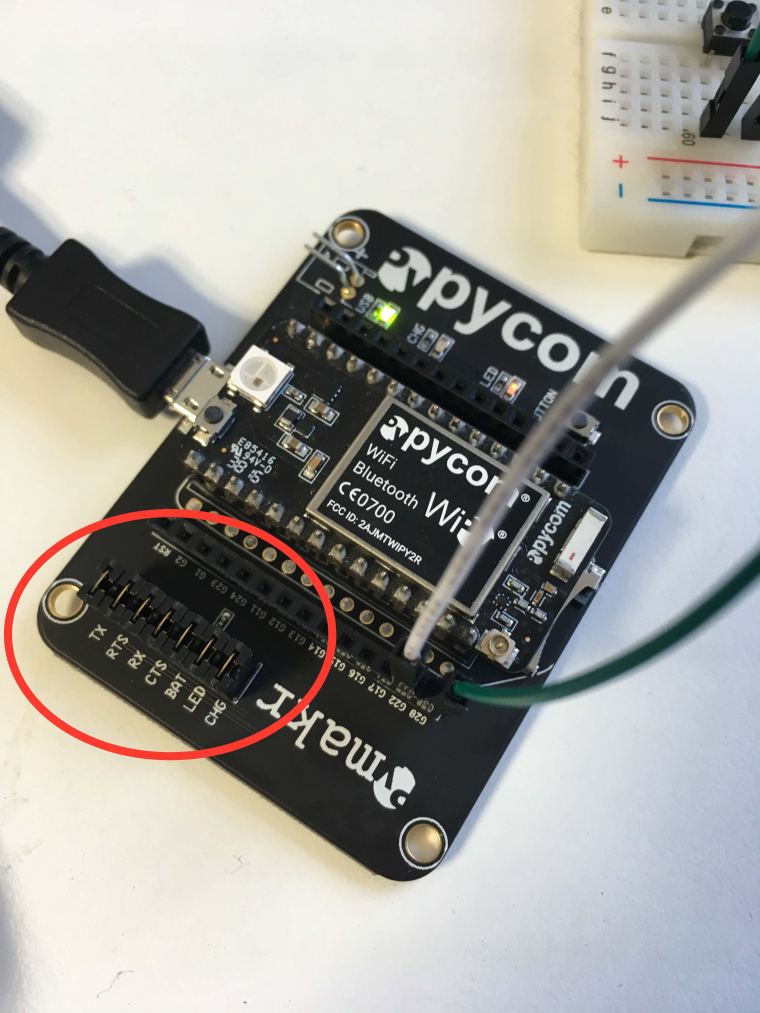
You'll want to make sure the TX and RX headers are there!
-
@paul12345 Try ls /dev/tty.*
-
Thanks everyone for the help. Yes, I already had the jumpers installed. I found that it was just (both!) micro USB cables that I was using previously: I think both were from charging-only electronics and were not complete USB cables. Trying a third cable, I now see the board mount and can start up the terminal using at least one of the two mount targets:
ls /dev/*usb*
/dev/cu.usbserial-<serialnumber> /dev/tty.usbserial-<serialnumber> -
@paul12345 Brilliant! I'm glad you're up and running with your WiPy now :)
-
got similar error, my expansion board doesnt show as recognized
Hello! It looks like you're interested in this conversation, but you don't have an account yet.
Getting fed up of having to scroll through the same posts each visit? When you register for an account, you'll always come back to exactly where you were before, and choose to be notified of new replies (either via email, or push notification). You'll also be able to save bookmarks and upvote posts to show your appreciation to other community members.
With your input, this post could be even better 💗
Register Login