Lopy and Node-Red communication
-
Hi,
I’ve got a Lopy with Pytrack extension board and have been playing around with GPS coordinates.
Now I’d like to connect to Node-Red, which I installed on my PC (Windows 10). What is the easiest way to send data between Lopy and Node-Red for testing purposes?
I’ve tried this via the serial port but did not succeed. I’ve to admit I’m bit of a beginner at this and hoping that someone can point me in the right direction.
I installed the serial nodes in Node-Red and set this to COM3 (9600 baud rate). This shows the Lopy as connected.
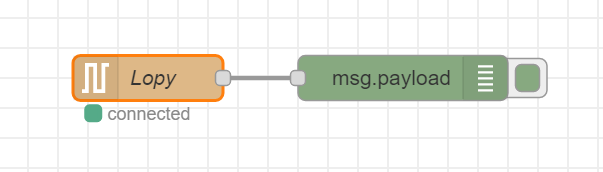
Then I created a simple loop to print every 5 seconds from the Lopy. I can see this in the REPL console but not in the debug window in Node-Red. I figured instead of print, I should use uart.write and added the following bits to my code:
from machine import UART

uart = UART(0, 9600)

while True:
    time.sleep(5)
    uart.write("Test")
However still no output in Node-Red. Also tried 115200 baud rate and UART1.
Where am I going wrong? Or is there perhaps a better way to communicate between Lopy and Node-Red, other than the serial port?
Also a little sub-question: how can I send l76.coordinates of the Lopy to Node-Red? I know uart.write expects bytes object or string, not tuple. Is there an easy way to convert or an alternative to uart.write that works with tuple?
Many thanks in advance!
-
Hi
Maybe using MQTT on Lopy to send messages into Node-Red (via a MQTT broker) may be a way to do it?
-
Thanks @Matthew-Felgate-0, that's a good suggestion. Will give MQTT a try.
Still curious though where I went wrong on the serial port. If someone sees an obvious error, please let me know.
-
Hi @newkit
I have got node-red Serial node working. In Node Red I have
/dev/tty.usbmodemPy91b3c81. Your board will have a similar name. note: make sure there is no empty space at the end of the name and baud rate set to115200.Node Red debug output:
04/03/2021, 15:08:12node: 7cae131c.d729ec
msg.payload : string[6]
"hello↵"
04/03/2021, 15:08:12node: 7cae131c.d729ec
msg.payload : string[13]
"print hello↵"
04/03/2021, 15:08:12node: 7cae131c.d729ec
msg.payload : string[2]
"↵"
I think your serial connection in terminal or Visual Studio will need to be closed else you won't get the data into Node-Red. (I think serial data can only be read at one place at a time)
Here is my code for reference:
from machine import UART import os uart = UART(0, 115200) os.dupterm(uart)import time print('Hello World!') while True: uart.write('hello\n') print('print hello\n') time.sleep(5) print('The End.')Let me know if that works for you?
-
Brilliant @Matthew-Felgate-0 the example is working for me and I was able to integrate this into my project. Thanks!
But now you also got me interested in MQTT :)
I followed some of the examples from here and here.
However I always run into the same error leading back to the mqtt library:
Traceback (most recent call last):
  File "main.py", line 19, in <module>
  File "/flash/lib/mqtt.py", line 65, in connect
OSError: Network card not available
This is line 65 in the connect function:
self.sock = socket.socket()I tried various MQTT brokers, e.g. HiveMQ ,test.mosquitto.org, as well running mosquito locally.
But I just can’t get past the above error.
Any idea?
Hello! It looks like you're interested in this conversation, but you don't have an account yet.
Getting fed up of having to scroll through the same posts each visit? When you register for an account, you'll always come back to exactly where you were before, and choose to be notified of new replies (either via email, or push notification). You'll also be able to save bookmarks and upvote posts to show your appreciation to other community members.
With your input, this post could be even better 💗
Register Login