Error starting modem connection
-
I am trying to connect to vodafone network using the example found in "Tutorials & Examples > Networks > LTE"
I have connected the gpy module to the pc as shown in "Getting Started > Getting Started Programming the modules > USB Serial"
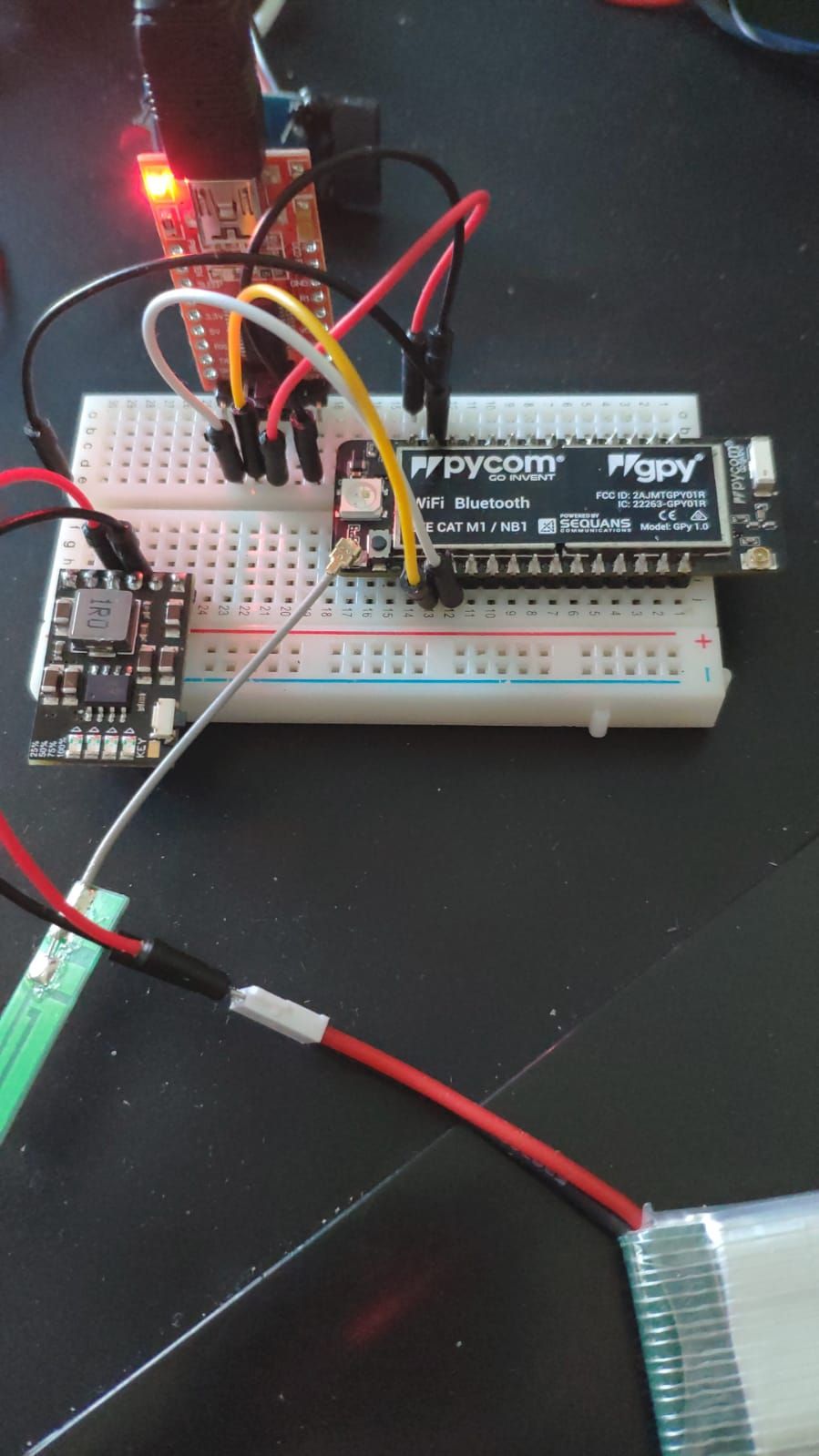
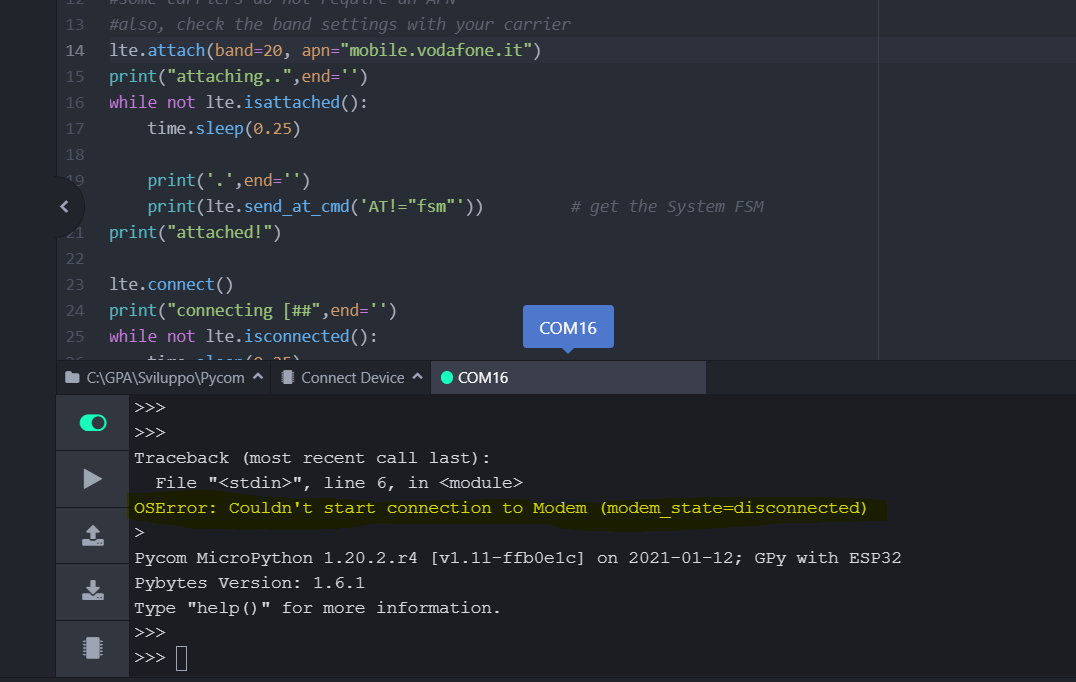
When I try to run the example code, I get the following error: "OSError: Couldn't start connection to Modem (modem_state=disconnected)"
After many retries, sometimes, the example starts without errors but goes in an infinite loop:
+SYSSTART
.
SYSTEM FSM+--------------------------+--------------------+ | FSM | STATE | +--------------------------+--------------------+ | RRC TOP FSM |STOPPED | | RRC SEARCH FSM |NULL | | RRC ACTIVE FSM |NULL | | PMM PLMN FSM |NULL | | EMM MAIN FSM |NULL | | EMM AUTH FSM |NULL | | EMM CONN FSM |NULL | | EMM TAU FSM |NULL | | EMM TEST FSM |NULL | | ESM BEARER FSM |BEARER_NULL | | SMS MT FSM |IDLE | | SMS MO FSM |IDLE | | HP MAIN FSM |IDLE | | HP USIM FSM |NULL | | HP SMS MO FSM |IDLE | | HP SMS MT FSM |IDLE | | HP CAT FSM |NULL | +--------------------------+--------------------+OK
.
+SYSSTART.
SYSTEM FSM+--------------------------+--------------------+ | FSM | STATE | +--------------------------+--------------------+Thanks for any help.
-
Hi,
Could you let me know of the output withlte =LTE(debug=True), that way, we can verify the AT commands. Also be sure to verify the power supply capabilities, as the LTE modem might consume more current than expected
Could you also let me know of the following output:import sqnsupgrade sqnsupgrade.info(debug=True)This will return a coredump at the end, please do not copy that over, but only the text at the top.
Let me know,
Gijs -
@Gijs said in Error starting modem connection:
sqnsupgrade.info(debug=True)
I have the same issue.
Connecting to /dev/ttyACM0... WMAC: 840D8E116C98 Firmware: 1.20.2.r4 Pybytes: 1.6.1 Initialized watchdog for WiFi and LTE connection with timeout 1260000 ms WiFi connection established Connected to MQTT mqtt.pybytes.pycom.io Pybytes connected successfully (using the built-in pybytes library) Pybytes configuration read from /flash/pybytes_config.json Pycom MicroPython 1.20.2.r4 [v1.11-ffb0e1c] on 2021-01-12; GPy with ESP32 Pybytes Version: 1.6.1 Type "help()" for more information. >>> >>> from network import LTE >>> lte = LTE() Traceback (most recent call last): File "<stdin>", line 1, in <module> OSError: Couldn't start connection to Modem (modem_state=disconnected) >>> import sqnsupgrade >>> sqnsupgrade.info(debug=True) <<< Welcome to the SQN3330 firmware updater [1.2.6] >>> >>> GPy with firmware version 1.20.2.r4 The current delay is 1000 Response (+++ #1): None Response (AT #1) None Response (AT #3) None Response (AT #4) None Response (AT #1 @ 115200) None Response (AT #2 @ 115200) None The current delay is 2000 Response (+++ #1): None Response (AT #1) None Response (AT #3) None Response (AT #4) None Response (AT #1 @ 115200) None Response (AT #2 @ 115200) None The current delay is 3000 Response (+++ #1): None Response (AT #1) None Response (AT #3) None Response (AT #4) None Response (AT #1 @ 115200) None Response (AT #2 @ 115200) None The current delay is 4000 Response (+++ #1): None Response (AT #1) None Response (AT #3) None Response (AT #4) None Response (AT #1 @ 115200) None Response (AT #2 @ 115200) None The current delay is 5000 Response (+++ #1): None Response (AT #1) None Response (AT #3) None Response (AT #4) None Response (AT #1 @ 115200) None Response (AT #2 @ 115200) None Modem state: None Cannot determine modem state! -
@Jeroen-Trappers Sorry for my late reply.
Could you try to power cycle the modem and see if that results in any progress?
If not, can you update the modem over UART using the instructions here: https://docs.pycom.io/updatefirmware/ltemodem/Let me know!
Hello! It looks like you're interested in this conversation, but you don't have an account yet.
Getting fed up of having to scroll through the same posts each visit? When you register for an account, you'll always come back to exactly where you were before, and choose to be notified of new replies (either via email, or push notification). You'll also be able to save bookmarks and upvote posts to show your appreciation to other community members.
With your input, this post could be even better 💗
Register Login