ImportError: no module named 'pytrack'
-
Hi. I'm using WiPy 3.0 with Pytrack. Here are the list of things I did before running the program:
- Manually update firmware for Pytrack and update firmware for WiPy using the firmware update tool.
- Uploaded the files and verified that the files are available using an FTP client (files from https://github.com/pycom/pycom-libraries) - Used os.fsformat('/flash') to delete all the files and reuploaded multiple times.
- Tried the files in both shields/pytrack_1.py and examples/pytrack_pysense_acclerometer/main.py.
I'm not sure if I have missed anything here but the library files are not found by the application file. Any help is appreciated regarding this issue.
Thanks a lot in advance.
-
@NITIN-Shivaraman
please show structure of your files and folders tree
I ask, as import look for libraries in default locations like:
'/flash','/flash/lib' -
The file in 'shields/pytrack_1.py' should not require a module named 'Pytrack'. Though you should upload some of the files in 'shields/lib/...' as well (Im not sure of the other file, you'll have to check). You can check here: https://github.com/pycom/pycom-libraries/releases for the example with all the needed files. And indeed, check if you're uploading into the
/flashand/flash/libfolders -
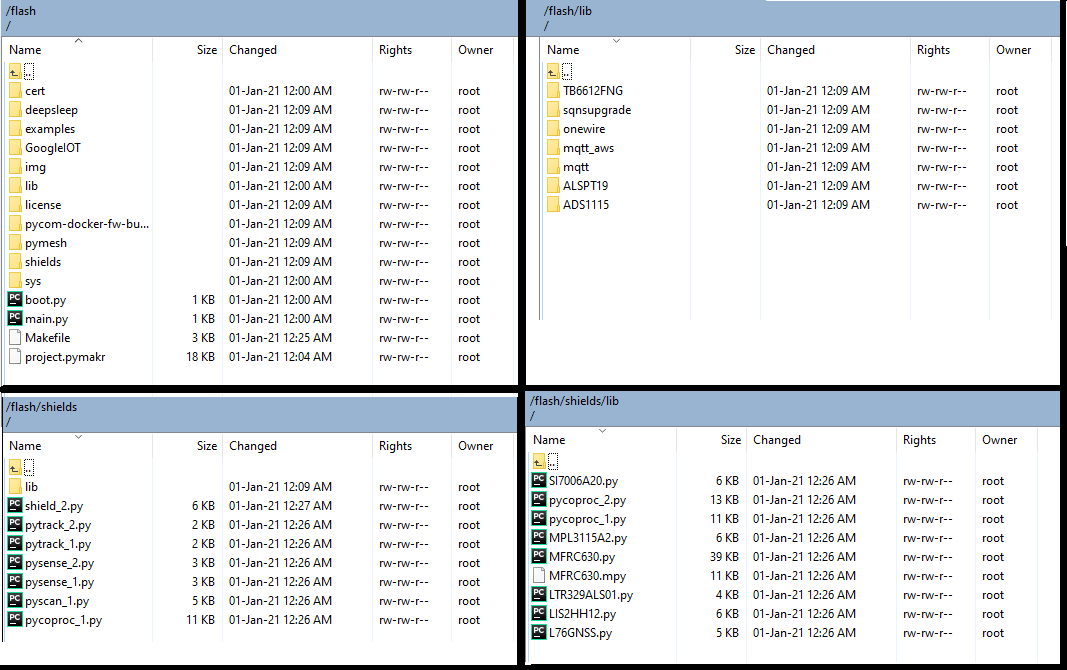
Thank you very much for the response. @livius I have attached the folder and files structure at the time of posting regarding the issue (the issue still exists with this structure).
@Gijs The files in the release directory works! Thanks a ton!
However, for better understanding, please advise on why the folder structure followed as per the https://github.com/pycom/pycom-libraries does not work. The application files (pytrack_1.py) are in the outer directory (shields) while the dependencies are placed in the lib folder rightfully. I even tried placing the files in the /flash/lib folder but ended up with the same error. Are the files expected in a different location?
Thanks again for the support. It has been a great help!
-
@NITIN-Shivaraman
if you have files which require import you must add it to search path as only/flash,/flash/libare initially in the path
e.g.import sys sys.path.append('/flash/shields')and all other folders
sometimes easier life is to have all in max 2 folders as flat ;-)
Hello! It looks like you're interested in this conversation, but you don't have an account yet.
Getting fed up of having to scroll through the same posts each visit? When you register for an account, you'll always come back to exactly where you were before, and choose to be notified of new replies (either via email, or push notification). You'll also be able to save bookmarks and upvote posts to show your appreciation to other community members.
With your input, this post could be even better 💗
Register Login