Welcome to the Pycom forum Forum
    • \[\[global:header.categories\]\]
    • \[\[global:header.recent\]\]
    • \[\[global:header.tags\]\]
    • \[\[global:header.popular\]\]
    • Login

    Explore Pybytes | Official Documentation | Report a Firmware Bug/Issue | GitHub

    How does socket.recv(bufsize) work?

    Scheduled Pinned Locked Moved SiPy
    sigfoxsipy
    10 Posts 2 Posters 3.4k Views 2 Watching
    Loading More Posts
    • Oldest to Newest
    • Newest to Oldest
    • Most Votes
    Reply
    • Reply as topic
    Log in to reply
    This topic has been deleted. Only users with topic management privileges can see it.
    • P Offline
      Paolo Prado
      last edited by

      Hello,

      I am trying to send data from the sigfox backend but I don't know how to receive them in the sipy.

      Someone could help me?

      B 1 Reply Last reply Reply Quote 0
      • B Offline
        bucknall
        last edited by

        Hi @Paolo-Prado if you want to receive a message from the Sigfox Backend, you'll need to use the following block of code -

        from network import Sigfox
        import socket
        
        sigfox = Sigfox(mode=Sigfox.SIGFOX, rcz=Sigfox.RCZ1)
        
        s = socket.socket(socket.AF_SIGFOX, socket.SOCK_RAW)
        
        s.setblocking(True)
        
        s.setsockopt(socket.SOL_SIGFOX, socket.SO_RX, True)
        
        s.send("hello")
        
        s.recv(32)
        

        The important thing to remember about Sigfox is that you must first send an uplink message to Sigfox which will trigger the downlink message.

        This line of code sets the downlink request -

        s.setsockopt(socket.SOL_SIGFOX, socket.SO_RX, True)
        

        Hope this helps!

        Developer Evangelist - Pycom

        1 Reply Last reply Reply Quote 1
        • P Offline
          Paolo Prado
          last edited by

          Hi @bucknall,

          I working whit the code that you showed.

          from network import Sigfox
          import socket
          sigfox = Sigfox(mode=Sigfox.SIGFOX, rcz=Sigfox.RCZ1)
          s = socket.socket(socket.AF_SIGFOX, socket.SOCK_RAW)
          s.setblocking(True)
          s.setsockopt(socket.SOL_SIGFOX, socket.SO_RX, True)
          s.send("hello")
          s.recv(32)

          But I have not yet been able to receive the data. In the backedn Sigfox the callback for the downlink is Status: OK

          Regards.

          B 1 Reply Last reply Reply Quote 0
          • B Offline
            bucknall @Paolo Prado
            last edited by

            @Paolo-Prado you need to go into the Sigfox Backend and specify what you want to be sent to your device via Downlink message. Go to:

            • Device Type
              • Information -> edit (the button is in the top right corner)
              • You should see a section called 'Downlink' which specifies what Sigfox will send back to the device when you request a downlink message.

            Let me know if this works!

            Developer Evangelist - Pycom

            P 1 Reply Last reply Reply Quote 0
            • P Offline
              Paolo Prado @bucknall
              last edited by

              @bucknall Do you mean this?

              0_1487864167922_Sin título.png

              1 Reply Last reply Reply Quote 0
              • B Offline
                bucknall @Paolo Prado
                last edited by

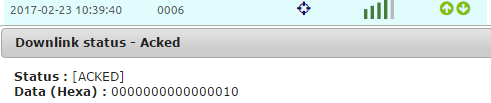
                @Paolo-Prado yes exactly! Can you show me the message when the Sigfox Backend returns the Status:OK message?

                Developer Evangelist - Pycom

                P 1 Reply Last reply Reply Quote 1
                • P Offline
                  Paolo Prado @bucknall
                  last edited by

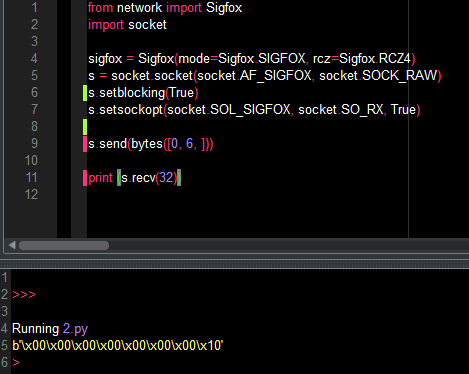
                  @bucknall Well it's working

                  0_1487864489636_upload-b35a7580-7574-416f-9bc2-39487bafbbe4

                  Pymark section

                  0_1487864543639_upload-19e04217-8bc5-4fcf-8905-0e08b68019e6

                  Just one more question. I did with a "DIRECT" downlink data mode, can i do with "CALLBACK" mode?

                  B 1 Reply Last reply Reply Quote 0
                  • B Offline
                    bucknall @Paolo Prado
                    last edited by

                    @Paolo-Prado Brilliant! Yes you can! :) when you specify a callback, you can set it as a "DOWNLINK" type - the Sigfox Backend will make a GET Request at your specified address and you can use this request to send a payload from your server down to your Sigfox Device.

                    Developer Evangelist - Pycom

                    P 1 Reply Last reply Reply Quote 0
                    • P Offline
                      Paolo Prado @bucknall
                      last edited by

                      @bucknall I have just two options: "UPLINK" and "BIDIR"
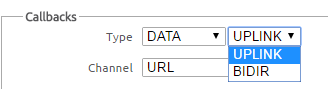
                      0_1487866635838_upload-3eca82b9-88ee-45ef-8065-77125f76e36e

                      I have worked with the "BIDIR" type, but I still can't send anything

                      B 1 Reply Last reply Reply Quote 0
                      • B Offline
                        bucknall @Paolo Prado
                        last edited by

                        @Paolo-Prado Sorry - you're right the downlink is confusingly called "BIDIR" - Have a look at this link for an example of how to get a payload from a server using the downlink

                        https://github.com/nicolsc/sigfox-downlink

                        Developer Evangelist - Pycom

                        1 Reply Last reply Reply Quote 0

                        Hello! It looks like you're interested in this conversation, but you don't have an account yet.

                        Getting fed up of having to scroll through the same posts each visit? When you register for an account, you'll always come back to exactly where you were before, and choose to be notified of new replies (either via email, or push notification). You'll also be able to save bookmarks and upvote posts to show your appreciation to other community members.

                        With your input, this post could be even better 💗

                        Register Login
                        • 1 / 1
                        • First post
                          Last post

                        Pycom on Twitter

                        Pycom