Pysense 2.0x sensor header
-
Hi there,
The goal:
I'm new in IoT world and since I can Python I purchased a FiPy and PySense 2.0x to make my first project. I can read values from embbeded sensors (temperature, pressure, ...) from Pysense expansion board and publish MQTT over WiFi. So far, so good. Now I want to add a sensor (Hydrogen Sulphide H2S) to this board and I noticed on the datasheet a PyPort (or sensor header) which could be used to add further sensors.The challenge:
The problem is that I have no knowledge about compatibility with PyCom hardware. I'm from industrial world where we talk about 24Vdc and 4.20mA analog signal. In the IoT world, it seems a bit different (at least for this connector) with 6 PINS in total: 3v3, GND, SCL, SDA, P9, P15
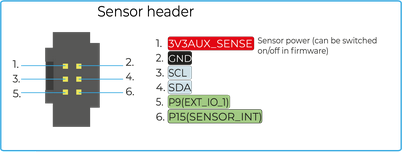
The different points I'm struggling with:-
The right sensor to choose
-
The cabling (from sensor to PyPort)
-
The code
My findings:
-
Sensor: I tried to Google (H2S sensor I2C) and found that:
https://euro-gasman.com/product/4-8v-digital-i2cbus-transmitter/
Is this compatible with Pysense board and can it directly be connected to sensor header port? -
The cabling: refering to Gasman datasheet:
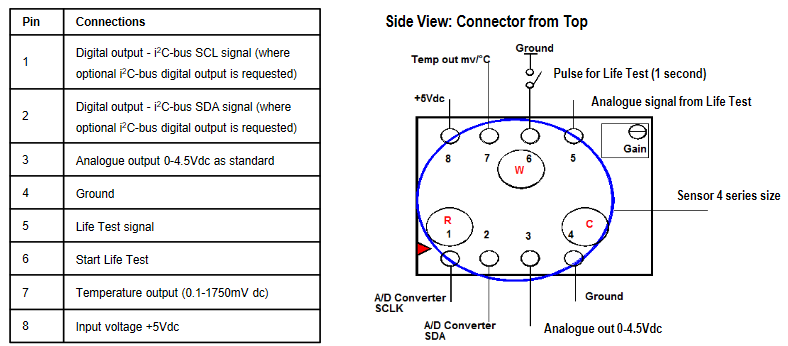
I guess I have to connect like this:
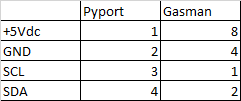
-
The code: I think the I2C tutorial on Pycom website should be the right one; but it seems that you have to code you own driver? ref. drivers for the BH1750FVI in the example. I have no clue how to adapt it to new sensors'stypes.
Some help for the 3 points would be appreciated :)
-
-
Hi,
To answer your questions:- I believe the H2S sensor you linked in should be applicable in with the Pysense over the I2C lines and powered by 3.3V. As you mention, there is indeed a difference between the industrial sensors and this type.
- For the cable, you might have to do some searching. In another forum post I linked in these: (From less reputable sources)
https://nl.aliexpress.com/item/32967146013.html
https://nl.aliexpress.com/item/33010603906.html
The connector and cable are both different from the regular ribbon cable you'd see. The Connector series (Minitek127) by amphenol is not widely available through component resellers unfortunately. - Concerning the code, you could look at our other sensor libraries ( https://github.com/pycom/pycom-libraries/tree/master/shields/lib) for inspiration. Compare the datasheet to what you want to achieve and you'll come a long way
Best,
Gijs -
@Gijs : I finally received my H2S sensor but I'm already confused with pin numbers the sensor header should refer to in the firmware. Would it be pysense.i2c or P22 and P21? (ref. example below taken from SI7006A20.py):
def __init__(self, pysense = None, sda = 'P22', scl = 'P21'):
        if pysense is not None:
            self.i2c = pysense.i2c
        else:
            self.i2c = I2C(0, mode=I2C.MASTER, pins=(sda, scl)
Hello! It looks like you're interested in this conversation, but you don't have an account yet.
Getting fed up of having to scroll through the same posts each visit? When you register for an account, you'll always come back to exactly where you were before, and choose to be notified of new replies (either via email, or push notification). You'll also be able to save bookmarks and upvote posts to show your appreciation to other community members.
With your input, this post could be even better 💗
Register Login