FTP doesn't properly work, while code is running
-
Dear Pycom-community,
I've managed to connect to my GPy via Filezilla to get access to the SD-card folder, when the GPy is plugged into my expansion board.
When my code is running on my GPy, it takes actually ages till a FTP-connection happens. When it happens though, while the code is running, I get an issue with the folders. They show a question mark and it's not possible to show the insides of that folder.
The GPy is checking the serial port for measurement strings all time, which get send by another MCU. A string arrives every 10 seconds at the moment. It feels like, the GPy is too occupied with that task reading the serial port continously, that there is no room for making a proper FTP connection happen. As soon, as I stop the code execution, the connection happens way smoother and faster.
The firmware-version is:
(sysname='GPy', nodename='GPy', release='1.20.2.r3', version='v1.11-d945d33ee on 2020-03-08', machine='GPy with ESP32', pybytes='1.3.1')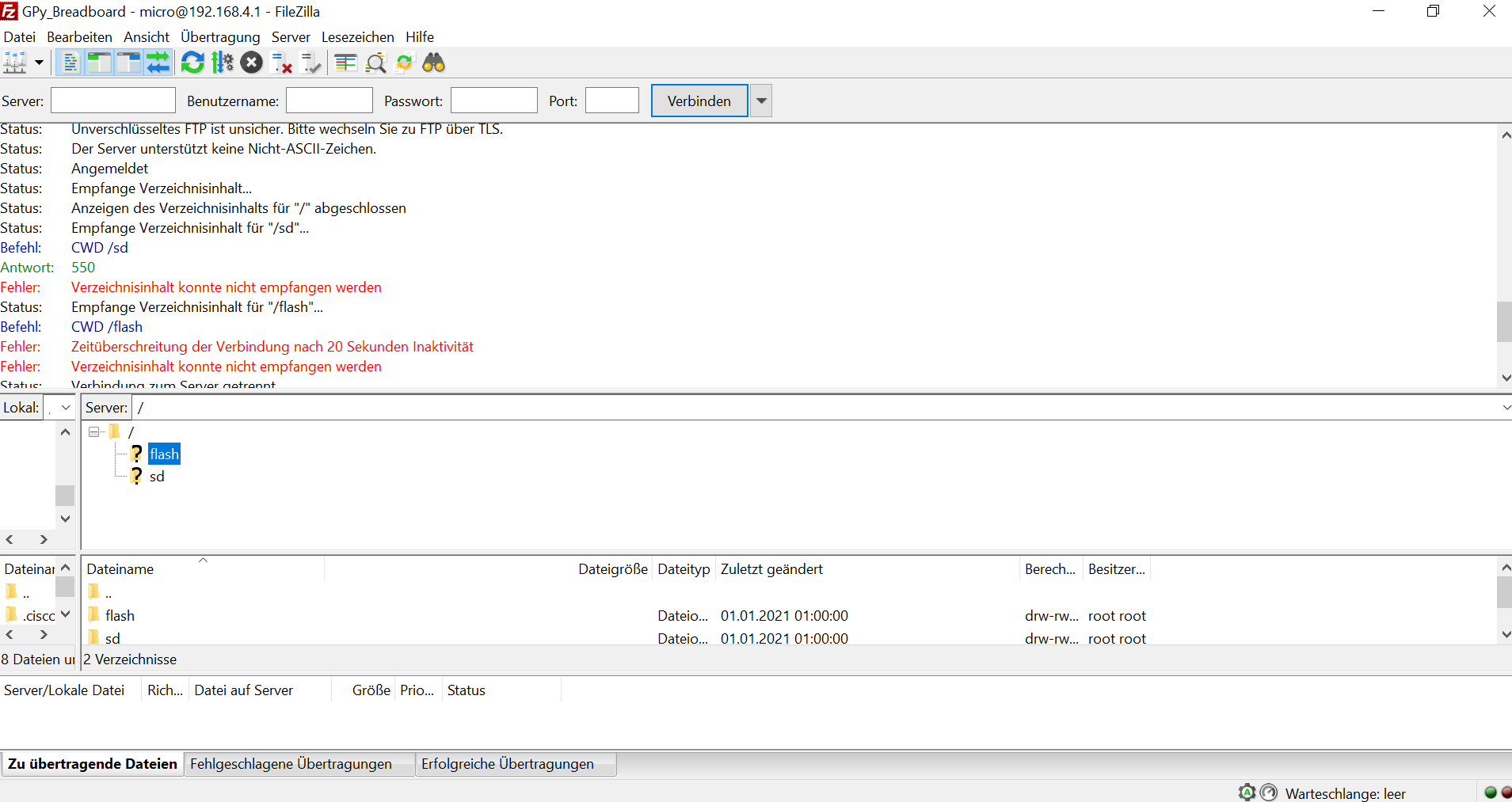
The code follows in the next section:
-
The code:
import os
import pycom
import machine
from machine import SD

sd = SD()
os.mount(sd, '/sd')

# check the content
# os.listdir('/sd')

os.dupterm(uart)

uart1 = UART(1, baudrate=9600, timeout_chars=10000, pins=('P9', 'P10'))

def serialrecv(uartport):
    #read the length of the data, letter by letter until we reach EOL
    dataString = ""
    char = uart1.read(1)
    if char is not None:
        print("")
        print("Reading string from Serial:")
        while char is not None:
            dataString += char.decode("utf-8")
            char = uart1.read(1)
    return dataString


while True:
    dataRec = serialrecv(uart1) # collect single bytes
    if dataRec is not None:
        if dataRec.startswith('{') and dataRec.endswith('}\r\n'):
            print(dataRec)
            data = dataRec
            data1 = data.replace("{", "")
            data2 = data1.split(";")
           # Creating a new file every day to append to (YearMonthDay_testID.txt)
            f = open("/sd/" + data2[1] + data2[2] + data2[3] +"_test" + data2[0] + ".txt", 'a')
            f.write(dataRec + "\r\n")
            f.close()
Is my code too busy? I guess, but I found this post from robert-hh, who said he also uses a relatively busy loop and he had no issues: https://forum.pycom.io/topic/4204/ftp-fails-on-larger-files?_=1625066170371
I receive around 200 characters every 10 seconds on the serial port at the moment and as I said, the port always gets checked.
Edit:
Another idea I came up with right now is getting rid of the
while True:I thought about pulling a Pin High on the GPy through the other MCU (when a data package is ready for transmission to the GPy), that sets a flag to True, which only then makes the GPy listen to the Serial port. I think that would possibly be the the easiest way to reduce the business of the GPy.
-
@SciWax Just add a short sleep time into the
while Trueloop. utime.sleep_ms(1) or utime.sleep_ms(10) should be OK. You will not loose any characters on the serial link, since that uses buffering. -
@robert-hh said in FTP doesn't properly work, while code is running:
utime
I can't believe, that the solution was so easy. :)
Thanks for giving me a headache less, rob! It worked.

Hello! It looks like you're interested in this conversation, but you don't have an account yet.
Getting fed up of having to scroll through the same posts each visit? When you register for an account, you'll always come back to exactly where you were before, and choose to be notified of new replies (either via email, or push notification). You'll also be able to save bookmarks and upvote posts to show your appreciation to other community members.
With your input, this post could be even better 💗
Register Login