LoRa () using LoRa MAC vs LoRaWAN
-
Hello everyone (again!),
I'm studying about the energy consumption over LoRaWAN and I thought it would be a great idea to study the LoRa RAW current consumption so I could change the TX_Power.
I found something a bit weird and wanted to ask if anyone had the same problem?
I've tested OTAA and ABP and I noticed that after the lora(mode=LORAWAN) the current didn't change, it stayed apparently the same.
I'm using the FiPy.
Example for OTAA, the phase 2 is where the lora() happens ( has a time.sleep() to be seen easier) - there's virtually no change :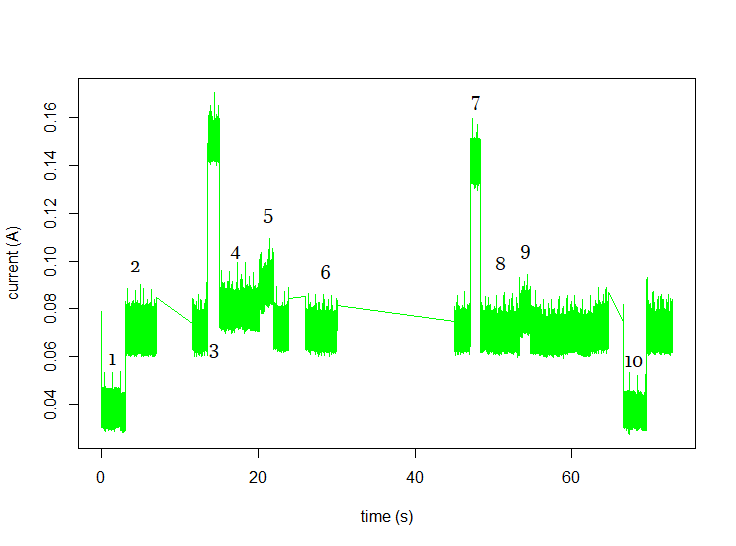
Yet, on RAW mode I can cleary see a jump (probably coming from the LoRa modem being used, it makes sense) but the question is, why not on LoRaWAN? - Around the 5 seconds marker.
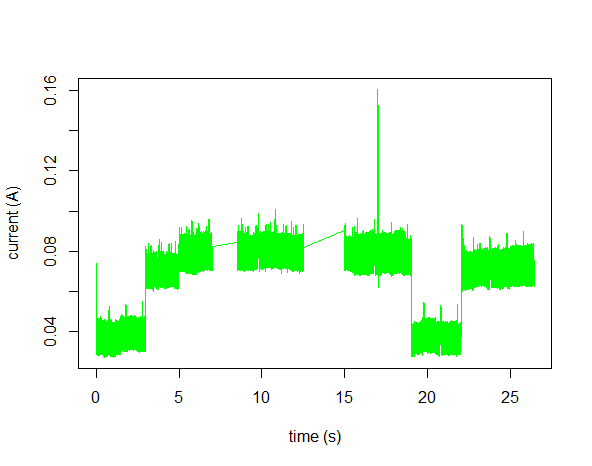
Example for RAW:
Thanks, again.
-
@João-Rocheteau These are very nice current traces, and I see nothing unexpected in these. For ABP join no data has to be sent. ABP simply activates locally the pre-configured keys. For OTAA, a key exchange happens. So a OTAA request is send, and after 5 or 6 seconds, the response with the working keys arrives. For that, the receiver is enabled shortly. LoRa does not send any data unless deliberately requested to do so. There is also no transport protocol which confirms proper reception. Lora just uses short telegrams, which may get lost without notice.
-
@robert-hh Hello robert, thank you for the answer.
I might have explained myself poorly or probably didn't really understand your answer!
The current trace seems okay, but my current problem is when I use lora() in RAW vs lora() in LoRaWAN.
In LoRaWAN(refer to the first image) in phase 2 is where I call the Lora(mode=LoraWAN) and the current doesn't change.
But why is in LoRa(mode = RAW) (image2) we can see a spike of 1mA for the rest of the current profile (Around~5 seconds) ?
Shouldn't they be the same as I'm using for both the LoRa modem? -
@João-Rocheteau If the current scale is right, it's ~10mA increase after 5 seconds. And that may be caused by the LoRa receiver being active all the time in RAW mode. You have that increase in the LoRaWAN figure for the OTAA receive window.
-
@robert-hh Thank you for your answer again.
Is there any documentation regarding this technical details on LoRa RAW? -
@João-Rocheteau in LoRaWAN mode, just instantiating the LoRa object does nothing at all in terms of RX or TX, so it’s quite normal there’s no significant change. I would expect the only change to be the LoRa servicing timer to start, but I haven’t looked how things are implemented in a long time (there used to be a 1 kHz timer to check for any stuff to do, not sure this is still the case).
As @robert-hh wrote, LoRaWAN in class A will never send or receive except at very specific times:
- TX when you do a join (OTAA join request).
- TX on join retries
- TX on explicit send
- TX on send retries (for unacknowledged confirmed uplinks)
- RX during one or two of the two RX windows after a join request
- RX during one or two of the two RX windows after an uplink
It’s the whole paradigm of LoRaWAN class A: send or receive as little as possible. There’s no scanning, no session keepalives, just the bare minimum. The LoRa modem is not even listening the vast majority of the time (even if RX uses a lot less current than TX, it’s still way too much for long lived battery-powered applications, so RX is limited as much as possible to just at most two very short windows after each uplink).
In raw LoRa things are up to you. I have to admit I have no idea whether the RX part is always on in that case or if you can control it (and if so, how). But the full source is available, feel free to check it out yourself.
NB: as I wrote in my answer to your now deleted previous question, if you can, switch your unit to mA instead of A, it will avoid a lot of mental confusion, especially since your graphs only show two decimals.
-
@jcaron Noted, thank you.

Hello! It looks like you're interested in this conversation, but you don't have an account yet.
Getting fed up of having to scroll through the same posts each visit? When you register for an account, you'll always come back to exactly where you were before, and choose to be notified of new replies (either via email, or push notification). You'll also be able to save bookmarks and upvote posts to show your appreciation to other community members.
With your input, this post could be even better 💗
Register Login