Firmware Release v1.20.2.r6
-
Hello,
I just updated 5 new boards (Gpy) to v1.20.2.r6, and all 5 wouldn't connect to REPL.
Tools Specification:
- IDE: VSCode v1.61
- Pymakr: v1.1.16
- OS: macOS
It connects seamlessly with boards running v1.20.2.r4. Kindly look into it. Regards
-
@Developer-Pydro just to confirm that I understand you correctly, the same gpy (expb/cable/usbport) fails when you update to r6, but works ok when you downgrade to r4? Are you able to try with Atom?
-
@peterp I unpacked 5 new gpy boards, each has its own expansion board, and each was updated to r6 using the Pycom Firmware Update tool. After updating, each was tested using VSCode, and none connected to REPL. See the error from one of the boards below:
Connecting to /dev/tty.usbmodemPy2b8e4e1...
> Connection timed out. Click here to try again.
> Failed to connect (Error: Port is not open). Click here to try again.
But my tinkering board (also gpy) running r4 connects seamlessly using the same terminal and cable. see below:
Connecting to /dev/tty.usbmodemPy1bc59b1...

>>>
I also tried out the gpy(r4) that works with other expansion boards to narrow down the problem. The r4 board connects to REPL with all 5 expansion boards.
I'll try it out on Atom firstly before downgrading. Thank you
-
@Developer-Pydro After trying different combinations on the firmware update tool. I finally got it to connect back to REPL. I had to reset the CONFIG and NVS partition to get it going, this was the only combination that allowed the connection to work.
 -
I'm using Pycom firmware updater.
Trying to update firmware of new Sipy.
Can't get it to work.. .page stuck after selecting the Country....any help?
-
@Calvin-Foo try downloading the firmware (from the Firmware Downgrades page, but select the latest), and then use the pycom-fwtool 'install from local file' option.
I think the current 1.20.2.r6 firmware auto download is broken.
-
Hi Ian, thanks for the tips.
But I can get the Sigfox device ID and PAC code with this method?
I thought this needs server to allocate the ID.
Thanks. -
@Calvin-Foo hmm I'm not a Sigfox guy (LoraWAN FTW) but is there something wrong with this:
(1) get your SiPy firmware from here: https://software.pycom.io/downloads/pybytes/SiPy.html
(2) Use pycom-fwtool to install that 'local file' to your board
(3) Connect a serial console to the REPL (maybe this is where you have issues) and use
sigfox.id()andsigfox.pac()as documented here: https://docs.pycom.io/firmwareapi/pycom/network/sigfox/Sorry if I've just stated the bleedin' obvious but hope this helps.
Edit:
Actually I've just updated a LoPy4 using essentially the same method as above, and I noticed thepycom-fwtoolgives you the sig_id and sig_pac in both the GUI and in the console when you flash the board:Script Version: 2.1 JSON: {u'binary': u'cLPVSZwS+wEBsrC82HXuajvoVXie9QrQCcoH5czJbWK9uWa0ABEiM0RVZneImaq7zN3u/////////////////w==', u'firmware_type': u'lopy4.lopy4 with esp32.868', u'wmac': u'2462ABD672C4', u'smac': [{u'smac': u'70B3D5499C12FB01', u'type': u'lpwan'}], u'sig_pac': u'D875EE6A3BE85578', u'sig_id': u'01B2B0BC'}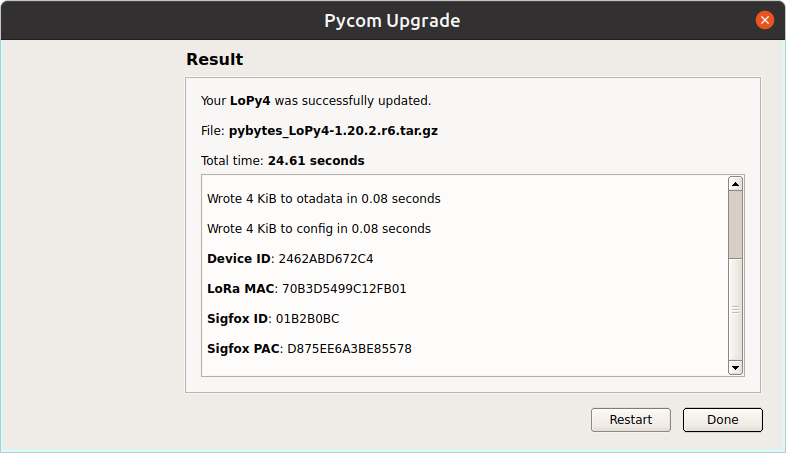
-
I have tried using the pcom-fwtool-cli.
But the sigfox id and pac still missing:
I got these results:
sigfox.id()
b'\xff\xff\xff\xff'
sigfox.pac()
b'\xff\xff\xff\xff\xff\xff\xff\xff' -
@Calvin-Foo I've just been able to check the Sigfox data on my LoPy4 modules, and my findings with the 'local file install' are the same as you are getting, i.e. the LoRa id's are ok (which is what I'm using, hence the delay in this reply) but the Sigfox id() and pac() are nulls.
NOTE this is from the pycom-fwtool 'local file download', not via the pycom-fwtool auto-firmware selection via the internet (which seems to be broken for release 1.20.2.r6). The Sigfox data IS correct on my LoPy4 with pybytes 1.20.2.r4 installed via pycom-fwtool 1.6.5, but the Sigfox id() and pac() are null on the pybytes 1.20.2.r6 installed by the same pycom-fwtool but with a manual download of the firmware and a 'local file install'.
BTW "using the pcom-fwtool-cli" doesn't contain enough information for anyone to really know what you're doing (I think the issue is with the manual file download / local file install).
Here's my simple test python:
>>> from network import Sigfox >>> s = Sigfox() >>> s.id() b'\xff\xff\xff\xff' >>> s.pac() b'\xff\xff\xff\xff\xff\xff\xff\xff' >>> from network import LoRa >>> l = LoRa(mode=LoRa.LORAWAN, region=LoRa.EU868) >>> l.mac() b'p\xb7\xd2I\x4c\xd8i\x18' >>> -
@Developer-Pydro
Thank you for this solution, you made my day !
Hello! It looks like you're interested in this conversation, but you don't have an account yet.
Getting fed up of having to scroll through the same posts each visit? When you register for an account, you'll always come back to exactly where you were before, and choose to be notified of new replies (either via email, or push notification). You'll also be able to save bookmarks and upvote posts to show your appreciation to other community members.
With your input, this post could be even better 💗
Register Login