Reflashing os package
-
Hi all,
Looking for some help to get out of a hole I dug myself into...
In short - I ran over the
lib/os, and now I can't communicate with my GPy anymore.More details:
I am new the pycom/micropython/microcontrollers world and have recently started playing with it. I've been trying to debug some code, and looking for a good logging implementation - and found this pycopy library. I could not figure out how to get it on my board, until I found this article explaining how to get
upipinstalled. The article uses it to installuasyncio- but I figured it's the same to install anypippackage. That worked quite well, and I indeed gotupipinstall, and then ran:upip.install("pycopy-logging", "lib"), resulting in the following output:Installing to: lib/ Warning: pypi.org SSL certificate is not validated Installing pycopy-logging 0.7.5 from https://files.pythonhosted.org/packages/07/2b/380b0db9e18ec7a37d0cca211ba9edde3d31c67e76d8df76847a8c86d694/pycopy-logging-0.7.5.tar.gz Installing pycopy-os 1.1.3 from https://files.pythonhosted.org/packages/45/1d/e0cd14fbe9a746d9971bdac179d7be1bba91f25af26abd54e6f557b8733b/pycopy-os-1.1.3.tar.gz Installing pycopy-errno 0.1.4 from https://files.pythonhosted.org/packages/ab/7c/a0d03cb169f37dc9a9de9fd40376d6f8a781b29768c45cb22158edb11985/pycopy-errno-0.1.4.tar.gz Installing pycopy-os.path 0.2.8 from https://files.pythonhosted.org/packages/31/ee/d9ad507eeb2b25f6ac6340e02b953a57523248dee9c96a5837b31d2e8e9c/pycopy-os.path-0.2.8.tar.gz Installing pycopy-stat 0.5.1 from https://files.pythonhosted.org/packages/65/95/ff904fce737681df1e6bda82c7618f1212a285b9650c73547af5757440cf/pycopy-stat-0.5.1.tar.gz Installing pycopy-uos2 0.5.6 from https://files.pythonhosted.org/packages/ef/1b/f178f71d0e592eb17704ed28eebe5eb86c8882cd6a2c58028783df7e2b27/pycopy-uos2-0.5.6.tar.gz Installing pycopy-ffilib 0.2.1 from https://files.pythonhosted.org/packages/60/d3/5f63d48a0699515eaafc01750bcc8ae926da8fd84ba2c8ab0561ea4aac55/pycopy-ffilib-0.2.1.tar.gz >>> Running main.py >>> >>> Traceback (most recent call last): File "<stdin>", line 8, in <module> File "/flash/lib/os/__init__.py", line 44 SyntaxError: constant must be an integer > Pycom MicroPython 1.20.2.r6 [v1.11-c5a0a97] on 2021-10-28; GPy with ESP32 Pybytes Version: 1.7.1 Type "help()" for more information. >>>As you can see, it installed
pycopy-osas a prerequisite, which is my best guess as to the reason of my issues.
At that point I didn't understand that yet, and I still had access to the REPL. However, since I could not figure out whymainwas not running - I tried rebooting the the GPY using the reset button, at which point it printed out:rst:0x1 (POWERON_RESET),boot:0x1b (SPI_FAST_FLASH_BOOT) configsip: 0, SPIWP:0xee clk_drv:0x00,q_drv:0x00,d_drv:0x00,cs0_drv:0x00,hd_drv:0x00,wp_drv:0x00 mode:DIO, clock div:1 load:0x3fff8020,len:8 load:0x3fff8028,len:2128 load:0x4009fa00,len:19760 entry 0x400a05bcAnd that was it.
Reinstalling the firmware does not seem to help, and I am not sure how to reflash the original software on to it. As I said - quite a noob here.
Any help is appreciated - thanks!
-
Top of the head, without going too deep into your issue, try reflashing to a really old firmware update the firmware (i.e. at least a few minor versions) from there. I only stumbled across your question because that's how I recovered a device which wouldn't boot (same log output).
-
hi @goldfishalpha - thanks for taking the time to answer!
And good that you did, as I already solved the issue, but forgot to update. For anyone with the same problem:
Using the "Pycom Firmware Update", if you tick on "show advanced settings":
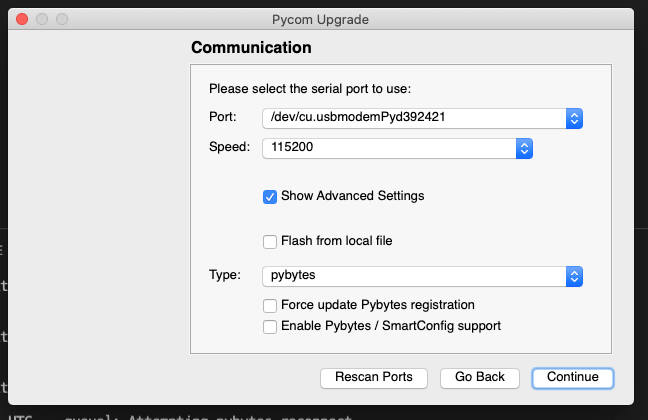
you'll have the option to "Erase during update". I've also ticked both RESET buttons, but not sure if strictly necessary:
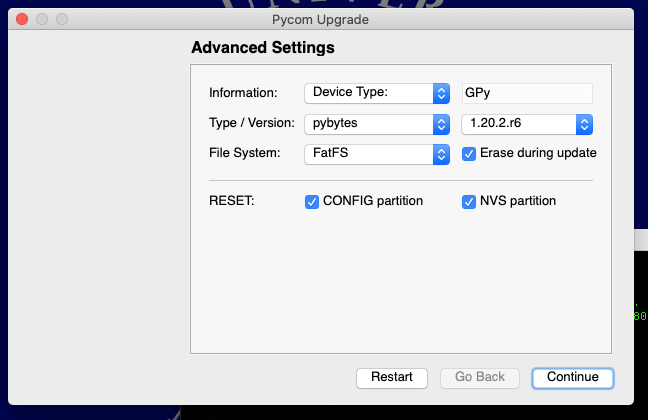
That did the trick for me.
Hello! It looks like you're interested in this conversation, but you don't have an account yet.
Getting fed up of having to scroll through the same posts each visit? When you register for an account, you'll always come back to exactly where you were before, and choose to be notified of new replies (either via email, or push notification). You'll also be able to save bookmarks and upvote posts to show your appreciation to other community members.
With your input, this post could be even better 💗
Register Login