How to wake up Gpy from Deep Sleep mode?
-
When I testing the Sleep mode, my device entering deep sleep mode and disabled USB connection so that I could not write new code into it. Is there any solutions to wake it up? If I can find a serial to USB cable, which port on the devices should I use to connect?
-
@Matt-Xu-0
look at safe boothttps://docs.pycom.io/gettingstarted/programming/safeboot/#app
-
Maybe it is another problem. I did what the doc said. Holding the safe boot button and restart the device, VS code cannot connect to the device. It just showing 'Connecting to COM3...'. In my device manager, I can see the device is "Port(COM and LPT) USB Serial Device (COM3)". (Something like that since my os is Chinese).
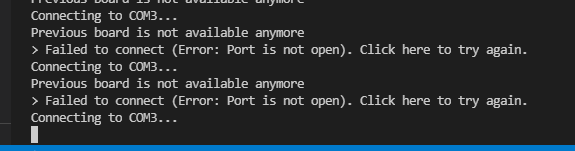

The LED flashes blue every 5 seconds (heartbeat perhaps). -
Maybe it is another problem. I did what the doc said. Holding the safe boot button and restart the device, VS code cannot connect to the device. It just showing 'Connecting to COM3...'. In my device manager, I can see the device is "Port(COM and LPT) USB Serial Device (COM3)". (Something like that since my os is Chinese).
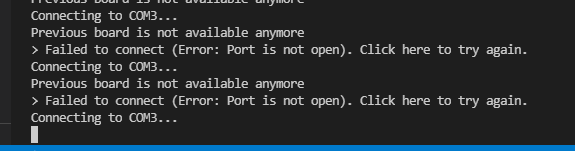

The LED flashes blue every 5 seconds (heartbeat perhaps).
Thank you!
Hello! It looks like you're interested in this conversation, but you don't have an account yet.
Getting fed up of having to scroll through the same posts each visit? When you register for an account, you'll always come back to exactly where you were before, and choose to be notified of new replies (either via email, or push notification). You'll also be able to save bookmarks and upvote posts to show your appreciation to other community members.
With your input, this post could be even better 💗
Register Login