Welcome to the Pycom forum Forum
    • \[\[global:header.categories\]\]
    • \[\[global:header.recent\]\]
    • \[\[global:header.tags\]\]
    • \[\[global:header.popular\]\]
    • Login

    Explore Pybytes | Official Documentation | Report a Firmware Bug/Issue | GitHub

    Upload failed: No project open

    Scheduled Pinned Locked Moved Pymakr
    5 Posts 4 Posters 94 Views 4 Watching
    Loading More Posts
    • Oldest to Newest
    • Newest to Oldest
    • Most Votes
    Reply
    • Reply as topic
    Log in to reply
    This topic has been deleted. Only users with topic management privileges can see it.
    • J Offline
      John Oxley
      last edited by

      I'm having trouble uploading a script to the WiPy. For the purpose of the test I have a simple LED blinker in main.py.
      When I click the upload button I get the resonse "Upload failed: No project open"
      In the "Project" panel I see the folder name with the main.py and (empty) boot.py under it.
      The script runs fine when I just click the Run button.
      I'm using Atom version 1.59.0 and Pymakr 2.3.0 running on Linux Mint 20.3.
      I'd be grateful for any advice on what I need to do to get this working. How do I "open" a project?

      P 1 Reply Last reply Reply Quote 0
      • P Offline
        PVBRAIN CETENMA @John Oxley
        last edited by

        @John-Oxley hello, I'm having the same problem and I can't work because I'm not able to upload my code. Did you find a way? Thanks.

        T 1 Reply Last reply Reply Quote 0
        • E Offline
          Elizar
          last edited by Elizar

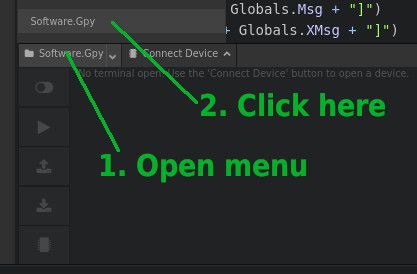
          Looks like a newer Atom problem.
          Atom.jpg

          1 Reply Last reply Reply Quote 0
          • P Offline
            PVBRAIN CETENMA
            last edited by

            @Elizar thank you very much! Now it is working

            1 Reply Last reply Reply Quote 0
            • T Offline
              Torban Peterson @PVBRAIN CETENMA
              last edited by

              @PVBRAIN-CETENMA
              in the event your still stuck, the 2 step picture Elizar posted fixed it for me. an odd but easy fix.

              1 Reply Last reply Reply Quote 0

              Hello! It looks like you're interested in this conversation, but you don't have an account yet.

              Getting fed up of having to scroll through the same posts each visit? When you register for an account, you'll always come back to exactly where you were before, and choose to be notified of new replies (either via email, or push notification). You'll also be able to save bookmarks and upvote posts to show your appreciation to other community members.

              With your input, this post could be even better 💗

              Register Login
              • 1 / 1
              • First post
                Last post

              Pycom on Twitter

              Pycom