Expansion Board i2c and Pin 10
-
Hi,
i have a expansion board 3 and a lopy4. I want to connect a BME280 to it. I have the libary and it works. But only for a few minutes, then i get a I2C Bus error. This is the libary: https://github.com/robert-hh/BME280
And this my code:
from machine import I2C

from bme280 import *

from utime import sleep


i2c=I2C(I2C.MASTER,pins=('P8','P9'))

print(i2c.scan())


bme280 = BME280(i2c=i2c)

while True:

    print(bme280.values)

    sleep(10)
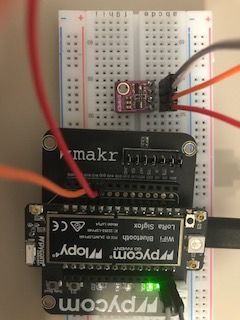
Where is Pin 10? Because it is said to be default for i2c but i can find it. Is it the user button?How do you connect it? Do you know where the I2C Bus error comes from?
Thanks
-
@Flo-Gritsch
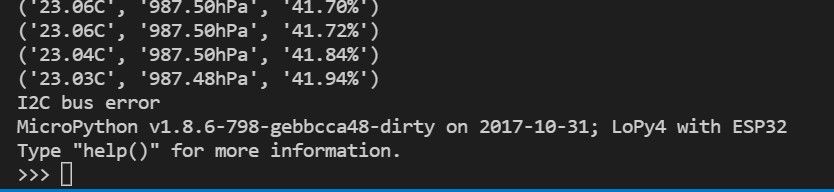
here is the i2c bus error
-
Where is Pin 10?
https://docs.pycom.io/datasheets/development/lopy4/#datasheet
where the I2C Bus error comes fro
look at wires, as breadboard is many times not good.
-
thanks! found pin 10. But still get the error:

connected the sensor directly to the pycom without the breadboard. Any other ideas?
-
@Flo-Gritsch I uswed that sensor with Pycom boards pretty reliable. So it may be a wiring problem. It that permanent?
so if you put that sensor reading into a try/except clause and ignore the error, does the next read attempt work?P.S.: In the picture you wired the sensor already to P9 and P10. So the code and the picture to not match. P8 is used by the SD card as well. And you use a pretty old version of the LoPy4 firmware. An update may help.
-
@robert-hh hi, thanks very much, i think updating did the thing. Works now fine.

Hello! It looks like you're interested in this conversation, but you don't have an account yet.
Getting fed up of having to scroll through the same posts each visit? When you register for an account, you'll always come back to exactly where you were before, and choose to be notified of new replies (either via email, or push notification). You'll also be able to save bookmarks and upvote posts to show your appreciation to other community members.
With your input, this post could be even better 💗
Register Login