BLE client configuration on SiPy
-
Hi guys,
I have an arduino board reading some parameters and publishing them via BLE. The service-characteristic configuration is as follows:#define SERVICE_UUID "91BAD492-B950-4226-AA2B-4EDE9FA42F59" BLECharacteristic bmeTemperatureCelsiusCharacteristics("cba1d466-344c-4be3-ab3f-189f80dd7518", BLECharacteristic::PROPERTY_NOTIFY);I am able to connect with my phone and visualize the data. Now I need to configure my SiPy to connect to the device/service and read the data. Could you help me understanding how I can do this? The official documentation is not so clear, I don't understand if I have to scan all possible BLE advertisements and then connect and retrieve data (https://docs.pycom.io/firmwareapi/pycom/network/bluetooth/gattcconnection/) or I have to configure a service like here (https://docs.pycom.io/firmwareapi/pycom/network/bluetooth/gattscharacteristic/).
The other thing I don't understand is how to configure uuids, given that in arduino they are strings while in python they are bytes.
Thanks a lot! -
@Antonello-Longo You do indeed have to scan for devices, find the one you are interested in, connect, go through services, find the one you are interested in, and go through characteristics and find the one you are interested in.
There's an example here: https://docs.pycom.io/tutorials/networks/ble/#connect-to-a-ble-device-and-retrieve-data
You'll have to change the example a bit to not filter on the advertised name, but then for each matching device it will list all services and all characteristics.
Better yet as the characteristic on the Arduino uses notifications, see the second example on this page https://docs.pycom.io/tutorials/networks/ble/callback/
Likewise, change the device filter, but then it connects and goes through all services and characteristics. Change the characteristic filter, and it will register to receive notifications on each change.
In the docs you linked to, the stuff starting in
gattsis for server, and that is the role of your Arduino board in you set up. Here you want to act as a client, hence you need the stuff starting withgattc. -
@jcaron thanks a lot for your answer. Yesterday I had a deep read in the documentation and understood (as you said) the difference between client and server configuration.
My situation is the following: I have my arduino device creating a service with 3 characteristics on which publishes some data, I am able to visualize them by connecting through my phone but when I scan for the characteristics through my SiPy code I am not able to read values, it always returns b'\x00'.This is what I see when I connect with my phone
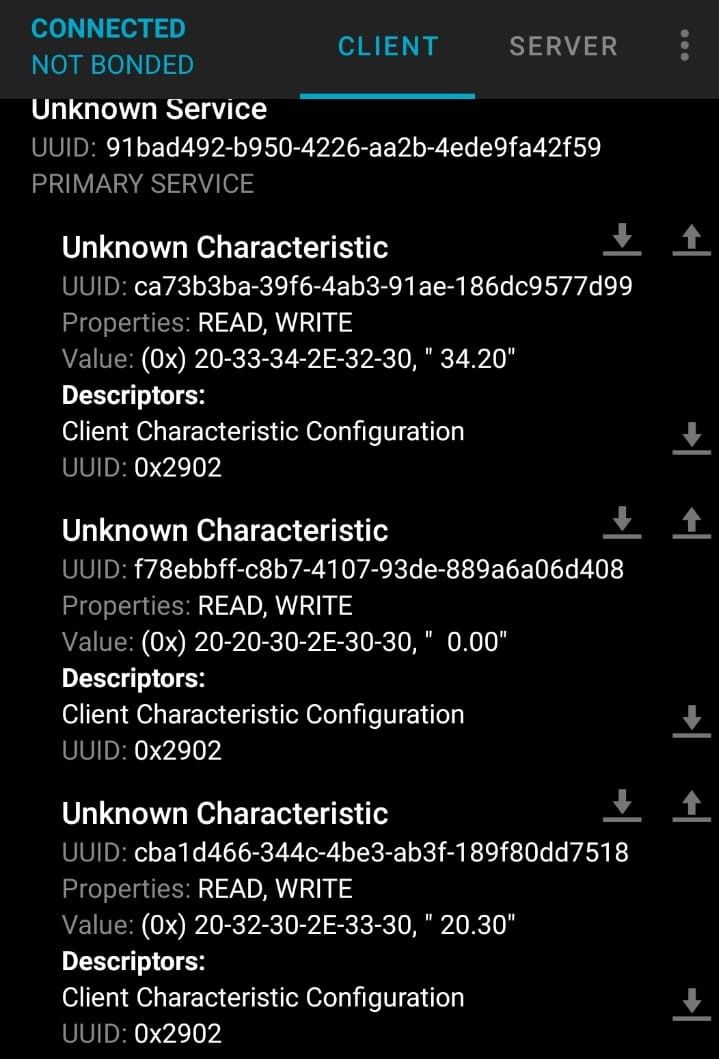
The code on my SiPy instead is the following:
from network import Bluetooth
import time

bt  =  Bluetooth()
bt.start_scan(-1)  #loop background
chars = None

while True:
  adv = bt.get_adv()
  if adv:
    print("Name of the device: {}".format(bt.resolve_adv_data(adv.data, Bluetooth.ADV_NAME_CMPL)))
    try:
      conn = bt.connect(adv.mac)
      services = conn.services()
      for service in services:
        time.sleep(0.050)
        if type(service.uuid()) == bytes:
          print('Reading chars from service = {}'.format(service.uuid()))
        else:
          print('Reading chars from service = %x' % service.uuid())

        time.sleep(0.050)
        chars = service.characteristics()

        if len(chars) >= 2:
          print("CHARACHTERISTICS: {}".format(chars))

          for char in chars:
            if (char.properties() & Bluetooth.PROP_READ):
              print('char uuid {} value {}'.format(char.uuid(),char.read()))
            else:
              print("Cannot read from characteristic {}".format(char.uuid()))

    except:
      print("Error while connecting or reading from the BLE device")
      break
  else:
    time.sleep(0.050)
I see the 3 characteristics but no value is returned, always b'\x00'. What is the problem?
Thanks a lot for your help -
@Antonello-Longo can you show us what the SiPy outputs when you run that script?
-
@jcaron this is what I get now that I've tried to use the callback on one of the characteristics:
>>>
Start scanning for BLE services
Connected to ESP 32
New value: b'\x00'
New value: b'\x00'
New value: b'\x00'
I'll show you asap the output of the previous code, it basically it prints the 3 GATTCharacteristics but when I try to read the value I get the same result (b'\x00')
-
@Antonello-Longo there’s a mismatch here. The output you give does not match the script you quoted (it matches the second example I linked to, which uses notifications rather than reading the characteristics directly).
Have you actually tried with the script you quoted above? What is the output in that case?
-
@jcaron I was able to solve the problem. The use of the callback actually waits until a notification is provided by the BLE server, so then the client is able to read a data. Whenever I try to read the data immediately (as the first script I posted) empty data is read. So the configuration you provided me with the use of the callback works. Thanks
Hello! It looks like you're interested in this conversation, but you don't have an account yet.
Getting fed up of having to scroll through the same posts each visit? When you register for an account, you'll always come back to exactly where you were before, and choose to be notified of new replies (either via email, or push notification). You'll also be able to save bookmarks and upvote posts to show your appreciation to other community members.
With your input, this post could be even better 💗
Register Login