How does LoRa socket chose which channel to use when you add several using lora.add_channel ?
-
Hello,
I'm trying to understand on which channel my Lopy4 is sending data, for example if I'm allocating these channel :
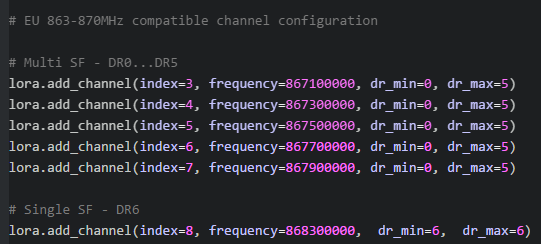
Then sending data using :
s = socket.socket(socket.AF_LORA, socket.SOCK_RAW)
s.setsockopt(socket.SOL_LORA, socket.SO_DR, 5)
s.send(packet)
How do I know which channel is used ? I know it's not the last because it's for downlink but for the uplink I've no idea, is there something to configure ? Or is it automatic ?
Thanks
-
@storm-1050 Long time since I went into these kind of details, but IIRC all channels you add using add_channel can be used for uplinks. Downlinks are handled separately, according to the region rules and/or configuration sent by the network. You should not add the downlink channel.
The channel listed at index 8 is not a downlink channel, but actually an additional DR on an existing uplink channel.
The device will use any of those links. Don't quite remember if it's round-robin, random, LRU or duty-cycle based, though, but you can check the sources if you want the details. Channel use is also controlled by the network, which can send a mask of which channels to use or not and/or reconfigure channels.
You can know the channel which was used by the last uplink by using
lora.stats()(tx_frequencyandsftx). -
Hey thanks for the answer, the lora.stats() is a good tip, as for the source, do you know where is it ? Where am I supposed to search ? Is it the network library ? The socket when you send the packet?
I'm a bit lost on where the algorithm which choose the channel is located. -
@storm-1050 a quick glance makes me think this could be in https://github.com/pycom/pycom-micropython-sigfox/blob/Dev/lib/lora/mac/region/RegionEU868.c starting at line 913, but I really haven’t looked into it in detail.
-
@jcaron It's perfect I found what I want thanks a lot !
So if people want to know, in RegionEU868.c the function RegionEU868NextChannel, call the function CountNbOfEnabledChannels which check all the channel that are enabled ( channel enabled, joined and available for transmission) which get you a list of available channel and then it select one randomly from this list.
In LoRaMac.c in the function ScheduleTx, there is a while loop calling RegionEU868NextChannel till one channel is available
Hello! It looks like you're interested in this conversation, but you don't have an account yet.
Getting fed up of having to scroll through the same posts each visit? When you register for an account, you'll always come back to exactly where you were before, and choose to be notified of new replies (either via email, or push notification). You'll also be able to save bookmarks and upvote posts to show your appreciation to other community members.
With your input, this post could be even better 💗
Register Login