EXPORT CODE FROM ARDUINO TO PYMAKR
-
Hello everyone. Please I need help, I have a code in arduino where I read an analog value and with respect to that value I execute a series of cases. I need to pass that code to urgent pymakr, but could you help me?
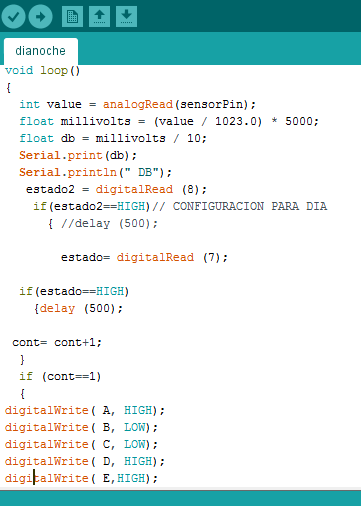
-
@julian-cifuentes
It is really simple code - but you must convert it to micropython
I do not like to show exact translation - better is doing it self :)arduino
analogreadequivalent is described here https://docs.pycom.io/pycom_esp32/library/machine.ADC.html#machine.ADCdigitalRead/write:
https://docs.pycom.io/pycom_esp32/library/machine.Pin.htmlin python you do not declare vars as typed
instead offloat db =you simple writedb =
insteadSerial.printyou simply writeprint
oruart.writeif you have it created in boot.pyline break is "
'\n' -
There is no tool for this. You have to learn python. This does not need skills to port.
-
@livius
Thank you so much friend, I'm going to work on it -
Take a look to an arduino like wrapper for pycom at https://github.com/dinosd/pyCom/blob/master/examples/arduino_sample.py
import arduino


estado = 0
estado2 = 0
cont = 0
A = 10
B = 11
C = 12
D = 13
E = 14
def setup():
    arduino.pinMode(15, "ANALOG_INPUT")  #PIN P15,  there is no mode analog input in arduino but pycom needs it
    arduino.pinMode(8, "INPUT")          # modes are "INPUT","OUTPUT","INPUT_PULLUP","INPUT_PULLDOWN","ANALOG_INPUT"
    arduino.pinMode(7, "INPUT")
    arduino.pinMode(A, "OUTPUT")
    arduino.pinMode(B, "OUTPUT")
    arduino.pinMode(C, "OUTPUT")
    arduino.pinMode(D, "OUTPUT")
    arduino.pinMode(E, "OUTPUT")


def loop():
    global estado, estado2, cont

    value = arduino.analogRead(13)
    millivolts = 1100 * value / 1.1      #max volts for analog in is 1.1V
    db = millivolts / 10
    print(db, "DB")
    estado2 = arduino.digitalRead(8)
    if estado2:   #this means high  or you can write if estado2==1
        estado = arduino.digitalRead(7)
        if estado:
            arduino.delay(500)
        cont += 1
    if cont==1:
        arduino.digitalWrite(A, 1)
        arduino.digitalWrite(B, 1)
        arduino.digitalWrite(C, 1)
        arduino.digitalWrite(D, 1)
        arduino.digitalWrite(E, 1)

setup()
while True:
    loop()
Hello! It looks like you're interested in this conversation, but you don't have an account yet.
Getting fed up of having to scroll through the same posts each visit? When you register for an account, you'll always come back to exactly where you were before, and choose to be notified of new replies (either via email, or push notification). You'll also be able to save bookmarks and upvote posts to show your appreciation to other community members.
With your input, this post could be even better 💗
Register Login