UART 0 flow control not working
-
Hello.
My application needs flow control on both serial ports.
For this reason, I am doing some tests using the Expansion board and a SiPy module.
All jumpers on the expansion board are inserted.I have the following code to initialize the UART0 serial port:
uart = UART(0, pins=("G2", "G1","G7", "G6"))
uart.init(115200, bits=8, parity=None, stop=1, pins=("G2", "G1","G7", "G6"))while(True):
time.sleep(1)
uart.write("Hello")Running this code, I can see the word "Hello" printed each second on my RealTherm interface.
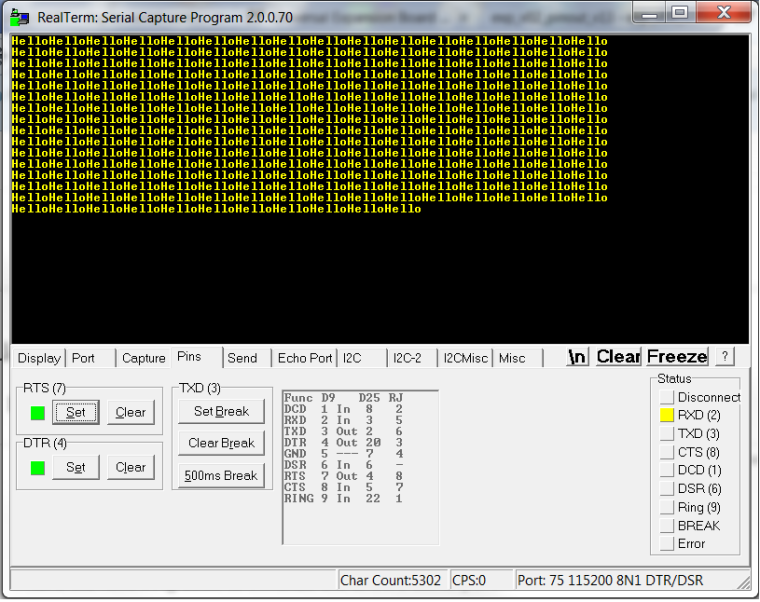
If I deassert the RTS line to stop the communication (I've even checked the line using a tester), the SiPy module continues to send data.
Why the RTS line doesn't pause the communication? What's wrong?
Is my init code wrong? Or the flow control is not really implemented at low level?Thankyou.
Regards.
-
Hi @sriboli have you specified that you're using the expansion board pin references in your code? E.g. :
Pin.exp_board.G16https://docs.pycom.io/pycom_esp32/library/machine.Pin.html#machine.pin.exp_board
-
This post is deleted! -
Yes, I've just tryed the following code, but doesn't work!
uart = UART(0, pins=(Pin.exp_board.G2, Pin.exp_board.G1, Pin.exp_board.G7, Pin.exp_board.G6))

uart.init(115200, bits=8, parity=None, stop=1, pins=(Pin.exp_board.G2, Pin.exp_board.G1, Pin.exp_board.G7, Pin.exp_board.G6))

while(True):
    time.sleep(1)
    uart.write("Hello")
Even if I deassert RTS, the SiPy module continues to send data.
What's wrong?Thankyou.
Regards.
-
I don't know a lot about the UART so don't take this as what's really happening. However the documentation for UART.init() says:
uart.init(baudrate=9600, bits=8, parity=None, stop=1, *, timeout_chars=2, pins=(TXD, RXD, RTS, CTS))Yet you're calling with
uart = UART(0, pins=("G2", "G1","G7", "G6"))G2 on the expansion board is RXD, not TXD, and vice-versa for G1. CTS is also swapped with RTS in your init.
So shouldn't it be
uart = UART(0, pins=("G1", "G2","G6", "G7"))?However that raises a question why does UART still print - and I'm wondering if there's a reason you can't change the parameters UART0. Maybe it's attached to the terminal via dupterm?
Have you tried this in UART1?
-
-
In boot.py I have the following code:
from machine import UART import os # uart = UART(0, 115200) # os.dupterm(uart)I've tryed your suggestion, swapping all pins (as follow):
uart = UART(0, pins=(Pin.exp_board.G1, Pin.exp_board.G2, Pin.exp_board.G6, Pin.exp_board.G7))
uart.init(115200, bits=8, parity=None, stop=1, pins=(Pin.exp_board.G1, Pin.exp_board.G2, Pin.exp_board.G6, Pin.exp_board.G7))
while(True):
    time.sleep(1)
    uart.write("Hello")
The strange thing is that the UART still prin "Hello" in my terminal... it seems that the pin association doesn't work (as you suggested, my expetation was to see nothing printed in the terminal)
Does anybody have already used serial port with the flow control enabled successfully?
Thanks
Regards
-
Hello.
Tryed again to use the flow control, without success.
Has anybody already used the serial port flow control?
Is it a usable feature? Or is currently in a developing state?Thanks.
-
Any news regarding RTS/CTS flow control? In my opinion it still does not work.
Hello! It looks like you're interested in this conversation, but you don't have an account yet.
Getting fed up of having to scroll through the same posts each visit? When you register for an account, you'll always come back to exactly where you were before, and choose to be notified of new replies (either via email, or push notification). You'll also be able to save bookmarks and upvote posts to show your appreciation to other community members.
With your input, this post could be even better 💗
Register Login