MPU9250 I2C bus failure
-
I update the driver for the MPU9250
I managed to make it work only calibration doesn't work when I uuse this portion of code once i initialize the button it fails the I2C busif i don't do any calibration i see the 9 values cahnging when i star moving the sensor
>>> execfile("irqtest.py")
You should see slightly different values on each pair of readings.
            Accelerometer                               Gyro                                Magnetometer
Interrupt: [0.0, 0.0, 0.0] [0.0, 0.0, 0.0] [0.0, 0.0, 0.0]
Normal:    (0.08520508, 0.9992676, 0.1296387) (-0.8091603, 0.6946565, 1.061069) (20.03906, -19.04766, -10.53516)

Interrupt: [0.08520508, 0.9992676, 0.1296387] [-0.8091603, 0.6946565, 1.061069] [20.03926, -19.04785, -10.53526]
Normal:    (0.08764648, 0.998291, 0.1298828) (-1.229008, 0.6259542, 1.290076) (19.33594, -19.40039, -11.89453)

Interrupt: [0.08764648, 0.998291, 0.1298828] [-1.229008, 0.6259542, 1.290076] [19.33613, -19.40059, -11.89465]
Normal:    (0.08422852, 1.002441, 0.1325684) (-0.9083969, 0.7633588, 1.129771) (18.10547, -18.51855, -9.005859)
>>> button = Pin("G17", mode=Pin.IN, pull=Pin.PULL_UP) >>> imu.mag.calibrate(button) Traceback (most recent call last): File "<stdin>", line 1, in <module> File "/flash/lib/vector3d.py", line 66, in calibrate File "/flash/lib/mpu9250.py", line 174, in _mag_callback MPUException: I2C failure when communicating with IMUoriginal code
>>> from  mpu9250 import MPU9250
>>> a = MPU9250('x')
>>> a.mag.cal
(0, 0, 0)
>>> import pyb
>>> sw = pyb.Switch()
>>> a.mag.calibrate(sw) # User rotates unit about each axis then presses the Pyboard switch
>>> a.mag.cal
(35.30567, 18.92022, -9.428905)
>>>
any idea why button init will fail the I2C ?
-
@gas said in MPU9250 I2C bus failure:
without detail about code - really hard to tell
do you use this?
https://github.com/micropython-IMU/micropython-mpu9x50/blob/master/mpu9250.py
https://github.com/micropython-IMU/micropython-mpu9x50/blob/master/imu.pyand how looks like your modifications?
-
I forked the master and the modified code is on
https://github.com/gesaleh/micropython-mpu9x50
I think I was calbiration was conflicting with the previous execution of the codemain modification are delay, pyb to time,machine classes
-
@gas
will be good to see exact error message and place
try change exception handlingtry: where = 1 # If read fails, returns last valid data and self._read(self.buf1, 0x02, self._mag_addr) # increments mag_stale_count where = 2 if self.buf1[0] & 1 == 0: where = 3 return self._mag # Data not ready: return last value where = 4 self._read(self.buf6, 0x03, self._mag_addr) where = 5 self._read(self.buf1, 0x09, self._mag_addr) where = 6 except OSError as e: raise MPUException(self._I2Cerror + str(e) + 'where: ' + str(where)) -
Can you share your modified code? I'm planning to use this accelerometer too with pycom devices. It would help me out!
Thanks,
Marvin -
I test this code with my Gpy and its working fine. My suggestion is not connect the pytrack or pysense board and MPU9250 together, use the Gpy board stand alone because when you connect SDA and SCL the I2C bus fail.
import machine, time, math, pycom, os
from machine import I2C
from mpu9250 import MPU9250
from ak8963 import AK8963

i2c = I2C(0, mode=I2C.MASTER, pins=('P22','P21'))
pycom.heartbeat(False)
sensor = MPU9250(i2c)
sensor2= AK8963(i2c)

#Declination Mex City
#https://www.ngdc.noaa.gov/geomag-web/calculators/calculateDeclination?lat1=%2719.48698%27&lon1=%27-99.18594%27
decli=4.56

print("MPU9250 id: " + hex(sensor.whoami))
print("AK8963 id: " + hex(sensor2.whoami))
print("To Calibrate Magnetometer please draw an 8 on the air 1 minute")
cali=sensor2.calibrate(60)
offset=cali[0]
scale=cali[1]

sensor2= AK8963(i2c,offset=offset, scale=scale)
print("Calibration finished (offset), (scale): ",cali)
time.sleep_ms(5000)
n=0
while True:
  print('acc :',sensor.acceleration)
  print('gyro:',sensor.gyro)
  print('mag :',sensor.magnetic)
 #Compass Direction
  x=sensor.magnetic[0]
  y=sensor.magnetic[1]
  z=sensor.magnetic[2]
  if (y > 0):
  	heading=math.atan(x/y)*(180/(math.pi))
  if (y < 0):
  	heading=180-math.atan(x/y)*(180/(math.pi))
  if (y==0) & (x < 0):
	  heading=180.00
  if (y==0) & (x > 0):
	  heading=0.0
  #print('mx=',x,'uT, my=',y,'uT, mz=',z,'uT')
  print('Compass Direction:',round(heading+decli),'degrees')
  # Turn light on Green when 0 degrees
  if (round(heading+decli)==0):
	 pycom.rgbled(0x000800)
  if (round(heading+decli)!=0):
	 pycom.rgbled(0x000000)
  time.sleep_ms(50)
  n=n+1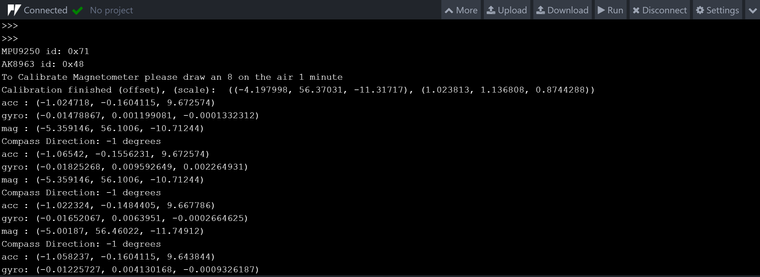
Hello! It looks like you're interested in this conversation, but you don't have an account yet.
Getting fed up of having to scroll through the same posts each visit? When you register for an account, you'll always come back to exactly where you were before, and choose to be notified of new replies (either via email, or push notification). You'll also be able to save bookmarks and upvote posts to show your appreciation to other community members.
With your input, this post could be even better 💗
Register Login