Welcome to the Pycom forum Forum
    • \[\[global:header.categories\]\]
    • \[\[global:header.recent\]\]
    • \[\[global:header.tags\]\]
    • \[\[global:header.popular\]\]
    • Login

    Explore Pybytes | Official Documentation | Report a Firmware Bug/Issue | GitHub

    Code only runs fully with USB plugged in - SOLVED

    Scheduled Pinned Locked Moved WiPy 2&3
    wipy2.0expansionboardusberror
    14 Posts 3 Posters 3.8k Views 3 Watching
    Loading More Posts
    • Oldest to Newest
    • Newest to Oldest
    • Most Votes
    Reply
    • Reply as topic
    Log in to reply
    This topic has been deleted. Only users with topic management privileges can see it.
    • S Offline
      smssms
      last edited by smssms

      Good tip - thank you.

      I've had a stab at the try: except: to write exceptions to the SD card, but nothing seems to go there.

      I'm starting to thing it is some sort of power supply issue i.e. it is only working with USB power available. But it is strange that it fails part way through the code, it can run boot.py and the first 1/3 of main.py. Seems to fail about when it has to read I2C or go into a for loop...

      L J 2 Replies Last reply Reply Quote 0
      • L Offline
        livius @smssms
        last edited by

        @smssms
        I2C have still issues it is software implementation.
        We wait for new firmware version where it will become hardware.
        @daniel say somewhere it is near finished

        think about people first, then computers

        1 Reply Last reply Reply Quote 0
        • J Offline
          jmarcelino @smssms
          last edited by

          @smssms
          What's powering it when not connected to USB?

          S 1 Reply Last reply Reply Quote 0
          • S Offline
            smssms @jmarcelino
            last edited by

            @jmarcelino
            XP JCJ1012S05 1.5A 5V output DC/DC converter into Vin/Gnd Plus 10uF capacitor for smoothing as it also has to run a stepper motor. The max. draw is only 800mA, so well within the supply's limits. The stepper motor is running in the first 1/3 of main.py too with no problems. But without USB, it just seems to hit a point where it freezes with no error messages (that I can capture).

            http://uk.farnell.com/xp-power/jcj1012s05/converter-dc-dc-10w-5v/dp/1637871

            J 1 Reply Last reply Reply Quote 0
            • J Offline
              jmarcelino @smssms
              last edited by

              @smssms
              Interesting setup thanks.

              So the DC/DC converter is mounted on a separate board which then powers the WiPy on the expansion board or do you have a custom board for the WiPy?

              Can you connect some cheap FTDI-style USB - Serial TTL (@3.3v) adapter to the TX + RX + GND pins on the WiPy in order to get the serial output without powering the board too?

              S 1 Reply Last reply Reply Quote 0
              • S Offline
                smssms @jmarcelino
                last edited by

                @jmarcelino
                Yes, the DC/DC is on a breadboard and jumpered across to the WiPy Expansion Board.

                Don't have the parts here now to try comms only, but will look into it - thanks.

                When it is running without USB (before it fails), I can get the code's serial output over Telnet, but there is never an error message when it stops...

                J 1 Reply Last reply Reply Quote 0
                • J Offline
                  jmarcelino @smssms
                  last edited by jmarcelino

                  @smssms
                  Have you tried running it without the stepper motor working (i.e. motor disconnected from power)

                  S 1 Reply Last reply Reply Quote 2
                  • S Offline
                    smssms @jmarcelino
                    last edited by

                    @jmarcelino
                    Yes, this is the annoying thing:
                    If I take the stepper motor out of the equation (commenting it out) the rest of the code seems to run ok.
                    But, it can run the stepper, it does so in the first 1/3 of main.py consistently with no problem.

                    L 1 Reply Last reply Reply Quote 0
                    • L Offline
                      livius @smssms
                      last edited by

                      @smssms
                      i suppose that @jmarcelino mean do not remove it from code
                      only disconnect it from power source

                      think about people first, then computers

                      S 1 Reply Last reply Reply Quote 1
                      • S Offline
                        smssms @livius
                        last edited by

                        @livius @jmarcelino
                        Ah, I see.
                        Tried that and yes, the code seems to run ok with the stepper unpowered.

                        L 1 Reply Last reply Reply Quote 0
                        • L Offline
                          livius @smssms
                          last edited by livius

                          @smssms
                          It would be nice to see how it is connected
                          Because if you power the motor and microcontroller from a single source then you must fight with disturbance
                          Some ceramic condenser, diode, RC/LC, etc.

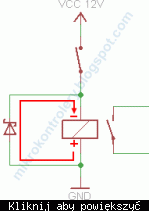
                          minimal protection will be diode:
                          alt text

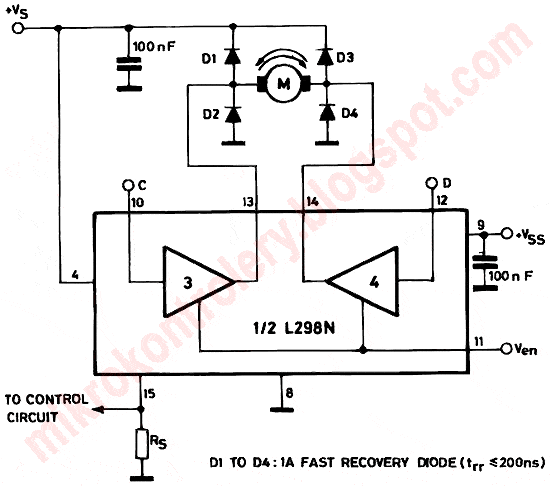
                          some hint also:
                          alt text

                          think about people first, then computers

                          1 Reply Last reply Reply Quote 2
                          • S Offline
                            smssms
                            last edited by

                            SOLVED - I powered the stepper motor separately and all is good. I'm guessing there were transient demands in excess of the 800mA I could measure that were causing problems.

                            1 Reply Last reply Reply Quote 0

                            Hello! It looks like you're interested in this conversation, but you don't have an account yet.

                            Getting fed up of having to scroll through the same posts each visit? When you register for an account, you'll always come back to exactly where you were before, and choose to be notified of new replies (either via email, or push notification). You'll also be able to save bookmarks and upvote posts to show your appreciation to other community members.

                            With your input, this post could be even better 💗

                            Register Login
                            • 1 / 1
                            • First post
                              Last post

                            Pycom on Twitter

                            Pycom