VLC Radio - IP remote control via Wipy 2.0
-
Hello all,
So heres the problem. Office ceiling speakers are driven by VLC media player, which in turn resides on a server hidden and locked away in another room.
Remote (RDP) access to the server is not allowed and staff would like ability to change the radio station (only so much 80s one can take).
VLC does have its own remote IP interface for control. I'm using a Wipy 2 to handle button events and then fire over appropriate IP commands for VLC.
Button interrupt handler. Code inside interrupt is kept to a minimum. We simply change a flag if a button is pressed (main loop then checks state of this flag). We also have a timestamp to prevent button bounce.
def handler(buttonID):
  global timestamp
  global channel, buttonPressed
  timenow = time.time()
  if (timenow-timestamp) >= 1: #  timestamp used to prevent button bounce.
    channel = buttonID
    buttonPressed = True
  timestamp = time.time()
IP commands are sent via standard Python socket.
Originally I tried keeping this socket open and forced open. This was problematic and found its just as quick and efficient (and correct?) to open the socket, send command then close the socket.This has proved the most reliable method rather than trying to keep the socket alive indefinitely
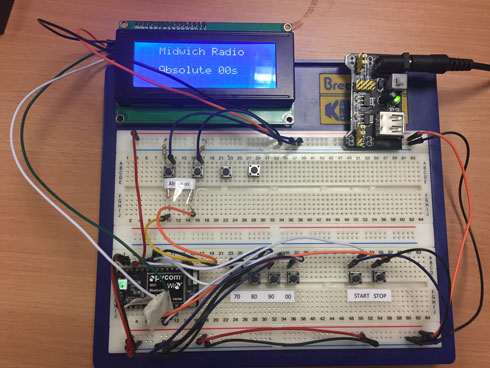
Project from breadboard to final project case.
Not all buttons are shown. Added a few more post breadboard stage.
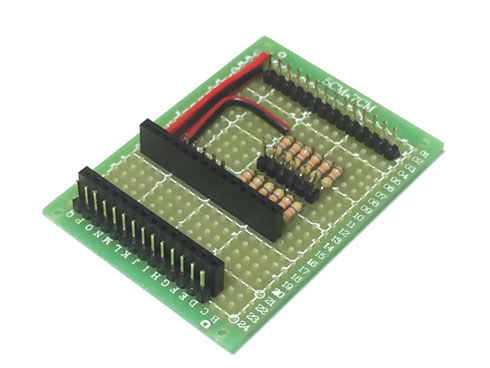
Notice the resistors ? These are for the i/o pins on the Wipy which do not have internal pull-up/down internal resistors, so we have to provide our own.
LCD will eventually have a nicer bezel rather than tape. :)
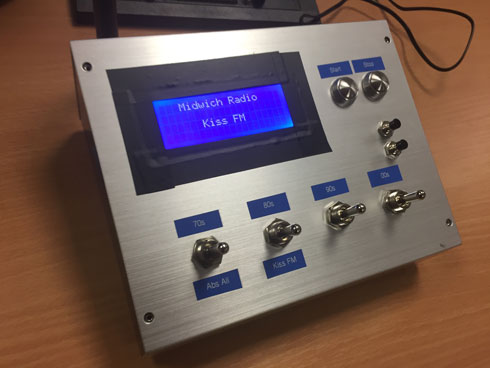
A fun project (my first Wipy and micro python project).
-
@reader-uk said in VLC Radio - IP remote control via Wipy 2.0:
Originally I tried keeping this socket open and forced open. This was problematic and found its just as quick and efficient (and correct?) to open the socket, send command then close the socket.
If it work then this should not be modified ;-)
You can try to leave it open e.g. for 10 minutes and close if no command to send. Something like session timeout.Nice project :)
Hello! It looks like you're interested in this conversation, but you don't have an account yet.
Getting fed up of having to scroll through the same posts each visit? When you register for an account, you'll always come back to exactly where you were before, and choose to be notified of new replies (either via email, or push notification). You'll also be able to save bookmarks and upvote posts to show your appreciation to other community members.
With your input, this post could be even better 💗
Register Login