• 0 Votes
    2 Posts
    365 Views
    L
    Nevermind, I solved it. I'm new to real time programming and apparently had to find out the hard way not to put code that's too time consuming into an ISR. I changed it so that the ISR just changes a flag and that the actual work is being done in the main loop.
  • 0 Votes
    5 Posts
    1k Views
    A
    Ah ha. I was using the wrong interrupt script. This is the correct working code for an accelerometer interrupt (P13) of machine.deepsleep(): import machine machine.pin_deepsleep_wakeup(['P13'], machine.WAKEUP_ANY_HIGH, False) machine.deepsleep(10*1000) So for pin interrupts there is a callback() function to create interrupts of active and sleep modes but the pin_deepsleep_wakeup() is needed to interrupt deep sleep (is that what you meant by "wake-on-pin" @jcaron?). There is no interrupt handler for pin_deepsleep_wakeup() because the working memory is cleared after deep sleep (as mentioned by @jcaron below). @jcaron I had tested my interrupt handler without sleep and it did work. In my main.py I had the following script to test that it woke from deep sleep and ran main.py. import pycom import utime pycom.heartbeat(False) #turn off LED pycom.rgbled(0xFF0000) #red LED utime.sleep(2) pycom.heartbeat(False) #turn off LED
  • 0 Votes
    5 Posts
    1k Views
    A
    @dmayorquin Amazing! Both of those solutions worked for me. Thanks for your help :)
  • 0 Votes
    4 Posts
    1k Views
    A
    @jcaron I have a WiPy 3. What do you recommend using for deep sleep? And for the handler interrupt, do you know how to integrate it while the device is sleeping?
  • 0 Votes
    5 Posts
    1k Views
    K
    @timh I kind of get what you're going for, but the issue is mostly that when attempting to use any sort of debouncing with multiple buttons (each button with their own callback), the first button pressed is the only button that the callback will run for until the device is reset (even though the device detects the other button is push as confirmed through looking at the pin value). So if I understand you correctly, I could simply provide arguments for each pin's callback function to identify which one was activated. That would work, but when the callback won't even go through for any button other than the first one pressed, that doesn't really work. I just worked around it and made a function to detect sequential long presses. Since I have 3 different status codes, I made it as such 1 long press sends status code 1 2 long presses sends status code 2 3 long presses sends status code 3 A user is notified of what press they are on based on the LED colors, and 3 green blinks represents that the status/data has been sent.
  • Advice on waking up the LoPy4

    Discussion lopy4 low power interrupt
    3
    0 Votes
    3 Posts
    893 Views
    dwsD
    @jcaron Ok thanks, appreciate the response and will keep all this in mind. Might reduce the frequency of the call-in's to once a day which of course would decrease power consumption appreciably.
  • Using an IO pin interrupt + Alarm

    MicroPython lopy pytrack pin interrupt alarm
    3
    0 Votes
    3 Posts
    2k Views
    K
    @gregcope Wondering if it might be useful to simply start a thread for everything. If I spawn an alarm in one thread, an interrupt in another and so on, I may be able to avoid the issue of blocking. The major issue is that since some of the functions I need to run can take 20 seconds or so, I don't want one to block another from running and have to wait a whole other interval for the respective functions to be run. Especially since there are multiple interrupts and one or two alarms. So would simply running a function that spawns an alarm within a separate thread make it so that the alarm itself is contained in that thread indefinitely?
  • 1 Votes
    1 Posts
    638 Views
    No one has replied
  • 0 Votes
    3 Posts
    996 Views
    A
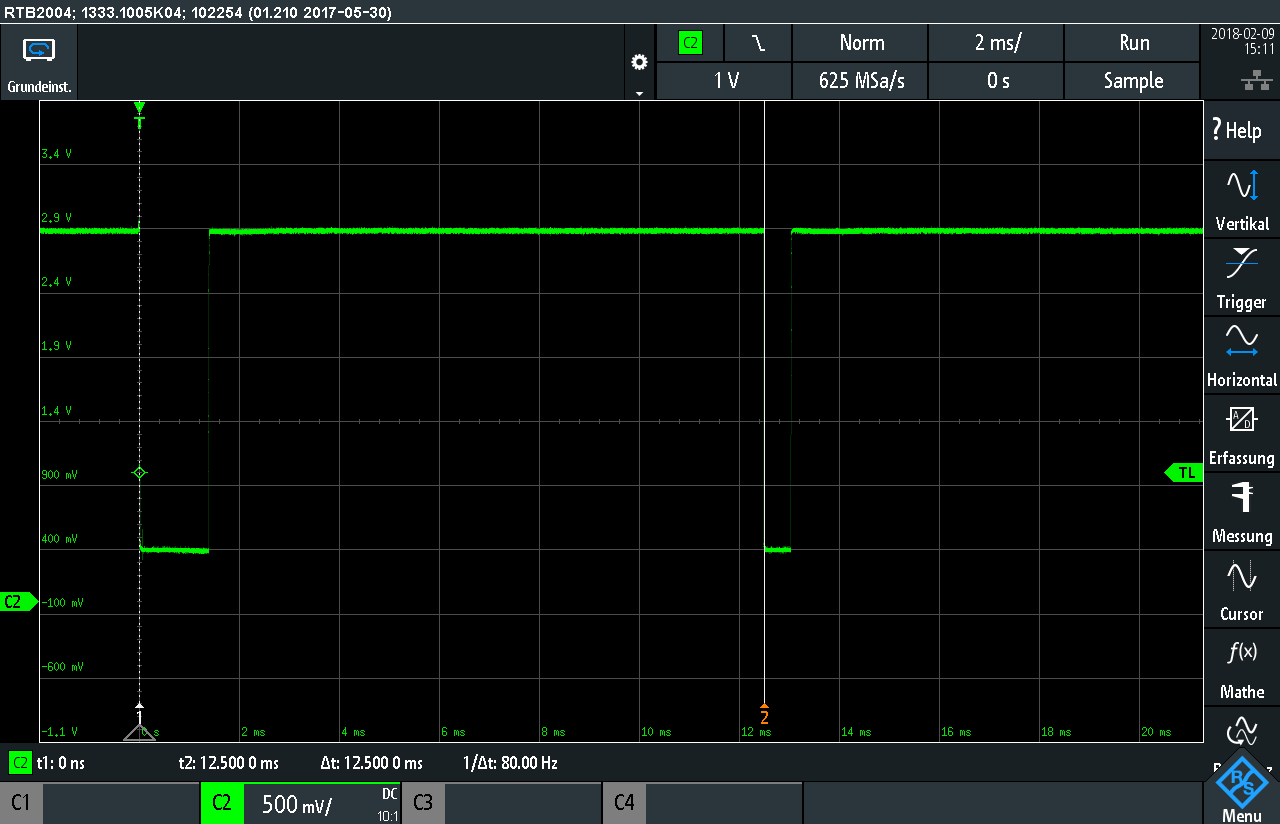
    @seb So my code was not the full text, but the part with which i made my mearusement... i tried your Period_timer()-class and now with the mean value from some measurements its really close to the expected value. Thats great. So obviously my code was very bad i think. But i still have this "wrong" values like the one in the middle (0.01154399 0.06744957). Any idea where they coud come from? At the moment i filter them by a minimum value. With 305 - 310 measurements, i got ~ 5-10 wrong Values. All close below to 1.5 ms. I tried to change my electrical circuit for better Voltages 0,15 V and 3.3 V instead of 0,4 V and 2,9 V. After i solved this i tried to run the same code. My wrong Values increased to ~ 286 from 586 measurements and the wrong values are close to 2,5 ms. I can´t set my minimum value to that, because my signal coud change to this period of time. This ist the new Signal: [image: 1518701859712-scr10-resized.png] The time span for my testing is still always the same(12,50 ms). Coud be the two little peaks at the very first beginnig a problem? Zoomes into the Signalstart at 0 s: [image: 1518702094347-scr11-resized.png] You don´t get wrong values, just to short? Andy

  • 0 Votes
    25 Posts
    11k Views
    S
    Hi @pierrot10 The internal ADC has very poor performance. The non linearity is poor and it has a high noise floor. I think someone earlier suggested using an external ADC and I think that is very good advice.
  • 0 Votes
    3 Posts
    1k Views
    N
    @robert-hh Thanks for that insight. My issue was that (unlike my example) the callback would trigger a separate function that included an additional but non-related alarm call back that would get 'stalled' from the original callback. Having worked out that as long as an alarm is created from the 'main' thread it will not be blocked by work from the caller I have adjusted my program to use a mix of sensor alarms and secondary "worker" threads which are triggered by not run from the alarm callback. Not sure if it is the best way but seems to allow things to run smoothly without blocking.
  • 0 Votes
    4 Posts
    2k Views
    N
    @robert-hh Thanks for that (and your assistance on my other question). I would be interested in your thoughts on how the "main" thread would check these flags as that goes back into using some kind of event/interrupt to know the timer/sensor readings have read something in. My first thoughts would be a while loop with a sleep count and checking periodically but feels like that is not the correct way to go about it. At this stage I am currently working with two or three period alarms executed from the "main" thread and a single secondary thread that is in a while loop and constantly sleeping looking for values at certain intervals which it then does the "heavy" processing and sending. @crumble - Yes I must admit I need to get out of some of my older habits to focus more on efficiency than simplicity/readability. However, I must admit I have been struggling to find material on how Micropython, specifically, works with allocation of memory for objects/variables/functions and what is the most efficient practice. Most examples go back to pure Python requiring multiple libraries to do memory statistics, even then not actually demonstrating what is the best way. Simple questions as to how the GC works, if I need to set variables to 'None' at the end of a function, or the use of a list over three distinct variables. The only way I am really finding it is by doing it both ways and testing it with gc.mem_free() which is time consuming and feels more like guess work. Would be interested on your point 4 about modules and compiling at boot time.
  • 0 Votes
    2 Posts
    2k Views
    robert-hhR
    @monersss If you get access to the REPL, you can simply hit Ctrl-C. Otherwise you can use safeboot: Connect G28 with the 3v3 pni, and then push reset. When the LED turns orange, then disconnect the wire. The device will then not execute boot.py and main.py. The documentation talks about falling back to a series of previous versions, but that is nonsense on a Lopy
  • 1 Votes
    2 Posts
    2k Views
    L
    @reader-uk said in VLC Radio - IP remote control via Wipy 2.0: Originally I tried keeping this socket open and forced open. This was problematic and found its just as quick and efficient (and correct?) to open the socket, send command then close the socket. If it work then this should not be modified ;-) You can try to leave it open e.g. for 10 minutes and close if no command to send. Something like session timeout. Nice project :)
  • Counting raising edges per second

    WiPy 2&3 pwm interrupt counting
    2
    0 Votes
    2 Posts
    1k Views
    robert-hhR
    @cts WiPy supports a Pin interrupt, which can be triggered with the rising edge. Look in the documentation for "Pin". And is has a timer module, which could be used for setting the gate time. Look in the documentation at "Timer". However, the precision and speed is very limited. Without testing, I would assume that it works reliably only for frequencies below 1 kHz, with a uncertainty of the gate time of about 1 ms. I
  • 0 Votes
    2 Posts
    864 Views
    L
    @ColombianAus Did you tried assigning same procedure to all pins? p_in1.callback(Pin.IRQ_FALLING | Pin.IRQ_RISING, pin_handler) p_in2.callback(Pin.IRQ_FALLING | Pin.IRQ_RISING, pin_handler) p_in3.callback(Pin.IRQ_FALLING | Pin.IRQ_RISING, pin_handler) ... you then can distinguish pins by arg.id() and e.g. Pin.module.P9.id()
  • Uart Interrupt Wipy 2.0

    Discussion wipy2.0 uart interrupt
    6
    0 Votes
    6 Posts
    2k Views
    M
    @bucknall said in Uart Interrupt Wipy 2.0: We currently do not support interrupts in the ESP32 MicroPython branch for the UART bus. I know this is on the roadmap of things to do, so I'll check with Daniel to see where we are with this! Thanks for your patience! Hi Guys, there are updates that concern UART interrupt? This aspect is very important! Thanks
  • 0 Votes
    3 Posts
    2k Views
    joeriJ
    Is there an update on the availability of the interrupts? I would like to use to it in my next project.
  • 'Timer' has no attribute 'PERIODIC'

    WiPy 2&3 wipy2.0 timer irq interrupt periodic
    5
    0 Votes
    5 Posts
    2k Views
    A
    Hi @bucknall, I finally found this library for using queues on micropython. However, this library need collections.deque and uasynio.core. 1 from collections.deque import deque 2 from uasyncio.core import sleep I went to the github repository, I downloaded collection.deque but I couldn't find uasynio.core anywhere. I think I'm not importing libraries correctly because I need to modify the line from collections.deque import deque to from collections import deque So now I would like to find the uasyncio.core module to be able to use the queue library ^^ I hope I do not need to open a new thread for this question. If so, I'm sorry ;)