• 0 Votes
    11 Posts
    1k Views
    robert-hhR
    @arthurmed So what are the properties of the pulses to receive, and what kind of device is it that you want to connect? Edit: I just tested that: Even if you specify then number of pulses, it will not return until a timeout happens (and the documentation is still wrong, because pulses_get() does not accept any arguments).
  • ticks_xx wrap-around period

    Discussion ticksxx utime timer
    1
    0 Votes
    1 Posts
    309 Views
    No one has replied
  • TimerWipy

    WiPy 2&3 wipy 2 timer interrup timer irq
    17
    0 Votes
    17 Posts
    2k Views
    V
    @robert-hh Hi, sorry for my insistence on this topic. I 'm not able to use thread but I read about it and I think that it's better for my code if I use them . So do you know if is it possibile to use thread to read from two I2C through the code that I posted before? thank you.
  • Alarm callback function not executing

    Discussion timer alarm
    5
    1
    0 Votes
    5 Posts
    966 Views
    J
    @robert-hh It turns out the "periodic=False" attribute is all it needed. Works fine now.
  • Timer.Alarm question

    Discussion timer alarm
    3
    0 Votes
    3 Posts
    764 Views
    J
    @robert-hh Got it! Many thanks!
  • Timers with us

    Issues & Bugs timer microsecond
    14
    1
    0 Votes
    14 Posts
    2k Views
    S
    @robert-hh Thanks for that. I really like the look of that new board! Hope it is released to market very soon.
  • 0 Votes
    3 Posts
    985 Views
    A
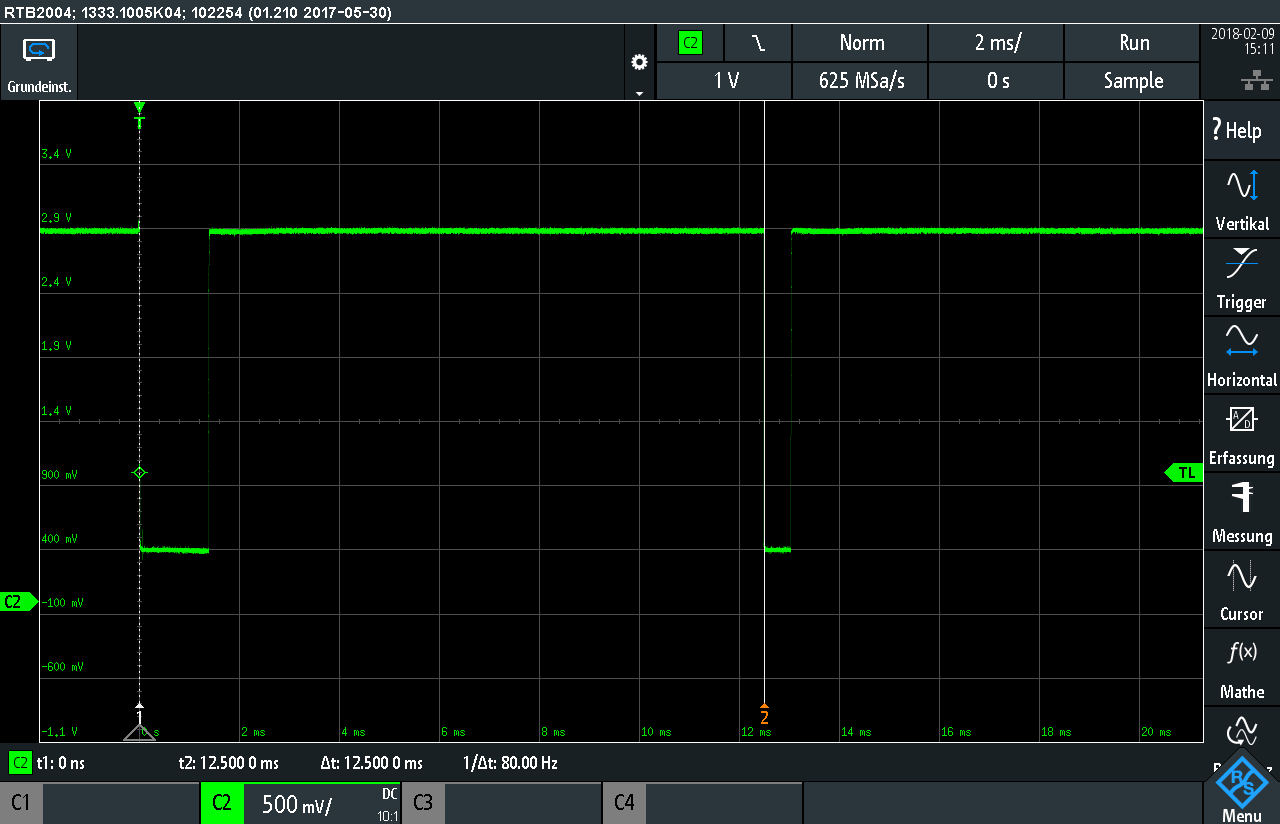
    @seb So my code was not the full text, but the part with which i made my mearusement... i tried your Period_timer()-class and now with the mean value from some measurements its really close to the expected value. Thats great. So obviously my code was very bad i think. But i still have this "wrong" values like the one in the middle (0.01154399 0.06744957). Any idea where they coud come from? At the moment i filter them by a minimum value. With 305 - 310 measurements, i got ~ 5-10 wrong Values. All close below to 1.5 ms. I tried to change my electrical circuit for better Voltages 0,15 V and 3.3 V instead of 0,4 V and 2,9 V. After i solved this i tried to run the same code. My wrong Values increased to ~ 286 from 586 measurements and the wrong values are close to 2,5 ms. I can´t set my minimum value to that, because my signal coud change to this period of time. This ist the new Signal: [image: 1518701859712-scr10-resized.png] The time span for my testing is still always the same(12,50 ms). Coud be the two little peaks at the very first beginnig a problem? Zoomes into the Signalstart at 0 s: [image: 1518702094347-scr11-resized.png] You don´t get wrong values, just to short? Andy
  • 0 Votes
    3 Posts
    1k Views
    N
    @robert-hh Thanks for that insight. My issue was that (unlike my example) the callback would trigger a separate function that included an additional but non-related alarm call back that would get 'stalled' from the original callback. Having worked out that as long as an alarm is created from the 'main' thread it will not be blocked by work from the caller I have adjusted my program to use a mix of sensor alarms and secondary "worker" threads which are triggered by not run from the alarm callback. Not sure if it is the best way but seems to allow things to run smoothly without blocking.
  • LoPy and Time-based Events

    LoPy timer alarm
    20
    0 Votes
    20 Posts
    5k Views
    robert-hhR
    @fuzzy OK. here is a variant of the fist version which counts down the total duration every second: from machine import Pin, Timer, idle DEFAULT_HIGH = const(2) DEFAULT_LOW = const(4) DEFAULT_DURATION = const(10) class BLINK: def __init__(self, pin, high = DEFAULT_HIGH, low = DEFAULT_LOW, duration = DEFAULT_DURATION): self.start(pin, high, low, duration) def start(self, pin, high, low, duration): self.pin = pin self.times = [high, low] self.duration = duration self.state = 0 self.count = self.times[self.state] self.pin(self.state) self.timer = Timer.Alarm(self.timerCallback, 1.0, periodic=True) def timerCallback(self, timer): self.duration -= 1 if self.duration <= 0: self.pin(0) # or whatever final state you like self.stop() else: self.count -= 1 if self.count <= 0: self.state = 1 - self.state self.count = self.times[self.state] self.pin(self.state) def stop(self): self.timer.cancel() def run(): pin = Pin("P5", mode=Pin.OUT) blink = BLINK(pin, 1, 1, 10) while blink.duration > 0: idle() run()

  • 'Timer' has no attribute 'PERIODIC'

    WiPy 2&3 wipy2.0 timer irq interrupt periodic
    5
    0 Votes
    5 Posts
    2k Views
    A
    Hi @bucknall, I finally found this library for using queues on micropython. However, this library need collections.deque and uasynio.core. 1 from collections.deque import deque 2 from uasyncio.core import sleep I went to the github repository, I downloaded collection.deque but I couldn't find uasynio.core anywhere. I think I'm not importing libraries correctly because I need to modify the line from collections.deque import deque to from collections import deque So now I would like to find the uasyncio.core module to be able to use the queue library ^^ I hope I do not need to open a new thread for this question. If so, I'm sorry ;)