Time measurement falling edges with callback
-
Hi,
i got a problem with my time measuring. My signal ist the following:
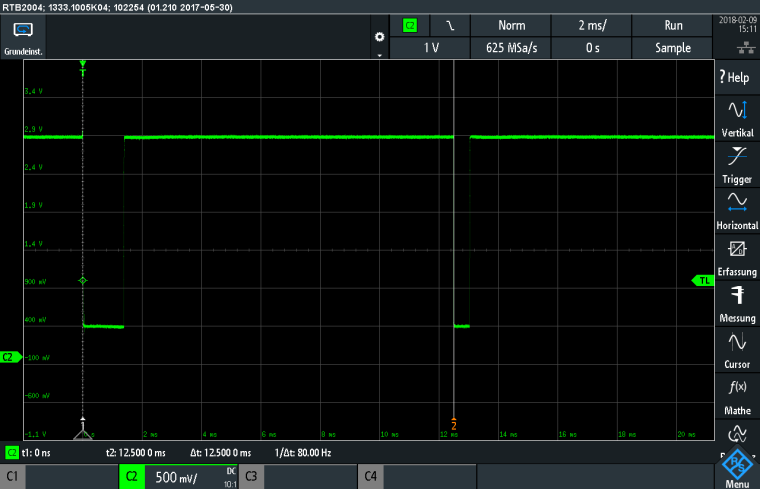
I want to measure the time span between the 2 falling edges(here 12.500 ms). With help from the docs.pycom.io -page i created this code:def pin_handler(arg): global y global x global dt1 x = y y = chrono.read_ms() dt1=y-x def messung_single(): global PinG12 global PinG13 global vSchall chrono.start() PinG12.value(0) for i in range(0,10): x=i PinG12.value(1) #to be sure calculating after max period ~30 ms for i in range(0,3000): x=i Abstand = (vSchall*dt1)/(1000*2) #Abstand in [m] chrono.stop() chrono.reset() print(Abstand,dt1) return Abstand #Konstanten werden definiert: Messperiode = 2 # in [s] Impuls = 200 #in ms MaxRange = 30 #in ms vSchall = 342.3 #Schallgeschwindigkeit bei 18°C in [m/s] x=0 y=0 PinG13 = Pin(Pin.exp_board.G13, mode=Pin.IN, pull=Pin.PULL_UP) PinG13.callback(Pin.IRQ_FALLING, pin_handler) chrono = Timer.Chrono() while True: Abstand = messung_single() print(Abstand, dt1) time.sleep(Messperiode-(Impuls/1000))And what my console says:
2.050287 11.97948
2.100725 12.27417
2.043377 11.9391
2.05588 12.01215
0.01154399 0.06744957
2.050873 11.9829
2.053744 11.99967
2.049962 11.97758
2.050283 11.97945
I was watching the signal at the oscilloscope and it was every time the same, without disorders.
So here are my questions:
Why do i measure a shorter time span ~ 12,0 ms ?! I coud imagine to measure a longer span cause of latency, but shorter? where are these 500 us gone?
I also tried the utime.ticks_us() and utime.ticks_ms() instead of chrono-> same result.
An other confusing thing is, when i change the irq to RISING, my consoleoutput values are the same altought there´s a differnece of 800us... shouldn´t i see that?! What i´m doing wrong?
I also tried shorter and longer time spans, but always the Board gave me a shorter time than the oscilloscope.
The difference between Gpy consoleoutput and oscilloscope time span is changing with the period.Why do i get this wrong value in the middle(0.06744957)? They appear evey 10-20 th value?
Is it maybe the wrong way to measure and analyze this signal with the Gpy?
I use the connection via USB and the Expansionboard.You got some ideas?
Thanks a lot!
Andy
-
@andy_n said in Time measurement falling edges with callback:
def pin_handler(arg):
global y
global x
global dt1x = y y = chrono.read_ms() dt1=y-xdef messung_single():
global PinG12
global PinG13
global vSchallchrono.start() PinG12.value(0) for i in range(0,10): x=i PinG12.value(1) #to be sure calculating after max period ~30 ms for i in range(0,3000): x=i Abstand = (vSchall*dt1)/(1000*2) #Abstand in [m] chrono.stop() chrono.reset() print(Abstand,dt1) return Abstand#Konstanten werden definiert:
Messperiode = 2 # in [s]
Impuls = 200 #in ms
MaxRange = 30 #in ms
vSchall = 342.3 #Schallgeschwindigkeit bei 18°C in [m/s]x=0
y=0PinG13 = Pin(Pin.exp_board.G13, mode=Pin.IN, pull=Pin.PULL_UP)
PinG13.callback(Pin.IRQ_FALLING, pin_handler)
chrono = Timer.Chrono()while True:
Abstand = messung_single()
print(Abstand, dt1)
time.sleep(Messperiode-(Impuls/1000))
Hi,
I tried to run your code but was not able to reproduce your results. It seems the code you pasted tries to use loops instead to sleeps for timing and this does not give the expected results.I recreated what I believe your was supposed to do using a class to remove the need for globals:
class Period_timer():
    def __init__(self, pin):
        self.y = 0
        self.x = 0
        self.dt1 = 0
        self.pin = Pin(pin, mode=Pin.IN, pull=Pin.PULL_UP)
        self.pin.callback(Pin.IRQ_FALLING, self.pin_handler)

    def pin_handler(self, pin):
        self.x = self.y
        self.y = time.ticks_us()
        self.dt1 = self.y-self.x
        print(p.dt1/1000)


def generate_pulse():
    PinG12 = Pin(Pin.exp_board.G12, mode=Pin.OUT)
    PinG12.value(0)
    time.sleep_ms(10)
    PinG12.value(1)
    time.sleep_ms(10)

p = Period_timer(Pin.exp_board.G13)
while True:
    generate_pulse() # 10ms high, 10ms low
    time.sleep_ms(800) # sleep 800ms
    # time between rising edges = 800 + 10 + 10 = 820ms
I too see it measure slightly too short (819.0399 vs 820), I will investigate this further and get back to you
-
@seb
So my code was not the full text, but the part with which i made my mearusement...
i tried your Period_timer()-class and now with the mean value from some measurements its really close to the expected value. Thats great.
So obviously my code was very bad i think.But i still have this "wrong" values like the one in the middle (0.01154399 0.06744957). Any idea where they coud come from? At the moment i filter them by a minimum value. With 305 - 310 measurements, i got ~ 5-10 wrong Values. All close below to 1.5 ms.
I tried to change my electrical circuit for better Voltages 0,15 V and 3.3 V instead of 0,4 V and 2,9 V. After i solved this i tried to run the same code. My wrong Values increased to ~ 286 from 586 measurements and the wrong values are close to 2,5 ms.
I can´t set my minimum value to that, because my signal coud change to this period of time.This ist the new Signal:
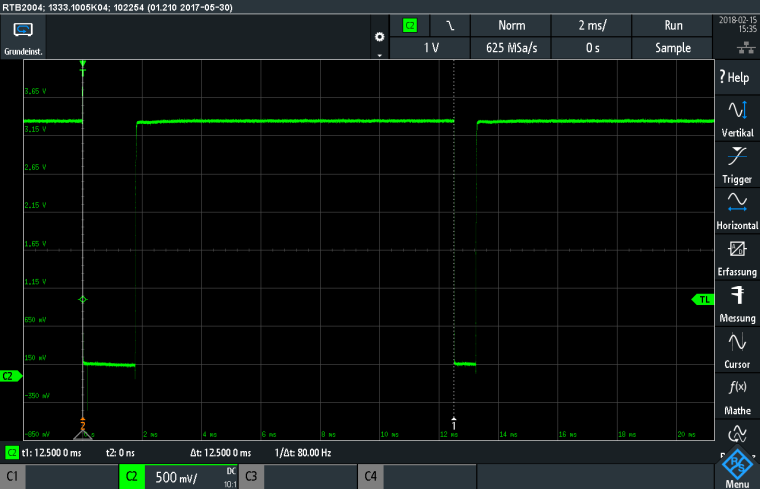
The time span for my testing is still always the same(12,50 ms).
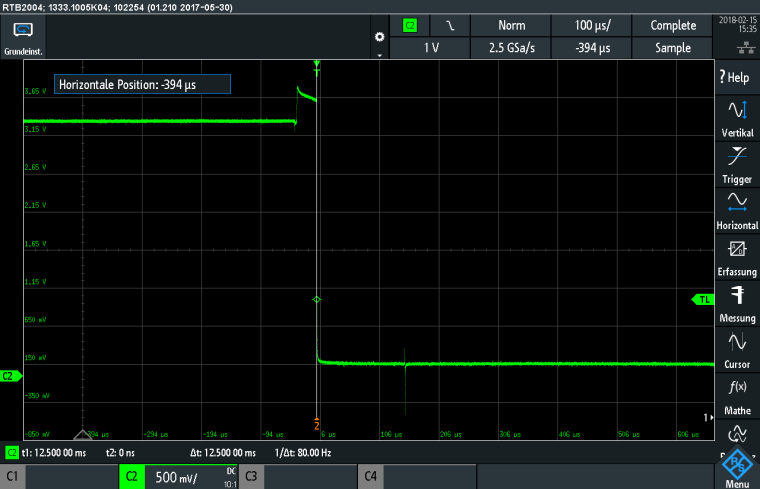
Coud be the two little peaks at the very first beginnig a problem?
Zoomes into the Signalstart at 0 s:
You don´t get wrong values, just to short?
Andy

Hello! It looks like you're interested in this conversation, but you don't have an account yet.
Getting fed up of having to scroll through the same posts each visit? When you register for an account, you'll always come back to exactly where you were before, and choose to be notified of new replies (either via email, or push notification). You'll also be able to save bookmarks and upvote posts to show your appreciation to other community members.
With your input, this post could be even better 💗
Register Login