Stability of LoPy in nano gateway mode?
-
Here is the powersupply measured with my DSM203. The toggling signal is my blinker from a CMOS 4060 circuit.
The signal seems to get some spikes, that also may cause a freeze :-)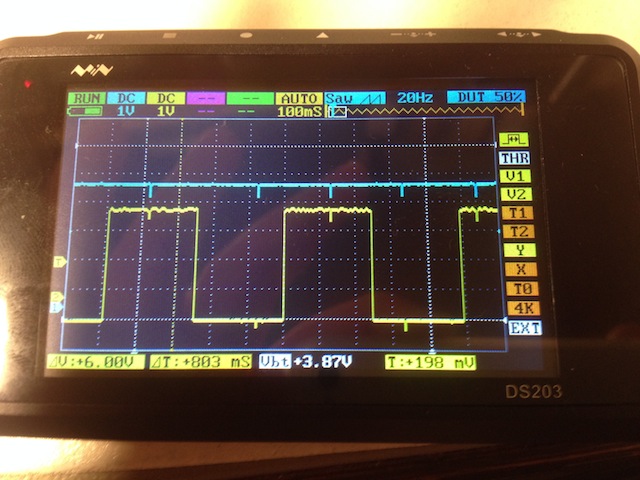
-
@lollisoft
Did you add the suggested capacitors to your 78S05? That said I don't think power is your issue especially as you're powering from 5V which gets regulated again.You should monitor the serial console for errors.
I also don't think the LoPy Nanogateway is "bulletproof" code, it's more proof of concept and the first version. I remember Daniel writing here they were working on improvements.
As for opening UDP, the LoPy initiates the UDP connection to port 1700 at TTN and TTN replies back from that same IP and source port. This is kept active by the frequent PULL_DATA requests from the LoPy with status data.
Most NAT firewall will be able to persist this UDP mapping without needing to open UDP to the world, but of course your configuration may be different.
-
@jmarcelino said in Stability of LoPy in nano gateway mode?:
@lollisoft
Did you add the suggested capacitors to your 78S05? That said I don't think power is your issue especially as you're powering from 5V which gets regulated again.In front I have a 220 uF and on both sides I have also 100nF. I may add some more to the LoPy as the breadboard is likely the case for the spikes (long copper wires and two breadboards).
Here is my crappy work: https://twitter.com/lollisoft/status/856193461434953728
You should monitor the serial console for errors.
No base board. I have only one. I need a plain dil chip to enable usb to serial functionality. It is a bit too much prototype :-)
I also don't think the LoPy Nanogateway is "bulletproof" code, it's more proof of concept and the first version. I remember Daniel writing here they were working on improvements.
At least I tried to improve a bit the memory consumption by moving buffer creation into the udp_lock code block.
I also tried to use the WDT class, but that is not available at the LoPy. Will it be available and if, when?
Also I think of buying a ttn gateway, if that makes sense (more users, reach and ROI).
I am planning a project around code generating the python code and infrastructure code around an IoT solution as a practical reference project for my open source project, I regularly post about in twitter :-)
That's the ROI factor.
As for opening UDP, the LoPy initiates the UDP connection to port 1700 at TTN and TTN replies back from that same IP and source port. This is kept active by the frequent PULL_DATA requests from the LoPy with status data.
Most NAT firewall will be able to persist this UDP mapping without needing to open UDP to the world, but of course your configuration may be different.
I am using a Fritz Box router and I am not aware of the firewall capabilities but now trying without that open udp port. I'll see it soon or later.
-
@lollisoft
You can find USB Serial TTL adapters for about 5 Euros, try looking on Ebay for example. Look for CP2104 for example (CP2102 also works but not as good). Make sure it supports 3.3VThen just set to 3.3V connect RX, TX, GND
I really recommend having something to monitor the serial port of the Pycom boards, many errors happen at the low level (ESP-IDF) and outside the control of the MicroPython. If not the baseboard (easiest) then one of these adapters.
-
@jmarcelino I think, I can use my FPGA ZPU programming cable (C232HM-DDHSL-0). I used that for the CPU programming within my FPGA and that is a 3V3 Xilinx Spartan 6 based chip. I am pretty sure, that this is usable.
http://www.ftdichip.com/Support/Documents/DataSheets/Cables/DS_C232HM_MPSSE_CABLE.pdf
-
@lollisoft
Sadly that is a MPSSE cable, I think - but not 100% sure - the FTDI chip inside is set to MPSSE mode (JTAG,I2C,etc) mode and so the UART mode you need is disabled. -
@jmarcelino Maybe it was the open UDP port. Actually, with a closed port I still receive Pull Ack and Push Ack messages. So I learned a bit more about UDP and firewalls :-)
If it runs stable, then there was some foreign traffic, the system could not work with and probably freezed.
I'll see.
-
I am experiencing the same problem. After around 3000 packets received (sender sends every 2 sec) the nano gateway stops working. I have modified the nano-gateway code to run without ACK each packet received. Even a "soft reboot" did not solve the issue. A power off / power on cycle was necessary to get it receiving again. I have tested with the latest firmware 1.7
-
@harix I have initially opened the udp port in my firewall and thus, it might be any hacking trials coming in to the port. After removing the rule, all worked well since some months. So be aware of this and it is probably to the limited amount of RAM available in the device. The firewall knows what incoming IP addresses are allowed to pass due to prior outgoing traffic to that server and thus allows udp packages from that server only flow back. For me that is a reasonable explanation.
-
@lollisoft Thanks for this information! I'll try this!

Hello! It looks like you're interested in this conversation, but you don't have an account yet.
Getting fed up of having to scroll through the same posts each visit? When you register for an account, you'll always come back to exactly where you were before, and choose to be notified of new replies (either via email, or push notification). You'll also be able to save bookmarks and upvote posts to show your appreciation to other community members.
With your input, this post could be even better 💗
Register Login