Upload Libraries
-
Hi there, i am new to pycom device. I am confuse after i read through the pycom.docs. After i have installed the libraries of the pytrack .py file and i navigate the related .py for pytrack in a new folder. I have few questions.
- Is it correct to add the regarding pytrack libraries folder in the atom software?
- How to upload the libraries to our pycom device?
- Where can i get the below files to add in the libraries folder?
- How to get main.py ?
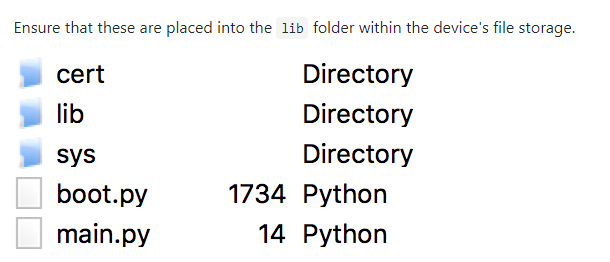
appreciate for your help :)
-
You can place the library files wherever you like, but
/flash/libis in the sys.path by default so it is easy to use. If you use another location, e.g. /flash/pytrack you would do:import sys sys.path.append('/flash/pytrack')Just add a project in Atom (only one) and add the required folders and then sync the project to your Pycom device. You can also use an FTP client like Filezilla to transfer your scripts and libraries.
You can just create a newmain.pyon your computer from within the same project. That will then also be included in the sync. -
Hi @RobTuDelft , i still have a little bit confuse on that. I go the File and click add new folder and i place my .py file in the pytrack lib folder. I have this :
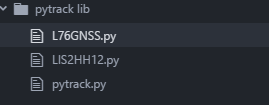
Is it correct? And i wanna add the GPS feature to the pytrack so i just go to setting either to sync folder or sync the file. Is it better for me to sync all the pytrack libraries( L76GNSS.py, LIS2HH12.py, pytrack.py) to the pytrack board?
-
@mj If you are familiar with Python: when you import functionality (with the import statement), from another file (known as a module), you don't have to specify the exact path of the module. The Python run-time will actually look for the imported file in the paths as specified by
sys.path.

Hello! It looks like you're interested in this conversation, but you don't have an account yet.
Getting fed up of having to scroll through the same posts each visit? When you register for an account, you'll always come back to exactly where you were before, and choose to be notified of new replies (either via email, or push notification). You'll also be able to save bookmarks and upvote posts to show your appreciation to other community members.
With your input, this post could be even better 💗
Register Login