LoPy deepsleep general issues/questions
-
@jmarcelino thank you for the answer.
Yes, the error appeared with from deepsleep import DeepSleep and ds=DeepSleep(), really don't know why.
Do I need a while loop in order to read the sensor data, send it and go to sleep or the reset effect of py.setup_sleep covers it? (I've tried both ways before putting this question but as far I can see LoPy behaves strange (again) and from experience I'll need to reset it a couple of times). -
@iplooky
Do you have any other file named deepsleep.py , maybe in your /flash/ folder ?You don’t need a loop, once the board “wakes” it will run your script again.
-
My basic main.py is the following:
from pysense import Pysense
from LIS2HH12 import LIS2HH12
from SI7006A20 import SI7006A20
from LTR329ALS01 import LTR329ALS01
from MPL3115A2 import MPL3115A2,ALTITUDE,PRESSURE
import pycom
import time

py = Pysense()
si = SI7006A20(py)
lt = LTR329ALS01(py)
li = LIS2HH12(py)
mp = MPL3115A2(py,mode=ALTITUDE)
mpp = MPL3115A2(py,mode=PRESSURE)

while True:

data1=mp.temperature()
data2=mpp.pressure()
data3=si.humidity()
data4=lt.light()

treasure=['Temperature=',data1,'Pressure=',data2,'Humidity=',data3,'Light=',data4]
print(treasure)
py.setup_sleep(5)
py.go_to_sleep()
If I don't have the while loop: it reads the data, it's not printing it and it goes to sleep JUST ONCE
If I have the while loop: it will show the data continously only if I don't use the last 2 lines, otherwise it will not display the info.
And it gets really buggy, (in the terminal normal info like Type help() for more information it displays only Type help() fo and I have to use a lot of CTRL+C and CTRL+B to restore and run it again. Is there a way to erase all content from LoPy? I think the "Upload" doesn't quite overwrite the code very well.
@jmarcelino I always use this name but I open only the folder I need when I want to run the code. I will change the name just to be shure in the future.
-
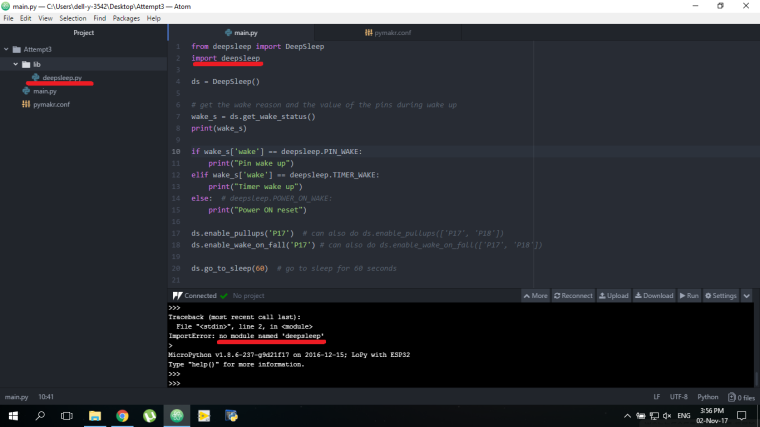
There I have the basic example and the lib from https://github.com/pycom/pycom-libraries , I begin to feel really bad because I really miss something.
-
Not sure if this your post was a question or a statement but just to be sure you only need the
from deepsleep import DeepSleepline, and notimport deepsleep -
Found the answer: it will not find the module if you just run it, you need to upload it and there it will be in internal registers, same works with Pysense module.
-
@jmarcelino said in LoPy deepsleep general issues/questions:
Once you enter deepsleep the RAM contents are gone, including your LoRaWAN session keys and counters. nvram_save / nvram_restore is an efficient way to store and restore these parameters without having to rejoin the LoRaWAN network.
supposedly it is like that,, but with nvram_save / nvram_restore the packet counters is not stored, it restarts in each cycle.
-
@johncaipa that’s quite incorrect. I have devices running for weeks using the save/restore APIs, and I can guarantee you that frame counters are indeed saved.
Some additional state (channels...) wasn’t, but it was added in the latest firmware release.
Note that you should not join in each cycle, as that will indeed reset counters.
-
@jcaron can you share a functional code ?, here mine:
https://forum.pycom.io/topic/1668/has-anyone-successfully-used-lora-nvram_save-and-restore/11
-
@johncaipa I have quite a lot of stuff going on in my code, but the main differences from yours are:
- I always to the initial join manually, so I don't try to detect whether that already happened or not.
- I use OTAA joins
- I keep the socket blocking
- I do wake on pin using the Pysense
Here's a slimmed down version. Important! Don't use this code as is! This code requires a Pysense firmware which supports INT wake-up.
from network import LoRa
from network import WLAN
from network import Server
import socket
import time
import binascii
from pysense import Pysense
import pycom
import machine

app_version = '2017-10-31-01'

SLEEP = 150

py = Pysense()

def read_pin():
    return 1 if py.peek_memory(0xE) & 0x02 else 0

pycom.heartbeat(0)

app_eui = binascii.unhexlify('***')
app_key = binascii.unhexlify('***')

# Whatever happens, init the LoRa stack and (try to) restore its state
lora = LoRa(mode=LoRa.LORAWAN, adr=True)
lora.nvram_restore()

# This part is not called from the code, only manually
def doJoin(lora):
    print(time.localtime(),"LoRa join")
    lora.join(activation=LoRa.OTAA, auth=(app_eui, app_key), timeout=0)
    while not lora.has_joined():
        time.sleep(1)
        print('Not yet joined...')

    lora.nvram_save()
    print(time.localtime(),"done LoRa join")

# This is the debug mode, entered when the button is pressed
def debugMode():
    # set led to orange
    pycom.rgbled(0x402000)
    wlan = WLAN()
    wlan.init(mode=WLAN.AP, ssid='LoPy-'+binascii.hexlify(lora.mac()).decode('ascii'), auth=(WLAN.WPA2,'***'), channel=7, antenna=WLAN.INT_ANT)
    server = Server()
    # set led to green once we're ready
    pycom.rgbled(0x00ff00)

# This is a modified version of the Pysense go_to_sleep which keeps INT working
def go_to_sleep2():
    PORTC_ADDR = const(0x00E)
    ANSELA_ADDR = const(0x18C)
    ANSELB_ADDR = const(0x18D)
    ANSELC_ADDR = const(0x18E)
    ADCON0_ADDR = const(0x9D)
    CMD_GO_SLEEP = const(0x21)

    # disable back-up power to the pressure sensor
    py.mask_bits_in_memory(PORTC_ADDR, ~(1 << 7))
    py.poke_memory(ADCON0_ADDR, 0)            # disable the ADC
    py.poke_memory(ANSELA_ADDR, ~(1 << 3))    # Don't touch RA3 so that button wake up works
    py.poke_memory(ANSELB_ADDR, 0xFF)
    py.poke_memory(ANSELC_ADDR, ~((1 << 7)|(1 << 1)))
    py._write(bytes([CMD_GO_SLEEP]), wait=False)
    # kill the run pin
    Pin('P3', mode=Pin.OUT, value=0)

def sendData(val):
    s = socket.socket(socket.AF_LORA, socket.SOCK_RAW)
    s.setsockopt(socket.SOL_LORA, socket.SO_CONFIRMED, 0)
    s.send(bytes([val]));

# This is the main function
def doTheWork():

     if py.button_pressed():
        debugMode()
        return

    p = read_pin()

    sendData(p)
    # send is blocking and should have waited long enough, but I'm a belt-and-suspenders kind of guy
    time.sleep(2)
    lora.nvram_save()
    py.setup_sleep(SLEEP)
    # Set edge
    py.poke_memory(0x95, py.peek_memory(0x95) & ~0x40 if p else py.peek_memory(0x95) | 0x40)
    # Enable INTE
    # If your Pysense is not running a version of the firmware that supports it, this will probably lock it up
    py.poke_memory(0x0b, py.peek_memory(0x0b) | 0x10)
    go_to_sleep2()

doTheWork()
Note: I haven't tried running this version of the code, so I may have cut a bit too much.

Hello! It looks like you're interested in this conversation, but you don't have an account yet.
Getting fed up of having to scroll through the same posts each visit? When you register for an account, you'll always come back to exactly where you were before, and choose to be notified of new replies (either via email, or push notification). You'll also be able to save bookmarks and upvote posts to show your appreciation to other community members.
With your input, this post could be even better 💗
Register Login