Flash Wipy with own build
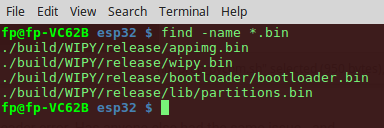
-
@profra The answer is in the makefile application.mk:
BOOT_OFFSET = 0x1000  # for bootloader.bin
PART_OFFSET = 0x8000  # for partitions.bin
APP_OFFSET = 0x10000 # for appimg.bin
The file wipy.bin will not be flashed. It's a part of appimg.bin.
If you run on the machine you used for builing the command:
make V=1 BOARD=WIPY flash
You can the esptool.py call used for flashing. Even if that fails, you can take the syntax from the log. -
@robert-hh You did me Christmas :-) I am going to go to our cottage now (with notebook and modules... have to do it under WSL) and I have the entertaining for nights... thank you very much.
-
If you have Wi-Fi set up, you can also upload the appimg.bin via FTP to /flash/sys and reboot.
-
@jcaron Good tip, I did not know it, many thanks.
-
@profra Note that there is a small catch when using it, the OTA update (via FTP) alternates between two locations while the upgrader always use the same location, so if you switch from one to the other you may end up with a version different from what you expect.
-
@jcaron It is a bit unclear to me the difference between appimg.bin and wipy.bin. I did compare both files and they are "identical"... in other words, the appimg.bin is bigger than wipy.bin by 32 bytes ... what does it mean, what does it say?
-
@jcaron @robert-hh ... here are these 32 bytes, red background colour

-
@profra There is a signature added to wipy.bin which is used to verify the integrity of the image.
-
Hi There
I'm trying do do the same thing with custom Lopy with Lora Class C enabled.
Firmware is generated from a linux clouded VM and my desktop PC is on windows.
The precise command line to launch and order would be help full. (I know it's with esptool but don't know the params).Best solution would be firmware updater allow to select custom files ;-)
-
@charly86 I think the easiest way is to do it OTA (as long as the version on the device is recent enough to support it). Connect via FTP, and upload the
appimg.binto/flash/sys/, wait until done, and reboot.Alternatively, on the command-line, I have successfully used (on macOs):
python2.7 /Applications/Pycom\ Firmware\ Update.app/Contents/Resources/src/bin/updater.py -s 57600 -t LoPy_868-1.7.8.b1.tar.gz -p /dev/cu.usbmodemPy343431This required the P23-GND short on boot. I believe there's a new method now if you use a Pytrack or Pysense with a recent firmware that allows you to do it without it.
-
@jcaron thanks, I forgot the OTA, will be nice an easier on the next time.
I got the updater.py in Pycom Firmware Package, could you confirm what is in your .tar.gz file,
3 files neededappimg.bin bootloader\bootloader.bin lib\partitions.binor just
appimg.bin -
@charly86 For OTA you just need appimg.bin, if the other two files are already loaded. The esptool.py command line for that would look like:
esptool.py --chip esp32 --port /dev/ttyUSB0 --baud 460800 write_flash -z --flash_mode dio --flash_freq 80m --flash_size detect 0x10000 appimg.bin


Hello! It looks like you're interested in this conversation, but you don't have an account yet.
Getting fed up of having to scroll through the same posts each visit? When you register for an account, you'll always come back to exactly where you were before, and choose to be notified of new replies (either via email, or push notification). You'll also be able to save bookmarks and upvote posts to show your appreciation to other community members.
With your input, this post could be even better 💗
Register Login