Welcome to the Pycom forum Forum
    • \[\[global:header.categories\]\]
    • \[\[global:header.recent\]\]
    • \[\[global:header.tags\]\]
    • \[\[global:header.popular\]\]
    • Login

    Explore Pybytes | Official Documentation | Report a Firmware Bug/Issue | GitHub

    Flash Wipy with own build
    Scheduled Pinned Locked Moved Discussion
    wipy 2flashwipyfirmwarebuild
    13 Posts 4 Posters 3.4k Views 4 Watching
    Loading More Posts
    • Oldest to Newest
    • Newest to Oldest
    • Most Votes
    Reply
    • Reply as topic
    Log in to reply
    This topic has been deleted. Only users with topic management privileges can see it.
    • J Offline
      jcaron
      last edited by

      If you have Wi-Fi set up, you can also upload the appimg.bin via FTP to /flash/sys and reboot.

      P 1 Reply Last reply Reply Quote 0
      • P Offline
        profra @jcaron
        last edited by

        @jcaron Good tip, I did not know it, many thanks.

        J 1 Reply Last reply Reply Quote 0
        • J Offline
          jcaron @profra
          last edited by

          @profra Note that there is a small catch when using it, the OTA update (via FTP) alternates between two locations while the upgrader always use the same location, so if you switch from one to the other you may end up with a version different from what you expect.

          P 2 Replies Last reply Reply Quote 0
          • P Offline
            profra @jcaron
            last edited by

            @jcaron It is a bit unclear to me the difference between appimg.bin and wipy.bin. I did compare both files and they are "identical"... in other words, the appimg.bin is bigger than wipy.bin by 32 bytes ... what does it mean, what does it say?

            1 Reply Last reply Reply Quote 0
            • P Offline
              profra @jcaron
              last edited by

              @jcaron @robert-hh ... here are these 32 bytes, red background colour

              0_1510332368534_Selection_024.png

              robert-hhR 1 Reply Last reply Reply Quote 0
              • robert-hhR Offline
                robert-hh @profra
                last edited by

                @profra There is a signature added to wipy.bin which is used to verify the integrity of the image.

                1 Reply Last reply Reply Quote 0
                • Charly86C Offline
                  Charly86 @profra
                  last edited by Charly86

                  Hi There
                  I'm trying do do the same thing with custom Lopy with Lora Class C enabled.
                  Firmware is generated from a linux clouded VM and my desktop PC is on windows.
                  The precise command line to launch and order would be help full. (I know it's with esptool but don't know the params).

                  Best solution would be firmware updater allow to select custom files ;-)

                  J 1 Reply Last reply Reply Quote 0
                  • J Offline
                    jcaron @Charly86
                    last edited by

                    @charly86 I think the easiest way is to do it OTA (as long as the version on the device is recent enough to support it). Connect via FTP, and upload the appimg.bin to /flash/sys/, wait until done, and reboot.

                    Alternatively, on the command-line, I have successfully used (on macOs):

                    python2.7 /Applications/Pycom\ Firmware\ Update.app/Contents/Resources/src/bin/updater.py -s 57600 -t LoPy_868-1.7.8.b1.tar.gz -p /dev/cu.usbmodemPy343431 
                    

                    This required the P23-GND short on boot. I believe there's a new method now if you use a Pytrack or Pysense with a recent firmware that allows you to do it without it.

                    Charly86C 1 Reply Last reply Reply Quote 0
                    • Charly86C Offline
                      Charly86 @jcaron
                      last edited by

                      @jcaron thanks, I forgot the OTA, will be nice an easier on the next time.
                      I got the updater.py in Pycom Firmware Package, could you confirm what is in your .tar.gz file,
                      3 files needed

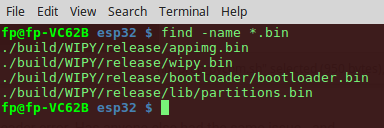
                      appimg.bin
                      bootloader\bootloader.bin
                      lib\partitions.bin
                      

                      or just

                      appimg.bin
                      
                      robert-hhR 1 Reply Last reply Reply Quote 0
                      • robert-hhR Offline
                        robert-hh @Charly86
                        last edited by

                        @charly86 For OTA you just need appimg.bin, if the other two files are already loaded. The esptool.py command line for that would look like:

                        esptool.py --chip esp32 --port /dev/ttyUSB0 --baud 460800 write_flash -z --flash_mode dio --flash_freq 80m --flash_size detect 0x10000 appimg.bin


                        1 Reply Last reply Reply Quote 0

                        Hello! It looks like you're interested in this conversation, but you don't have an account yet.

                        Getting fed up of having to scroll through the same posts each visit? When you register for an account, you'll always come back to exactly where you were before, and choose to be notified of new replies (either via email, or push notification). You'll also be able to save bookmarks and upvote posts to show your appreciation to other community members.

                        With your input, this post could be even better 💗

                        Register Login
                        • 1 / 1
                        • First post
                          Last post

                        Pycom on Twitter

                        Pycom