LoRa Nano-Gateway Set Up Help
-
Hello All,
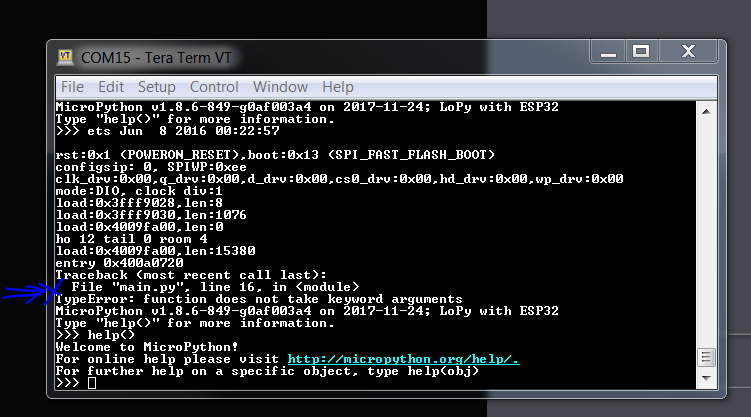
I have been running into an issue with running example 5.3.4. I'm using the example parts exactly as provided by the guide but have been running into this error. I would really appreciate if someone can shed some light on this issue.
Thanks in advance
-
@az311 Even though you're not running the latest firmware, we didn't make any changes to the code recently and it's running fine on my LoPy with the current version.
I suggest you double-check your code around line 16 in
main.py.You can also post the code here, with the following formatting:
``` python
<paste your code>
``` -
Hello Thank you for your feedback. The code is per below and exactly as in the example provided. Thank you.
""" LoPy LoRaWAN Nano Gateway example usage """ import config from nanogateway import NanoGateway if __name__ == '__main__': nanogw = NanoGateway( id=config.GATEWAY_ID, frequency=config.LORA_FREQUENCY, datarate=config.LORA_GW_DR, ssid=config.WIFI_SSID, password=config.WIFI_PASS, server=config.SERVER, port=config.PORT, ntp_server=config.NTP, ntp_period=config.NTP_PERIOD_S ) nanogw.start() nanogw._log('You may now press ENTER to enter the REPL') input() -
@xykon
Hello Thank you for your feedback. The code is per below and exactly as in the example provided. Thank you.""" LoPy LoRaWAN Nano Gateway example usage """ import config from nanogateway import NanoGateway if __name__ == '__main__': nanogw = NanoGateway( id=config.GATEWAY_ID, frequency=config.LORA_FREQUENCY, datarate=config.LORA_GW_DR, ssid=config.WIFI_SSID, password=config.WIFI_PASS, server=config.SERVER, port=config.PORT, ntp_server=config.NTP, ntp_period=config.NTP_PERIOD_S ) nanogw.start() nanogw._log('You may now press ENTER to enter the REPL') input() -
This looks like the example from 5.3.6 rather than 5.3.4
You can get the most up2date version from our GitHub repository. The easiest way is to download an archive of the most recent version and then open the directory
examples/lorawan-nano-gateway/in either Visual Studio Code or Atom, modifyconfig.pyand upload the code to the board.
Hello! It looks like you're interested in this conversation, but you don't have an account yet.
Getting fed up of having to scroll through the same posts each visit? When you register for an account, you'll always come back to exactly where you were before, and choose to be notified of new replies (either via email, or push notification). You'll also be able to save bookmarks and upvote posts to show your appreciation to other community members.
With your input, this post could be even better 💗
Register Login