Welcome to the Pycom forum Forum
    • \[\[global:header.categories\]\]
    • \[\[global:header.recent\]\]
    • \[\[global:header.tags\]\]
    • \[\[global:header.popular\]\]
    • Login

    Explore Pybytes | Official Documentation | Report a Firmware Bug/Issue | GitHub

    Lopy and Matchx usage

    Scheduled Pinned Locked Moved Discussion
    matchxgatewaylorawan server
    37 Posts 2 Posters 12.1k Views 2 Watching
    Loading More Posts
    • Oldest to Newest
    • Newest to Oldest
    • Most Votes
    Reply
    • Reply as topic
    Log in to reply
    This topic has been deleted. Only users with topic management privileges can see it.
    • J Offline
      jmarcelino @misterlisty
      last edited by

      Thanks @misterlisty

      Please remove your all add_channel and remove_channel code and replace it with the following (yes remove_channel should be first). It should then match your gateway configuration. Also change the SO_DR to 3 as mentioned in my previous post. Do try OTAA and ABP if you can.

      for i in range(0, 72):
          lora.remove_channel(i)
      
      # set the 8 channels for MatchX configuration
      for channel in range(0,8):
          lora.add_channel(channel, frequency=915200000+channel*200000, dr_min=0, dr_max=3)
      
      1 Reply Last reply Reply Quote 0
      • M Offline
        misterlisty @jmarcelino
        last edited by

        @jmarcelino I get an error if i try to remove channels upto 72

        J 1 Reply Last reply Reply Quote 0
        • J Offline
          jmarcelino @misterlisty
          last edited by

          @misterlisty
          Is your LoPy configured configured for the EU868 region by any chance?

          It should have selected 915Mhz if you chose Australia during firmware upgrade.

          Please check with

          from network import LoRa
          lora = LoRa()
          lora.frequency()
          

          also are you running the latest firmware?

          Thanks

          M 2 Replies Last reply Reply Quote 0
          • M Offline
            misterlisty @jmarcelino
            last edited by

            @jmarcelino

            from network import LoRa
            lora = LoRa()
            lora.frequency()
            

            doesn't return anything...

            My firmware is MicroPython v1.8.6-834-g5677703c on 2017-11-13; FiPy with ESP32

            J 1 Reply Last reply Reply Quote 0
            • J Offline
              jmarcelino @misterlisty
              last edited by

              @misterlisty
              Did you try it on the REPL?

              Try print(lora.frequency())

              1 Reply Last reply Reply Quote 0
              • M Offline
                misterlisty @jmarcelino
                last edited by

                @jmarcelino The result is 868000000

                Appears like it isn't Australia..i assume i have to reapply firmware?

                J 1 Reply Last reply Reply Quote 0
                • J Offline
                  jmarcelino @misterlisty
                  last edited by jmarcelino

                  @misterlisty

                  Yes that’s set to EU868. We need to reset the device in Pycom’s database before you do a firmware upgrade to change the location. Please send me the MAC address of the WLAN via chat or email a request to support@pycom.io.

                  Thanks

                  import binascii
                  binascii.hexlify(network.WLAN().mac(),':').decode()
                  
                  M 1 Reply Last reply Reply Quote 0
                  • M Offline
                    misterlisty @jmarcelino
                    last edited by jmarcelino

                    @jmarcelino Here is my Mac <removed>

                    How do you know what setting my fopy has? DO you sedn this during firmware update?

                    J 1 Reply Last reply Reply Quote 0
                    • J Offline
                      jmarcelino @misterlisty
                      last edited by

                      Hi,

                      We have no record of your board, so I guess you never updated it?

                      We really recommend always updating all our boards first. The factory firmware tends to be very old - or set to the wrong region as yours was.

                      In any case if you run the upgrade tool and choose Australia, then it should set to 915Mhz correctly and you can use the code I posted.

                      The firmware update instructions are at: https://docs.pycom.io/chapter/gettingstarted/installation/firmwaretool.html

                      Thanks!

                      M 1 Reply Last reply Reply Quote 0
                      • M Offline
                        misterlisty @jmarcelino
                        last edited by

                        @jmarcelino I have connected a wire from GND to G23 and the fopy will not go into upgrade mode. Its connected to a pysense board while i atempt this. It just running my normal code...can i upgrade while connected to the pysense board? Instructions suggest yes.

                        J 1 Reply Last reply Reply Quote 0
                        • J Offline
                          jmarcelino @misterlisty
                          last edited by jmarcelino

                          @misterlisty
                          Yes you can use the PySense and you don't need the wire anymore.

                          Make sure you update the Pysense firs, follow the steps here:
                          https://docs.pycom.io/chapter/pytrackpysense/installation/firmware.html

                          When you have the new firmware on the Pysense load the the Pycom Firmware Update tool and tick the box which says Pytrack/Pysense:
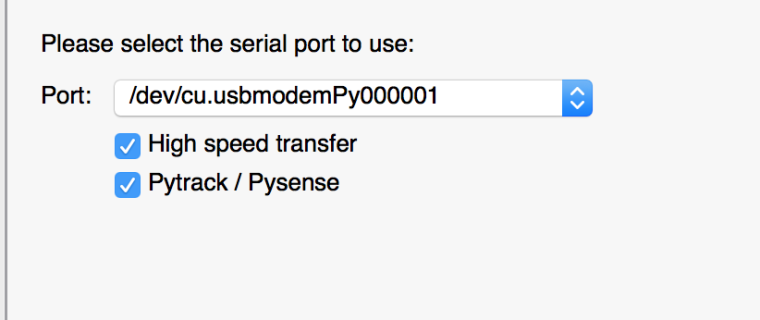
                          0_1515239801584_Screen Shot 2018-01-06 at 11.55.52.png

                          With this setup you don't need the jumper wire as the tool will use the Pysense to put the FiPy into programming mode.

                          M 1 Reply Last reply Reply Quote 0
                          • M Offline
                            misterlisty @jmarcelino
                            last edited by

                            @jmarcelino Will atempt update through pysense board shortly but it not upgrading the firmware if i use an USB adapter, connect G23 & GND...its running the normal code instead of going in upgrade mode..any suggestion here?

                            J 1 Reply Last reply Reply Quote 0
                            • J Offline
                              jmarcelino @misterlisty
                              last edited by jmarcelino

                              @misterlisty
                              It has to go into flash programming mode, it's a very low level hardware feature.

                              Are you sure you are connecting GND and G23 (also called P2 on the pin map https://docs.pycom.io/chapter/datasheets/downloads/fipy-pinout.pdf )

                              Also when you use an USB adapter what exactly is your setup?

                              In any case I think it will be easier to use the Pysense.

                              1 Reply Last reply Reply Quote 0
                              • M Offline
                                misterlisty
                                last edited by

                                OK..here is my status..have updated Fopy to latest firmware ie 1.1.12b

                                Here is my OTTA code..it appears to work if you look at the logs of MatchX but code says not yet joined still.

                                from network import LoRa
                                import socket
                                import time
                                import binascii
                                import struct
                                
                                lora = LoRa(mode=LoRa.LORAWAN)
                                print("Lora send::-3")
                                
                                print("DevEUI[",binascii.hexlify(lora.mac()).upper().decode('utf-8'),"]")
                                
                                # create an OTAA authentication parameters
                                dev_eui = binascii.unhexlify('70 B3 D5 49 97 E4 4C 6E'.replace(' ','')) 
                                app_eui = binascii.unhexlify('70 B3 D5 7E D0 00 81 BD'.replace(' ',''))
                                app_key = binascii.unhexlify('77 E7 AE FA 56 67 78 3D 5C 2F 4A E0 B9 F2 E3 FC'.replace(' ',''))
                                
                                print("Lora send::-1")
                                
                                for i in range(0, 72):
                                    lora.remove_channel(i)
                                
                                # set the 8 channels for MatchX configuration
                                for channel in range(0,8):
                                    lora.add_channel(channel, frequency=915200000+channel*200000, dr_min=0, dr_max=3)
                                
                                lora.join(activation=LoRa.OTAA, auth=(dev_eui,app_eui, app_key), timeout=0)
                                
                                print("Lora send::0")
                                
                                while not lora.has_joined():
                                    time.sleep(5)
                                    print('Not yet joined...')
                                
                                print('Finally joined...')
                                
                                # remove all the non-default channels
                                for i in range(3, 16):
                                    lora.remove_channel(i)
                                
                                # create a LoRa socket
                                s = socket.socket(socket.AF_LORA, socket.SOCK_RAW)
                                
                                print("Lora send::1")
                                
                                i = 0
                                while True:
                                    print("Lora send::1")
                                    # set the LoRaWAN data rate
                                    s.setsockopt(socket.SOL_LORA, socket.SO_DR, 3)
                                    print("Lora send::2")
                                    # make the socket blocking
                                    # (waits for the data to be sent and for the 2 receive windows to expire)
                                    s.setblocking(True)
                                    print("Lora send::3")
                                    # send some data
                                    count = s.send(bytes([i % 256]))
                                    print('Sent %s bytes' % count)
                                    print("Lora send::4")
                                    # make the socket non-blocking
                                    # (because if there's no data received it will block forever...)
                                    s.setblocking(False)
                                    print("Lora send::5")
                                    # get any data received (if any...)
                                    data = s.recv(64)
                                    print("Lora send::",data)
                                    i += 1
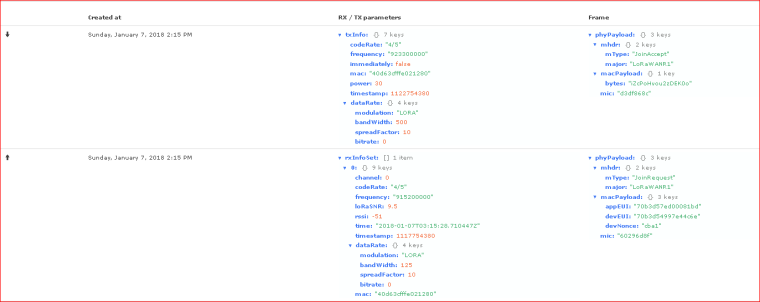
                                

                                0_1515295131632_Capture.PNG

                                J 1 Reply Last reply Reply Quote 0
                                • J Offline
                                  jmarcelino @misterlisty
                                  last edited by jmarcelino

                                  @misterlisty

                                  You're removing channels twice unnecessarily, remove your second part:

                                  > # remove all the non-default channels
                                  > for i in range(3, 16):
                                  >     lora.remove_channel(i)
                                  

                                  Also you're sill using RX2, there are two places for this configuration, I think you missed under Application Configuration -> Network Settings. Please set it to RX1 there.

                                  M 1 Reply Last reply Reply Quote 0
                                  • M Offline
                                    misterlisty @jmarcelino
                                    last edited by misterlisty

                                    @jmarcelino its set to to RX1 as suggested. I now have ABP working :), OTTA is yet to work...its definitely getting a lora_accept signal but the code doesn't acknowledge this.

                                    J 1 Reply Last reply Reply Quote 0
                                    • J Offline
                                      jmarcelino @misterlisty
                                      last edited by jmarcelino

                                      @misterlisty
                                      OK glad ABP is working, for OTAA you need to get the downlinks working.

                                      If you see the JoinResponse on frequency 923.3Mhz that means it's still RX2. Make sure it's set to RX1 in both places, there's a configuration for the Application and another for the device.

                                      --If it's correctly set to RX1 you'll see that the frequency of the JoinResponse matches the JoinRequest.

                                      M 2 Replies Last reply Reply Quote 0
                                      • M Offline
                                        misterlisty @jmarcelino
                                        last edited by

                                        @jmarcelino Thanks, what will the frequency be for RX1? I will try your suggestion.

                                        1 Reply Last reply Reply Quote 0
                                        • M Offline
                                          misterlisty @jmarcelino
                                          last edited by

                                          @jmarcelino Its definitely set to RX1 in application settings and node settings..i suspect they have a bug and not replying to my support requests.

                                          1 Reply Last reply Reply Quote 0
                                          • M Offline
                                            misterlisty
                                            last edited by

                                            @jmarcelino Not sure if i have it right but according to MatchX

                                            "As stated in the instructions 1883 is not correct, the downlink is not the same as the uplink frequency, this is due and in accordance with the LoraWAN Australian specifications.

                                            We advise to use the RX at the correct frequency to receive the OTAA join response.
                                            "

                                            1 Reply Last reply Reply Quote 0

                                            Hello! It looks like you're interested in this conversation, but you don't have an account yet.

                                            Getting fed up of having to scroll through the same posts each visit? When you register for an account, you'll always come back to exactly where you were before, and choose to be notified of new replies (either via email, or push notification). You'll also be able to save bookmarks and upvote posts to show your appreciation to other community members.

                                            With your input, this post could be even better 💗

                                            Register Login
                                            • 1
                                            • 2
                                            • 2 / 2
                                            • First post
                                              Last post

                                            Pycom on Twitter

                                            Pycom